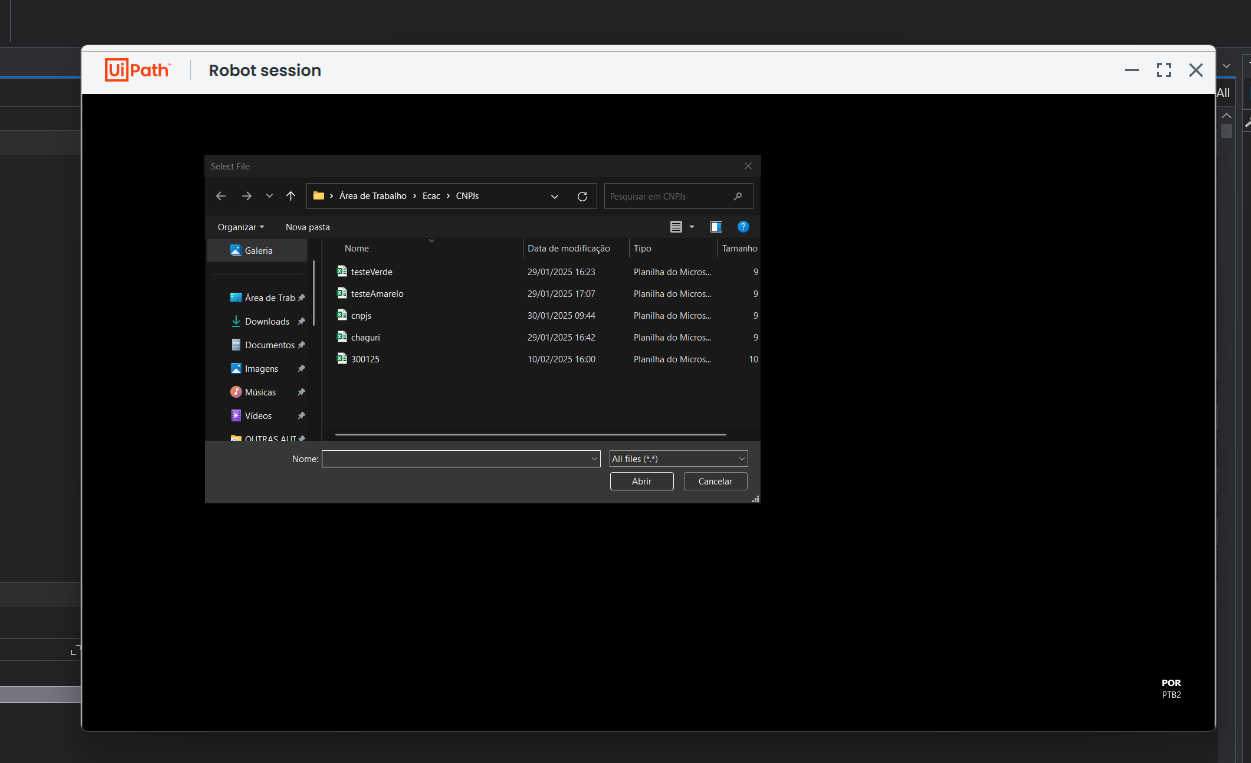
Hello! I’m having an issue with the Picture-in-Picture mode, it was working completely normal but it just started to fail. I did execute the “.\UiRobot.exe PiP --enable” on PowerShell and CMD, on the right path, both on admin mode, but it didn’t worked. I’ll include a screenshot of the error and the log.
This is happening both on Studio and Assistant. I tried running them as admin too.

I’ll paste the log since i can’t upload it
10:01:26.4290 => [WARN] [UiPath.Studio] [1] Studio version: 25.0.157-cloud.18912+Branch.release-s157.Sha.7489f58f146d342879812d8004994f9c67c3982f.7489f58f146d342879812d8004994f9c67c3982f
10:01:26.8364 => [WARN] [UiPath.Studio] [1] Session id: f4ca5049-10e8-4a81-a04a-5ac3ca784296
10:01:29.3991 => [ERROR] [UiPath.Studio] [8] Error: No license exist for this installation Exception: UiPath.Licensing.Library.Extended.Exceptions.NotLicensedException: No license exist for this installation
at UiPath.Licensing.Library.Extended.Implementation.OnlineLoader.UpdateAsync(IDictionary2 userMetadata, ProxySettings proxySettings) at UiPath.Licensing.Library.Extended.Implementation.LicenseProvider.UiPath.Licensing.Library.Extended.ILicenseProvider.UpdateOnlineLicenseAsync(IDictionary2 userMetadata)
10:01:36.1091 => [WARN] [UiPath.Studio] [1] Office version: O365
10:01:36.1091 => [WARN] [UiPath.Studio] [1] Office build version: 16.0.18429.20132
10:02:34.6126 => [WARN] [UiPath.Studio] [1] Studio version: 25.0.157-cloud.18912+Branch.release-s157.Sha.7489f58f146d342879812d8004994f9c67c3982f.7489f58f146d342879812d8004994f9c67c3982f
10:02:34.9197 => [WARN] [UiPath.Studio] [1] Session id: 7d5ef4b5-8f2c-4c85-84b3-e5b454ab0018
10:02:35.9490 => [WARN] [UiPath.Studio] [1] Office version: O365
10:02:35.9490 => [WARN] [UiPath.Studio] [1] Office build version: 16.0.18429.20132
10:02:37.4146 => [ERROR] [UiPath.Studio] [4] Error: No license exist for this installation Exception: UiPath.Licensing.Library.Extended.Exceptions.NotLicensedException: No license exist for this installation
at UiPath.Licensing.Library.Extended.Implementation.OnlineLoader.UpdateAsync(IDictionary2 userMetadata, ProxySettings proxySettings) at UiPath.Licensing.Library.Extended.Implementation.LicenseProvider.UiPath.Licensing.Library.Extended.ILicenseProvider.UpdateOnlineLicenseAsync(IDictionary2 userMetadata)
10:09:46.4655 => [WARN] [UiPath.Studio] [1] GetCompilableWorkflows: allWfCount = 7, normalizedDistinctWfCount = 6
10:10:05.4193 => [ERROR] [UiPath.Studio.App.Logging.OutputLogger] [22] Click ‘Nesta página’: The UI element is invalid. Make sure the target application is open and the element is on the screen.
10:19:42.4521 => [WARN] [UiPath.Studio] [1] GetCompilableWorkflows: allWfCount = 7, normalizedDistinctWfCount = 6
10:19:42.8106 => [WARN] [UiPath.Studio.App.Logging.OutputLogger] [30] INITIALIZATION: Unable to load the specified dependency ‘C:\Users\mathe.nuget\packages\UiPath.emgucvbundle\1.3.0\lib/net6.0/concrt140.dll’. Reason was: ‘LoadFromFailure. Bad IL format. The format of the file ‘C:\Users\mathe.nuget\packages\UiPath.emgucvbundle\1.3.0\lib/net6.0/concrt140.dll’ is invalid.’.
10:19:42.8107 => [WARN] [UiPath.Studio] [30] INITIALIZATION: Unable to load the specified dependency ‘C:\Users\mathe.nuget\packages\UiPath.emgucvbundle\1.3.0\lib/net6.0/concrt140.dll’. Reason was: ‘LoadFromFailure. Bad IL format. The format of the file ‘C:\Users\mathe.nuget\packages\UiPath.emgucvbundle\1.3.0\lib/net6.0/concrt140.dll’ is invalid.’.
10:19:42.8109 => [WARN] [UiPath.Studio.App.Logging.OutputLogger] [30] INITIALIZATION: Unable to load the specified dependency ‘C:\Users\mathe.nuget\packages\UiPath.emgucvbundle\1.3.0\lib/net6.0/cvextern.dll’. Reason was: ‘LoadFromFailure. Bad IL format. The format of the file ‘C:\Users\mathe.nuget\packages\UiPath.emgucvbundle\1.3.0\lib/net6.0/cvextern.dll’ is invalid.’.
10:19:42.8107 => [WARN] [UiPath.Studio] [30] INITIALIZATION: Unable to load the specified dependency ‘C:\Users\mathe.nuget\packages\UiPath.emgucvbundle\1.3.0\lib/net6.0/cvextern.dll’. Reason was: ‘LoadFromFailure. Bad IL format. The format of the file ‘C:\Users\mathe.nuget\packages\UiPath.emgucvbundle\1.3.0\lib/net6.0/cvextern.dll’ is invalid.’.
10:19:42.8109 => [WARN] [UiPath.Studio.App.Logging.OutputLogger] [30] INITIALIZATION: Unable to load the specified dependency ‘C:\Users\mathe.nuget\packages\UiPath.emgucvbundle\1.3.0\lib/net6.0/libusb-1.0.dll’. Reason was: ‘LoadFromFailure. Bad IL format. The format of the file ‘C:\Users\mathe.nuget\packages\UiPath.emgucvbundle\1.3.0\lib/net6.0/libusb-1.0.dll’ is invalid.’.
10:19:42.8107 => [WARN] [UiPath.Studio] [30] INITIALIZATION: Unable to load the specified dependency ‘C:\Users\mathe.nuget\packages\UiPath.emgucvbundle\1.3.0\lib/net6.0/libusb-1.0.dll’. Reason was: ‘LoadFromFailure. Bad IL format. The format of the file ‘C:\Users\mathe.nuget\packages\UiPath.emgucvbundle\1.3.0\lib/net6.0/libusb-1.0.dll’ is invalid.’.
10:19:42.8110 => [WARN] [UiPath.Studio.App.Logging.OutputLogger] [30] INITIALIZATION: Unable to load the specified dependency ‘C:\Users\mathe.nuget\packages\UiPath.emgucvbundle\1.3.0\lib/net6.0/msvcp140_1.dll’. Reason was: ‘LoadFromFailure. Bad IL format. The format of the file ‘C:\Users\mathe.nuget\packages\UiPath.emgucvbundle\1.3.0\lib/net6.0/msvcp140_1.dll’ is invalid.’.
10:19:42.8107 => [WARN] [UiPath.Studio] [30] INITIALIZATION: Unable to load the specified dependency ‘C:\Users\mathe.nuget\packages\UiPath.emgucvbundle\1.3.0\lib/net6.0/msvcp140_1.dll’. Reason was: ‘LoadFromFailure. Bad IL format. The format of the file ‘C:\Users\mathe.nuget\packages\UiPath.emgucvbundle\1.3.0\lib/net6.0/msvcp140_1.dll’ is invalid.’.
10:19:42.8111 => [WARN] [UiPath.Studio.App.Logging.OutputLogger] [30] INITIALIZATION: Unable to load the specified dependency ‘C:\Users\mathe.nuget\packages\UiPath.emgucvbundle\1.3.0\lib/net6.0/msvcp140_2.dll’. Reason was: ‘LoadFromFailure. Bad IL format. The format of the file ‘C:\Users\mathe.nuget\packages\UiPath.emgucvbundle\1.3.0\lib/net6.0/msvcp140_2.dll’ is invalid.’.
10:19:42.8107 => [WARN] [UiPath.Studio] [30] INITIALIZATION: Unable to load the specified dependency ‘C:\Users\mathe.nuget\packages\UiPath.emgucvbundle\1.3.0\lib/net6.0/msvcp140_2.dll’. Reason was: ‘LoadFromFailure. Bad IL format. The format of the file ‘C:\Users\mathe.nuget\packages\UiPath.emgucvbundle\1.3.0\lib/net6.0/msvcp140_2.dll’ is invalid.’.
10:19:42.8112 => [WARN] [UiPath.Studio.App.Logging.OutputLogger] [30] INITIALIZATION: Unable to load the specified dependency ‘C:\Users\mathe.nuget\packages\UiPath.emgucvbundle\1.3.0\lib/net6.0/msvcp140_atomic_wait.dll’. Reason was: ‘LoadFromFailure. Bad IL format. The format of the file ‘C:\Users\mathe.nuget\packages\UiPath.emgucvbundle\1.3.0\lib/net6.0/msvcp140_atomic_wait.dll’ is invalid.’.
10:19:42.8107 => [WARN] [UiPath.Studio] [30] INITIALIZATION: Unable to load the specified dependency ‘C:\Users\mathe.nuget\packages\UiPath.emgucvbundle\1.3.0\lib/net6.0/msvcp140_atomic_wait.dll’. Reason was: ‘LoadFromFailure. Bad IL format. The format of the file ‘C:\Users\mathe.nuget\packages\UiPath.emgucvbundle\1.3.0\lib/net6.0/msvcp140_atomic_wait.dll’ is invalid.’.
10:19:42.8113 => [WARN] [UiPath.Studio.App.Logging.OutputLogger] [30] INITIALIZATION: Unable to load the specified dependency ‘C:\Users\mathe.nuget\packages\UiPath.emgucvbundle\1.3.0\lib/net6.0/msvcp140_codecvt_ids.dll’. Reason was: ‘LoadFromFailure. Bad IL format. The format of the file ‘C:\Users\mathe.nuget\packages\UiPath.emgucvbundle\1.3.0\lib/net6.0/msvcp140_codecvt_ids.dll’ is invalid.’.
10:19:42.8107 => [WARN] [UiPath.Studio] [30] INITIALIZATION: Unable to load the specified dependency ‘C:\Users\mathe.nuget\packages\UiPath.emgucvbundle\1.3.0\lib/net6.0/msvcp140_codecvt_ids.dll’. Reason was: ‘LoadFromFailure. Bad IL format. The format of the file ‘C:\Users\mathe.nuget\packages\UiPath.emgucvbundle\1.3.0\lib/net6.0/msvcp140_codecvt_ids.dll’ is invalid.’.
10:19:42.8114 => [WARN] [UiPath.Studio.App.Logging.OutputLogger] [30] INITIALIZATION: Unable to load the specified dependency ‘C:\Users\mathe.nuget\packages\UiPath.emgucvbundle\1.3.0\lib/net6.0/msvcp140.dll’. Reason was: ‘LoadFromFailure. Bad IL format. The format of the file ‘C:\Users\mathe.nuget\packages\UiPath.emgucvbundle\1.3.0\lib/net6.0/msvcp140.dll’ is invalid.’.
10:19:42.8107 => [WARN] [UiPath.Studio] [30] INITIALIZATION: Unable to load the specified dependency ‘C:\Users\mathe.nuget\packages\UiPath.emgucvbundle\1.3.0\lib/net6.0/msvcp140.dll’. Reason was: ‘LoadFromFailure. Bad IL format. The format of the file ‘C:\Users\mathe.nuget\packages\UiPath.emgucvbundle\1.3.0\lib/net6.0/msvcp140.dll’ is invalid.’.
10:19:42.8114 => [WARN] [UiPath.Studio.App.Logging.OutputLogger] [30] INITIALIZATION: Unable to load the specified dependency ‘C:\Users\mathe.nuget\packages\UiPath.emgucvbundle\1.3.0\lib/net6.0/vcruntime140_1.dll’. Reason was: ‘LoadFromFailure. Bad IL format. The format of the file ‘C:\Users\mathe.nuget\packages\UiPath.emgucvbundle\1.3.0\lib/net6.0/vcruntime140_1.dll’ is invalid.’.
10:19:42.8107 => [WARN] [UiPath.Studio] [30] INITIALIZATION: Unable to load the specified dependency ‘C:\Users\mathe.nuget\packages\UiPath.emgucvbundle\1.3.0\lib/net6.0/vcruntime140_1.dll’. Reason was: ‘LoadFromFailure. Bad IL format. The format of the file ‘C:\Users\mathe.nuget\packages\UiPath.emgucvbundle\1.3.0\lib/net6.0/vcruntime140_1.dll’ is invalid.’.
10:19:42.8116 => [WARN] [UiPath.Studio.App.Logging.OutputLogger] [30] INITIALIZATION: Unable to load the specified dependency ‘C:\Users\mathe.nuget\packages\UiPath.emgucvbundle\1.3.0\lib/net6.0/vcruntime140.dll’. Reason was: ‘LoadFromFailure. Bad IL format. The format of the file ‘C:\Users\mathe.nuget\packages\UiPath.emgucvbundle\1.3.0\lib/net6.0/vcruntime140.dll’ is invalid.’.
10:19:42.8107 => [WARN] [UiPath.Studio] [30] INITIALIZATION: Unable to load the specified dependency ‘C:\Users\mathe.nuget\packages\UiPath.emgucvbundle\1.3.0\lib/net6.0/vcruntime140.dll’. Reason was: ‘LoadFromFailure. Bad IL format. The format of the file ‘C:\Users\mathe.nuget\packages\UiPath.emgucvbundle\1.3.0\lib/net6.0/vcruntime140.dll’ is invalid.’.
10:19:45.3026 => [ERROR] [UiPath.Studio.App.Logging.OutputLogger] [30] System.Exception: Could not start executor. An error occurred while we tried to start the process in Picture in Picture.
10:23:29.0531 => [WARN] [UiPath.Studio] [1] GetCompilableWorkflows: allWfCount = 7, normalizedDistinctWfCount = 6
10:23:29.7608 => [ERROR] [UiPath.Studio.App.Logging.OutputLogger] [39] System.Exception: Could not start executor. An error occurred while we tried to start the process in Picture in Picture.
10:24:34.0892 => [WARN] [UiPath.Studio] [1] Studio version: 25.0.157-cloud.18912+Branch.release-s157.Sha.7489f58f146d342879812d8004994f9c67c3982f.7489f58f146d342879812d8004994f9c67c3982f
10:24:34.4781 => [WARN] [UiPath.Studio] [1] Session id: a14b60b5-91b1-484b-8d5b-e0d0375d8072
10:24:35.6362 => [WARN] [UiPath.Studio] [1] Office version: O365
10:24:35.6362 => [WARN] [UiPath.Studio] [1] Office build version: 16.0.18429.20132
10:24:36.9886 => [ERROR] [UiPath.Studio] [4] Error: No license exist for this installation Exception: UiPath.Licensing.Library.Extended.Exceptions.NotLicensedException: No license exist for this installation
at UiPath.Licensing.Library.Extended.Implementation.OnlineLoader.UpdateAsync(IDictionary2 userMetadata, ProxySettings proxySettings) at UiPath.Licensing.Library.Extended.Implementation.LicenseProvider.UiPath.Licensing.Library.Extended.ILicenseProvider.UpdateOnlineLicenseAsync(IDictionary2 userMetadata)
10:24:50.4779 => [WARN] [UiPath.Studio] [1] GetCompilableWorkflows: allWfCount = 7, normalizedDistinctWfCount = 6
10:24:51.3479 => [ERROR] [UiPath.Studio.App.Logging.OutputLogger] [10] System.Exception: Could not start executor. An error occurred while we tried to start the process in Picture in Picture.