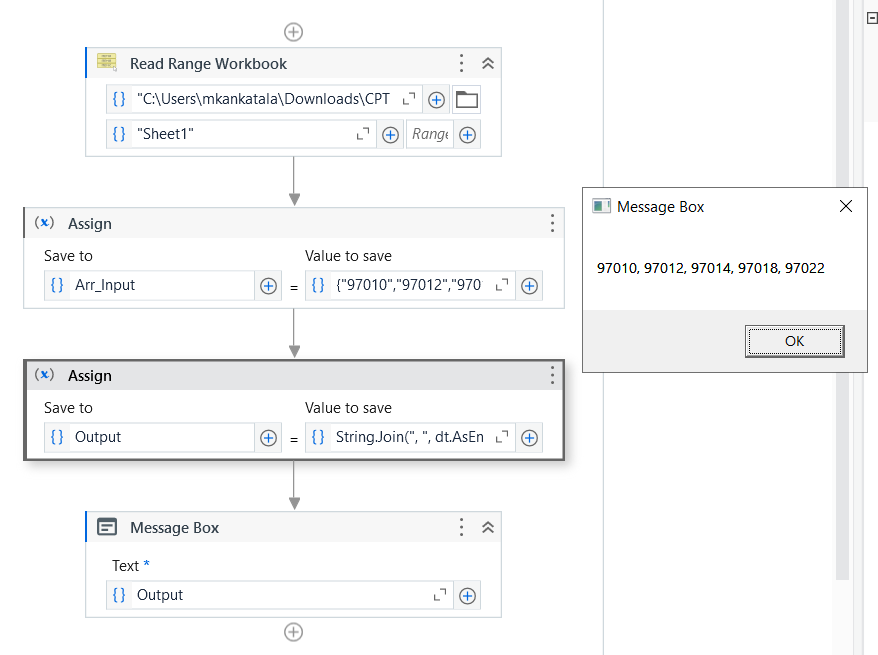
I have a input like this …
so i have to match master excelfile which i attached brlow …
so , if these number are matched to master file … then only i have to write in output or else i dont need to get that number in output …
and also one more condition … sometimes im getting duplicates also in my input…
so i dont need duplicates
and also … i want output as a string not in a datatable
→ Use the Read range workbook activity to read the excel and store in a datatable called dt.
→ Use the Assign activity to write the linQ Expression to check the condition and to take the matched input.
and also one more condition … sometimes im getting duplicates also in my input…
so i dont need duplicates
and also … i want output as a string not in a datatable
Then you want the output in String right, check the below,
→ Use the assign activity and create a Array of String datatype variable called Arr_Input to store the input numbers in a variable.
→ Use the Read range workbook activity to read the excel and store in a datatable called dt.
→ Use the Assign activity to write the linQ Expression to check the condition and to take the matched input and create a String datatype variable called Output to store the output.
Dim resultDt As DataTable = masterDt.Clone()

For Each code As String In inputCodesArray
    Dim trimmedCode As String = code.Trim()

    If masterDt.AsEnumerable().Any(Function(row) row("CPTCODES").ToString().Trim().Equals(trimmedCode)) Then
        resultDt.Rows.Add(trimmedCode)
    End If
Next

result = resultDt