Hi I have 2 different Datatable.
I want to create a function that will matched the Datatable 2 from Datatable 1
Datatable 1
Column 1, Column 2, Column 3, Column 4, Column 5, Column 6.
datatable 2.
Column 6, Column 2, Column 1, Column 3, Column 5, Column 4
Expected Output.
Column 1, Column 2, Column 3, Column 4, Column 5, Column 6.
Any help would be highly appreciated:)
-Vincent
Yoichi
(Yoichi)
2
Hi,
Can you elaborate with specific sample?
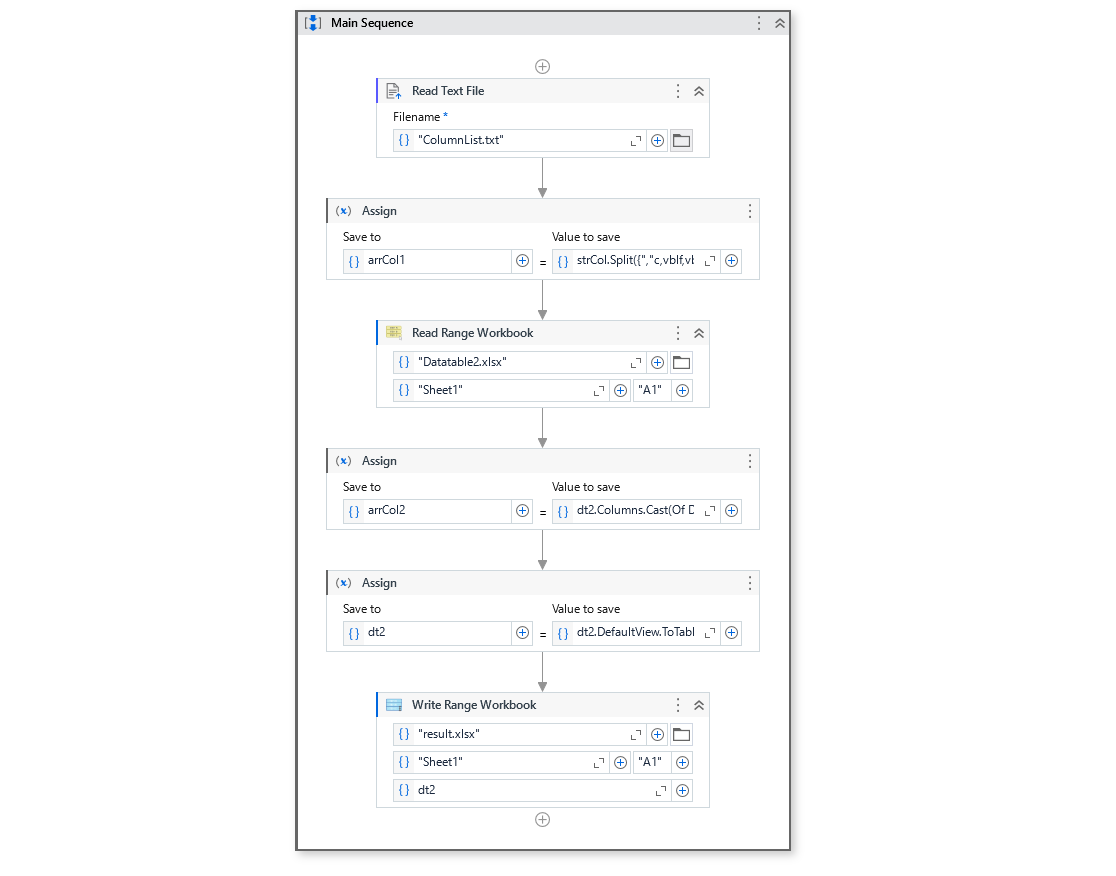
If you want to re-order columns of DataTable2 as same as DataTable1, the following will work.
dt2 = dt2.DefaultView.ToTable(False,dt1.Columns.Cast(Of DataColumn).Select(Function(dc) dc.ColumnName).ToArray())
Regards,
vrdabberu
(Varunraj Dabberu)
3
Hi @Vincent_Nuestro
→ Read Range Workbook

Output:dt1
→ Read Range Workbook

Output:dt2
Use below syntax in assing:
dt_result= dt2.DefaultView.ToTable(False,dt1.Columns.Cast(Of DataColumn).Select(Function(dc) dc.ColumnName).ToArray())
dt_result is of DataType System.Data.DataTable
→ Write Range Workbook
Output:

Regards
Hi , thank you for this,
Sorry i forgot there is more exception that i need to handle.
Sometimes the datatable 2, is more the Datatable 1
Column 1, Column 2, Column 3, Column 4, Column 5, Column 6.
datatable 2.
Column 6, Column 2, Column 1, Column 3, Column 5, Column 4, Column 7, Column 9, Column 10
Yoichi
(Yoichi)
5
Hi,
Can you share expected result in the above case?
Regards,
vrdabberu
(Varunraj Dabberu)
6
@Vincent_Nuestro
Can you share the expected output?
Regards
expected output.
same as datatable 1
Column 1, Column 2, Column 3, Column 4, Column 5, Column 6.
vrdabberu
(Varunraj Dabberu)
8
Hi @Vincent_Nuestro
You can use the same query. How many are there in dt2 it will print the column present in dt1 in resultant datatable.
dt_result= dt2.DefaultView.ToTable(False,dt1.Columns.Cast(Of DataColumn).Select(Function(dc) dc.ColumnName).ToArray())
Regards
Yoichi
(Yoichi)
9
Hi,
In this case, the above expression will also work. Can you try it?
dt2 = dt2.DefaultView.ToTable(False,dt1.Columns.Cast(Of DataColumn).Select(Function(dc) dc.ColumnName).ToArray())
Regards,
Hi,
Upon testing it Only match 1 column(RequestID)
Here is the output
Datatable 1 looks like this
Already converted this to datatable

Left side is the Final Output
Right Side is the datatable 2
vrdabberu
(Varunraj Dabberu)
11
Hi @Vincent_Nuestro
Could you share the excels with same column names with dummy data.
Regards
Yoichi
(Yoichi)
13
HI,
It seems you fails to read DataTable1 correctly.
Can you check it using BreakPoint etc?
Regards,
vrdabberu
(Varunraj Dabberu)
14
@Vincent_Nuestro
Can you share the DataTable1 excel too.
Regards
Here is my datatable 1, I already have a function to convert this to Datatable
ColumnList.txt (265 Bytes)
You can add dummy column on datatable 2 if it is less than Datatable 1:)
Yoichi
(Yoichi)
16
Hi,
How about the following sample?
Sample
Sample20240126-2.zip (10.2 KB)
Regards,
Yoichi
(Yoichi)
17
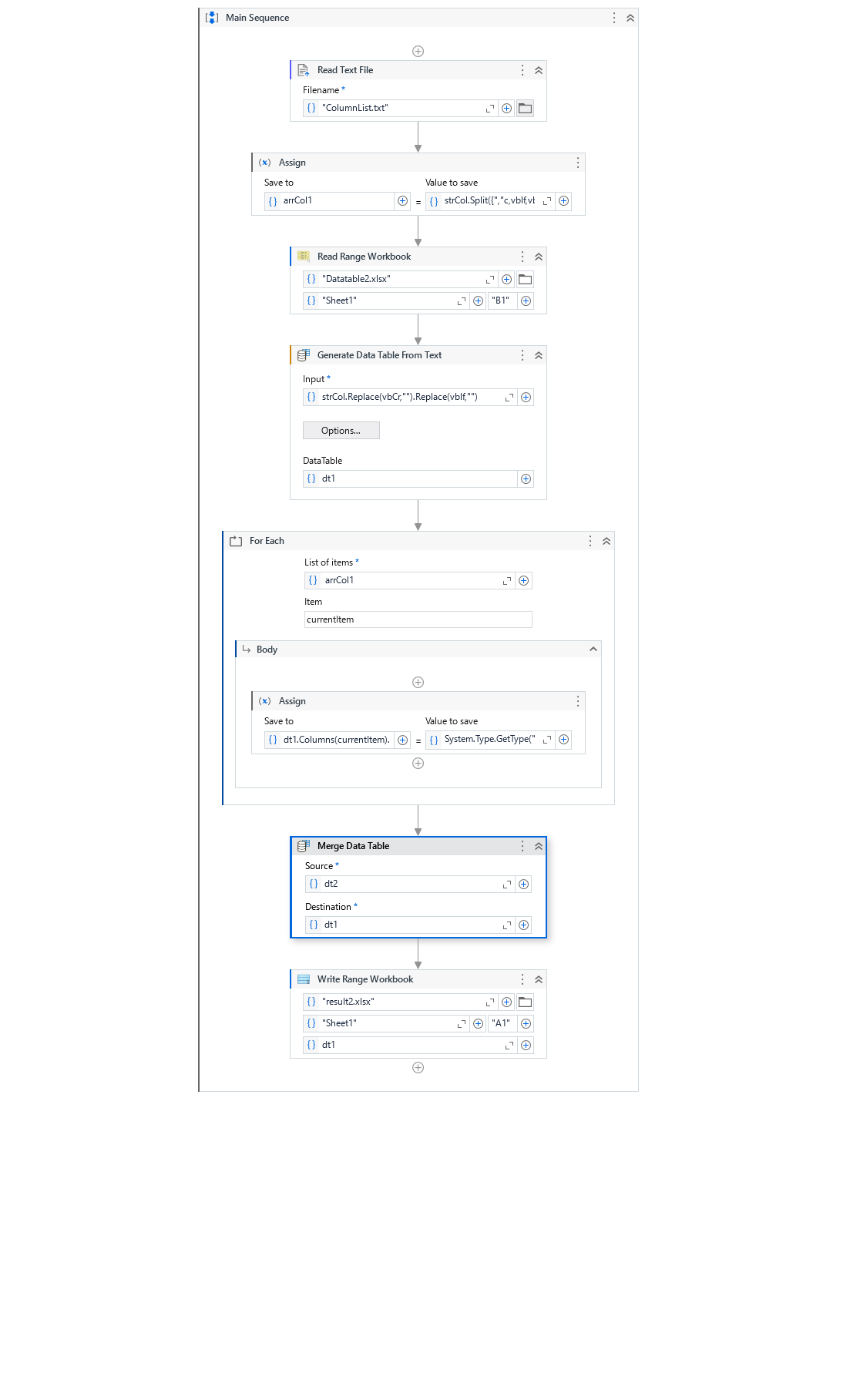
Or if you need to keep all the dt1 columns, the following will work
Sample
Sample20240126-2 (2).zip (10.6 KB)
Regards,