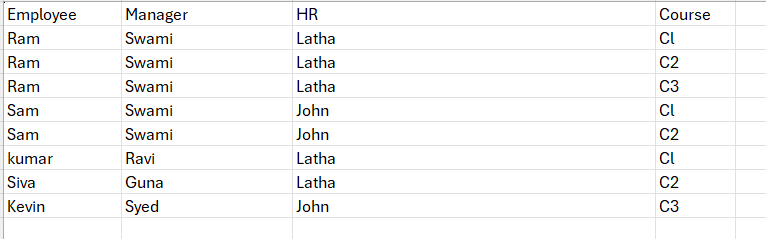
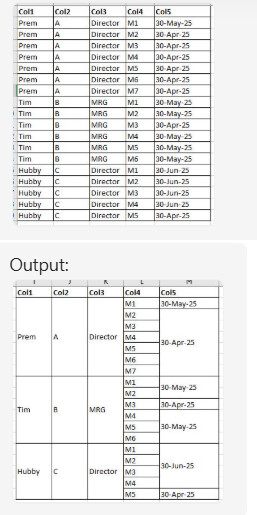
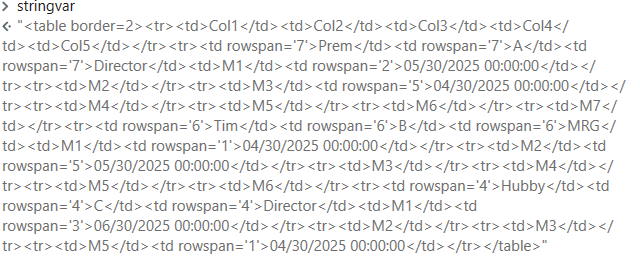
I have a requirement to dynamically merge data if 2 or more employee report to same manager and if they are enrolled in same set of course, I have attached screenshot of sample table, please check and suggest HTML some code snippet which can be used for this type of requests, Please note this will be sent in body of mail along with other text content
html  = "<table border=2><tr><td>" +
String.Join("</td><td>", YourDT.Columns.Cast(Of System.Data.DataColumn).Select(Function(x) x.ColumnName).ToArray()) +
"</td></tr>"

Dim grouped = From row In YourDT.AsEnumerable()
              Group row By
              Emp = row("Employee").ToString().Trim(),
              Mgr = row("Manager").ToString().Trim(),
              HR = row("HR").ToString().Trim()
              Into GroupRows = Group
              Select Emp, Mgr, HR, Courses = GroupRows.Select(Function(r) r("Course").ToString().Trim()).ToList()

For Each g In grouped
    For i As Integer = 0 To g.Courses.Count - 1
        html &= "<tr>"
        If i = 0 Then
            html &= "<td rowspan='" & g.Courses.Count & "'>" & g.Emp & "</td>" &
                    "<td rowspan='" & g.Courses.Count & "'>" & g.Mgr & "</td>" &
                    "<td rowspan='" & g.Courses.Count & "'>" & g.HR & "</td>"
        End If
        html &= "<td>" & g.Courses(i) & "</td></tr>"
    Next
Next

html &= "</table>"
@Deeipauk
Did you directly try the input excel directly with the code i suggested it will directly create the html String, which you can add the html string in body of mail activity with bodyAsHtml Property Ticked
Change the column names accordingly in the code for the above one the change in code is
html = "<table border=2><tr><td>" +
    String.Join("</td><td>", YourDT.Columns.Cast(Of System.Data.DataColumn).Select(Function(x) x.ColumnName).ToArray()) +
    "</td></tr>"

Dim grouped = From row In YourDT.AsEnumerable()
              Group row By
              Col1 = row("Col1").ToString().Trim(),
              Col2 = row("Col2").ToString().Trim(),
              Col3 = row("Col3").ToString().Trim()
              Into GroupRows = Group
              Select Col1, Col2, Col3, Items = GroupRows.Select(Function(r) New With {
                  Key .Col4 = r("Col4").ToString().Trim(),
                  Key .Col5 = r("Col5").ToString().Trim()
              }).ToList()

For Each g In grouped
    ' Group Col4 items by Col5 (date), so we can rowspan by date too
    Dim byDateGroup = g.Items.GroupBy(Function(x) x.Col5).ToList()

    For i As Integer = 0 To byDateGroup.Count - 1
        Dim dateGroup = byDateGroup(i)
        For j As Integer = 0 To dateGroup.Count() - 1
            html &= "<tr>"
            If i = 0 AndAlso j = 0 Then
                html &= "<td rowspan='" & g.Items.Count & "'>" & g.Col1 & "</td>" &
                        "<td rowspan='" & g.Items.Count & "'>" & g.Col2 & "</td>" &
                        "<td rowspan='" & g.Items.Count & "'>" & g.Col3 & "</td>"
            End If
            html &= "<td>" & dateGroup(j).Col4 & "</td>"
            If j = 0 Then
                html &= "<td rowspan='" & dateGroup.Count() & "'>" & dateGroup.Key & "</td>"
            End If
            html &= "</tr>"
        Next
    Next
Next

html &= "</table>"
Hi Sanjay,
Im writing this behalf of Deepauk,
input type is data table as mentioned in screenshots and expecting output also in data table.
could you please provide us any LINQ query to achieve this ?
Thanks Sanjay…This solution is working when courses column at end, but we need to have courses column in middle of datatable (Example-Emp,Mgr,HR,Courses,Duedate,MD).
Please rewrite your logic?
Dim html As String = "<table border=2><tr><td>" +
    String.Join("</td><td>", YourDT.Columns.Cast(Of System.Data.DataColumn).Select(Function(x) x.ColumnName).ToArray()) +
    "</td></tr>"

' Grouping based on fixed columns
Dim grouped = From row In YourDT.AsEnumerable()
              Group row By
              Emp = row("Emp").ToString().Trim(),
              Mgr = row("Mgr").ToString().Trim(),
              HR = row("HR").ToString().Trim()
              Into GroupRows = Group
              Select Emp, Mgr, HR, CourseDetails = GroupRows.Select(Function(r) New With {
                  Key .Course = r("Course").ToString().Trim(),
                  Key .DueDate = r("DueDate").ToString().Trim(),
                  Key .MD = r("MD").ToString().Trim()
              }).ToList()

' Loop through each group
For Each g In grouped
    For i As Integer = 0 To g.CourseDetails.Count - 1
        html &= "<tr>"

        ' Add merged cells only for the first row in the group
        If i = 0 Then
            html &= "<td rowspan='" & g.CourseDetails.Count & "'>" & g.Emp & "</td>" &
                    "<td rowspan='" & g.CourseDetails.Count & "'>" & g.Mgr & "</td>" &
                    "<td rowspan='" & g.CourseDetails.Count & "'>" & g.HR & "</td>"
        End If

        ' Add course and related columns
        html &= "<td>" & g.CourseDetails(i).Course & "</td>" &
                "<td>" & g.CourseDetails(i).DueDate & "</td>" &
                "<td>" & g.CourseDetails(i).MD & "</td></tr>"
    Next
Next

html &= "</table>"
Hi Sanjay,
im using Invoke code activity, In_arugment as datatable and out_Arugument as String.
Getting this error …No Complied Code to run, error BC30734 ‘html’ is already declared as a parameter of this method. at line 0
html = "<table border=2><tr><td>" +
    String.Join("</td><td>", YourDT.Columns.Cast(Of System.Data.DataColumn).Select(Function(x) x.ColumnName).ToArray()) +
    "</td></tr>"

' Grouping based on fixed columns
Dim grouped = From row In YourDT.AsEnumerable()
              Group row By
              Emp = row("Emp").ToString().Trim(),
              Mgr = row("Mgr").ToString().Trim(),
              HR = row("HR").ToString().Trim()
              Into GroupRows = Group
              Select Emp, Mgr, HR, CourseDetails = GroupRows.Select(Function(r) New With {
                  Key .Course = r("Course").ToString().Trim(),
                  Key .DueDate = r("DueDate").ToString().Trim(),
                  Key .MD = r("MD").ToString().Trim()
              }).ToList()

' Loop through each group
For Each g In grouped
    For i As Integer = 0 To g.CourseDetails.Count - 1
        html &= "<tr>"

        ' Add merged cells only for the first row in the group
        If i = 0 Then
            html &= "<td rowspan='" & g.CourseDetails.Count & "'>" & g.Emp & "</td>" &
                    "<td rowspan='" & g.CourseDetails.Count & "'>" & g.Mgr & "</td>" &
                    "<td rowspan='" & g.CourseDetails.Count & "'>" & g.HR & "</td>"
        End If

        ' Add course and related columns
        html &= "<td>" & g.CourseDetails(i).Course & "</td>" &
                "<td>" & g.CourseDetails(i).DueDate & "</td>" &
                "<td>" & g.CourseDetails(i).MD & "</td></tr>"
    Next
Next

html &= "</table>"