How to repeat http request for same url

I want to save the json data in Excel by repeatedly rotating the url address of http request activity.

The url address is "https://m.land.naver.com/complex/getComplexArticleList?hscpNo=5390&tradTpCd=A1:B1&&page=1 " and I want to get the json data by changing the page number from 1 to 20 in the last part (page=1). If you know, please reply.

Hi @ecosy

You can do iteration for 20 times and change the value of the page in the URL in last by incrementing count for every iteration. To get more clarity on it.

Check the below steps for better understanding,
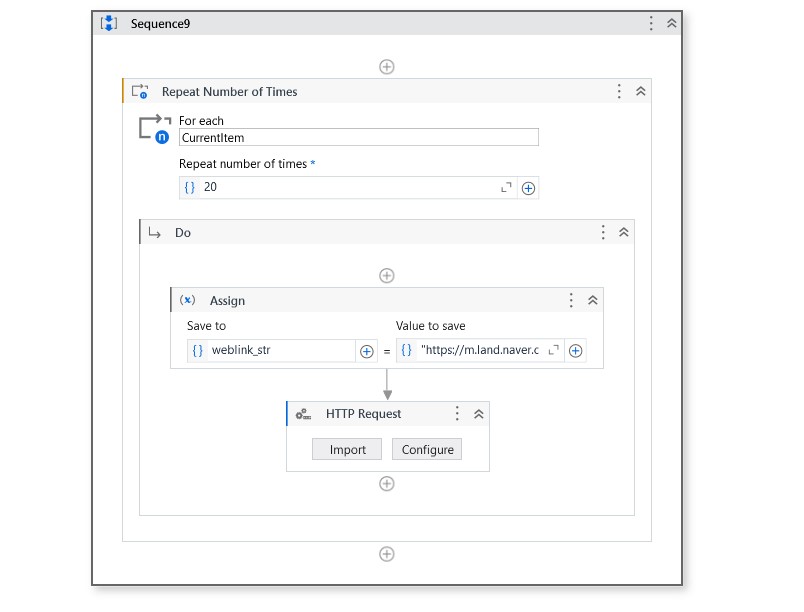
→ Use repeat number of times activity and give the Repeat number of times value as 20 to iterate twenty times. Output of repeat number of times activity is currentitem.
→ Inside of it insert an assign activity and store the web link in a variable called weblink_str

- weblink_str = "https://m.land.naver.com/complex/getComplexArticleList?hscpNo=5390&tradTpCd=A1:B1&&page="+currentitem.toString

→ Use the http request after the assign activity and pass the variable to the URL

Repeat number of times activity iterates for 20 times and for every iteration the page number change in the weblink and it will get each page data by HTTP Request activity.

Check the below workflow for better understanding,
Hope it helps!!

1 Like

Thank you so much! I solved it~! :+1:

1 Like

It’s my pleasure… @ecosy

Make my post mark as solution to close the loop.

Happy Automation!!

This topic was automatically closed 3 days after the last reply. New replies are no longer allowed.