Hi @divya.17290 ,
There is a Similar post created by you where we did have the solution received, we could use the same start logic here as well, but here instead of the Array of Strings it is the Table Format that you would require. The post mentioned :
The same logic can be used but the conversion should be to a Datatable.
For that we could change the Linq Expression to the below :
filteredRowsCount = DT.AsEnumerable.Skip(rowIndex+1).TakeWhile(Function(x)String.IsNullOrWhiteSpace(x("Payer Claim Number").ToString)).Count
Here, filteredRowsCount is a variable to type Integer. We fetch the Total rows from the next position of the row Index of the value found to the next non-empty value. This count is used to retrieve the Filtered/Required rows later.
We could take the Required number of rows since we now have the rowIndex and the number of rows the value found is mapped in the below way :
OutputDT = DT.AsEnumerable.Skip(rowIndex).Take(filteredRowsCount).CopyToDataTable
Here, OutputDT is a new Datatable.
We now have the filtered rows, but we would need to filter the columns as well, For that we could do the following :
OutputDT = OutputDT.DefaultView.ToTable(false,"CPT","Amount")
As we need only CPT and Amount columns.
Next, in order for the Formatting to be properly made look as a Table, we would need to fetch the count/Length of the Largest word in the Whole Filtered Table (including column Names). For that we could do the following operations :
columnNamesLongestValueLength = OutputDT.Columns.Cast(Of System.Data.DataColumn).Max(Function(x)x.columnName.Length)

rowValuesLongestLength = OutputDT.AsEnumerable.Max(Function(x)x.ItemArray.Max(function(y)y.ToString.Length))

LongestLengthValue = if(columnNamesLongestValueLength<rowValuesLongestLength,rowValuesLongestLength,columnNamesLongestValueLength)
Here, the variables columnNamesLongestValueLength, rowValuesLongestLength and LongestLengthValue are of integer type.
Next, we perform the formatting based on the LongestLengthValue and use PadRight for appending the remaining spaces required for the word, hence preserving a table like look.

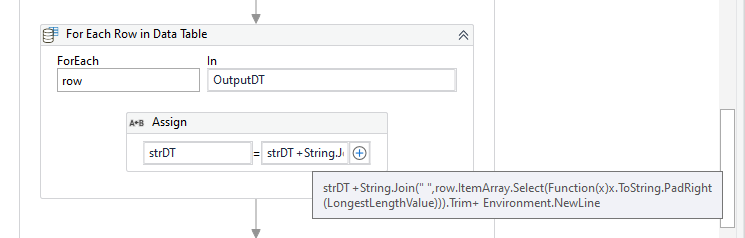
Lastly, we write the String strDT to a Text file :
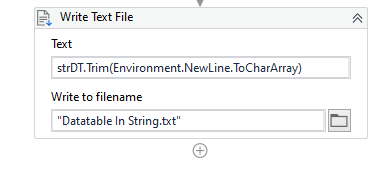
Check the Workflow Below :
DT_Filter_FormatToStringTable.zip (11.5 KB)
Maybe a better approach could be used for this task, but when considering the formatting for a Generic data I did arrive at this conclusion.
Let us know if this doesn’t work or if you are facing any issues.
Also, we see that there are multiple threads created by you which may ultimately ask the same question as this thread. Do make sure to close them if you requirements are met, thus avoiding duplicate topics.