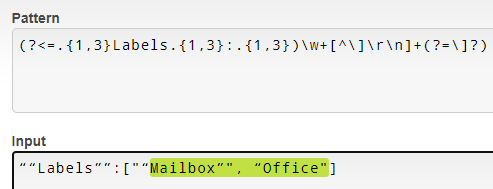
Yes, it is second example. Where same variables should store other values:
“Project”:“Developement”
“Type”:“Issue”
“Description”:“No Description”
Yes it is
You will need to install UiPath Web activities to use the Deserialize Json
The content in jsontext.json is your string. But mind the two different kinds of double quotes. json requires " and not the other slanted double quotes. jsontext.json (73 Bytes) Json.xaml (6.7 KB)
It doesn’t work for you because the input text in the regex tester has a different kind of quotation marks. Probably the text was copied from UiPath Forum. The regular quotation marks are vertical while the other ones are leaning to the right.
Also the sample you provided in your first post doesn’t match the one you provided below. It has several quotation marks around Project and Test.
If you save the EmailBody variable to a text file (Write Text File activity) and upload it here, we can help you create better regular expressions. (You could of course replace sensitive data with other text. Just keep the formatting.)
Please provide a text file or use the Preformatted text option.
You should have gotten a match even for the new input if those are regular quotations. But since you didn’t get any match at all, I suspect that the input text might contain different kinds of quotation marks.
So, You are pro and Im really thankful. With the System.Text.RegularExpressions.Regex.Match in assign activity I get errors but If I use Matches activity and then assign to a result of match it works… I dont know why. Thank You one more time.
You input text starts to look more and more like JSON. If it is, then @jeevith’s solution is probably better.
If you want to continue with regex, you need to do it with two patterns. First extract the all the text after “Labels”, then split it into an array and remove empty entries.