Hello,
i have output like below
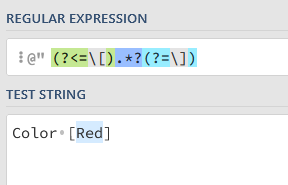
Color [Red]
i need to get only “Red”
help me on same .
expected output -
Red
Hello,
i have output like below
Color [Red]
i need to get only “Red”
help me on same .
expected output -
Red
Assign Activity
strText =
System.Text.RegularExpressions.Regex.Match(YourTextVar,"(?<=\[).*?(?=\])").Value
[CheatSheet] - System.Text.RegularExpressions | RegEx - News / Tutorials - UiPath Community Forum
use regex
System.Text.RegularExpressions.Regex.Match(strValue, “(?<=[)(.*)(?=])”).ToString
if you find it helpful, please mark it as solution
result = System.Text.RegularExpressions.Regex.Match(yourString, “[(.*?)]”).Groups(1).Value
Hello @Mathkar_kunal ,
Store the text where you are getting the output like:
“i have output like below
Color [Red]
i need to get only “Red”
help me on same .
expected output -
Red”
in a variable named ‘inputText’, and then pass this variable into the Regex expression.
Regex:-
System.Text.RegularExpressions.Regex.Match(inputText, “(?<=[).+?(?=])”).Value
I will chime in with an answer if there happens to be a case where your input contains multiple brackets and you would like to output each one of them.
For example:
Input: The apple is [red], the banana is [yellow] and the pear is [green].
We already have the correct answer on how to get “red”, see the answer from ppr.
To output red, yellow and green we need to read the values into a MatchCollection that we can later on loop through with a For Each-activity.
Assign a string with the input, assign a new MatchCollection-variable with the value: System.Text.RegularExpressions.Regex.Matches(inputvariable, "(?<=[)(.?)(?=])")* and then loop through the collection with a for each where lists of items is the variable name for your collection.
nice activity , but i cant find it in activities.
any package needs to be install ? i will use this later
UiPath.System.Activities
![The image illustrates a workflow extracting the word 'Red' from the text 'Color [Red]' using specified delimiters and displaying it in a message box. (Captioned by AI)](https://global.discourse-cdn.com/uipath/original/4X/9/5/1/951559cdc0ca8d1703ca187d04e9c5213a5e9906.png)