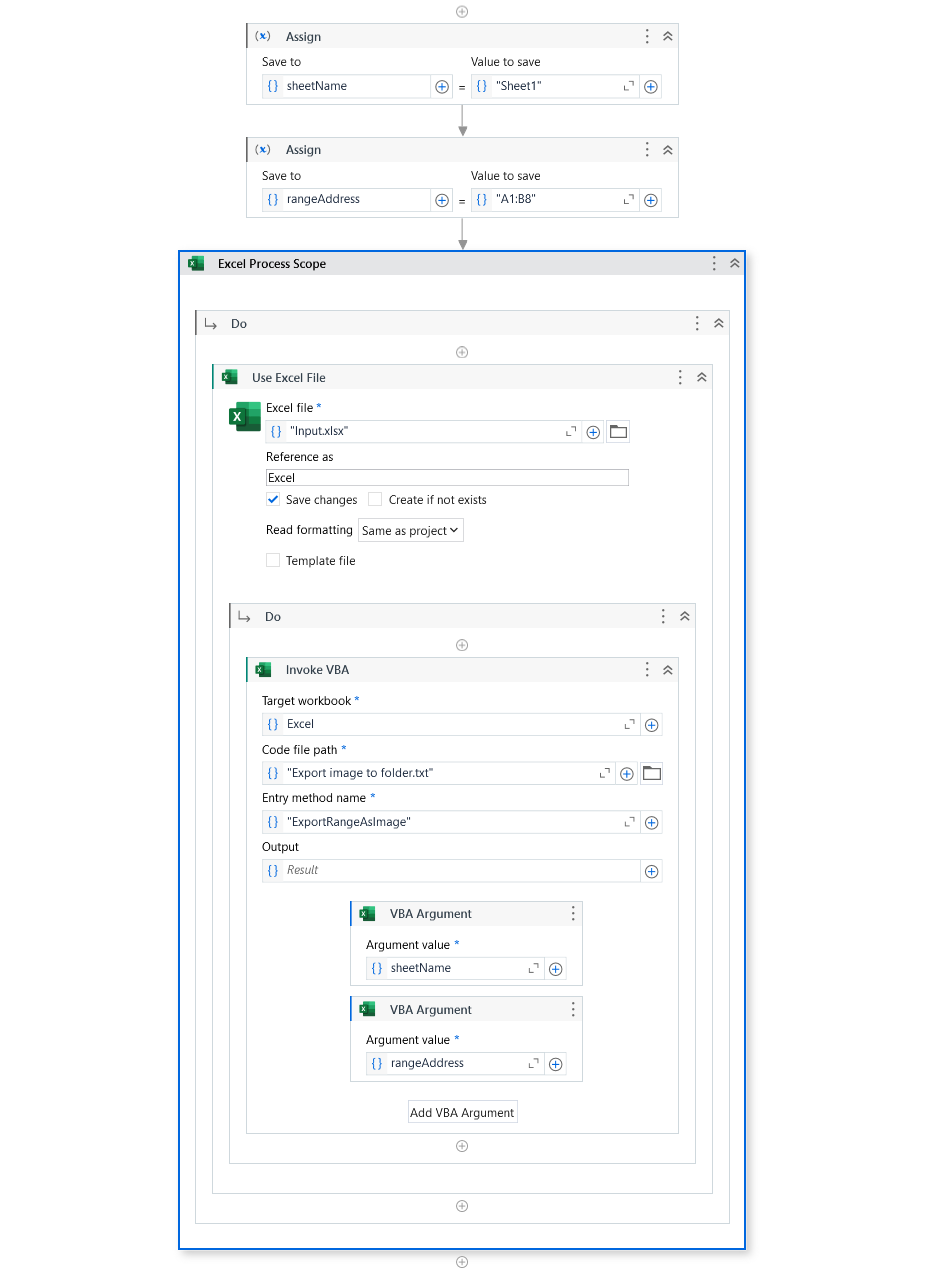
Sub ExportRangeAsImage(sheetName As String, rangeAddress As String)
    Dim ws As Worksheet
    Dim rng As Range
    Dim chartObj As ChartObject
    Dim imgPath As String

    ' Dynamic sheet name and range
    sheetName = sheetName        ' Replace or make dynamic
    rangeAddress = rangeAddress  ' Replace or make dynamic

    Set ws = ThisWorkbook.Sheets(sheetName)
    Set rng = ws.Range(rangeAddress)

    ' Copy range as picture
    rng.CopyPicture Appearance:=xlScreen, Format:=xlPicture

    ' Add temporary chart
    Set chartObj = ws.ChartObjects.Add(Left:=rng.Left, Top:=rng.Top, Width:=rng.Width, Height:=rng.Height)

    ' Paste copied picture into chart
    chartObj.Activate
    chartObj.Chart.Paste

    ' Export chart as PNG
    imgPath = "E:\testFolder\RangeImage.png"  ' Ensure folder exists
    chartObj.Chart.Export Filename:=imgPath, FilterName:="PNG"

    ' Delete temporary chart
    chartObj.Delete
End Sub
Sure! Here’s a VBA script that dynamically converts a specified Excel range to an image and saves it to a local folder (like E:\testFolder). You can adjust the sheet name and range in variables.
Sub ExportRangeAsImage()
    Dim ws As Worksheet
    Dim rng As Range
    Dim filePath As String
    Dim chartObj As ChartObject
    Dim chartShape As Chart

    ' === Set dynamically (you can change these values or prompt via InputBox) ===
    Dim sheetName As String
    Dim startCell As String
    Dim endCell As String
    sheetName = "Sheet1"
    startCell = "A2"
    endCell = "B8"
    filePath = "E:\testFolder\RangeImage.png" ' Change as needed

    ' === Reference the worksheet and range ===
    Set ws = ThisWorkbook.Sheets(sheetName)
    Set rng = ws.Range(startCell & ":" & endCell)

    ' === Copy range as picture ===
    rng.CopyPicture Appearance:=xlScreen, Format:=xlPicture

    ' === Add temporary chart to paste the picture ===
    Set chartObj = ws.ChartObjects.Add(Left:=rng.Left, Top:=rng.Top, Width:=rng.Width, Height:=rng.Height)
    Set chartShape = chartObj.Chart
    chartShape.Paste

    ' === Export the chart as image ===
    chartShape.Export fileName:=filePath, FilterName:="PNG"

    ' === Clean up ===
    chartObj.Delete
    MsgBox "Image saved to: " & filePath, vbInformation
End Sub
Let me know if you want a version where it loops through multiple ranges or auto-names files!