I want to create a loop, when the robot find a error it will try again
Creating a loop ? please specify what exactly you want in uipath you can use a for each row loop and a for each loop. What is your requirement .
In studio, you will have 3 loops.
1.While,
2.Do while,
3.For each.
You can use anything as you wish. If you still need guidance, watch this video : Control Flow in UiPath Studio 1.2 - YouTube
Hi @Soudios
I think u should use while loop
Try this way
Put a while loop with condition as True (Boolean)
Inside it do the following
Use try catch inside the while loop
In try section try to execute ur activity u need to do and atlast put a break to exit out of loop
In catch section specify the exception type and in corresponding sequence put a continue activitiy to continue the activity once again
Try this and let me know
Mark it as solution if it helps u in answering ur query
Regards
Nived N 
Happy Automation
Can you show me plz ? ORCHESTRAOR-Forum.xaml (33.7 KB)
Hi @Soudios i had done it
But the big query for me do you want to retry it until it works fine or is there any limit to which it retries
Well i am attaching the updated workflow , i had updated ur workflow in such a way that it will retry until everything seems to be ok
Check this workflow
ORCHESTRAOR-Forum.xaml (44.3 KB)
Hope it helps you
please answer to my query which i asked above too
Hope it helps
Regards
Nived N
Happy Automation
Hi mate,
Put that activity within TryCatch block , If any exception occurs give same condition in While loop in Catch block.
Hope this helps,
I have this error when i try to do the same as your workflow
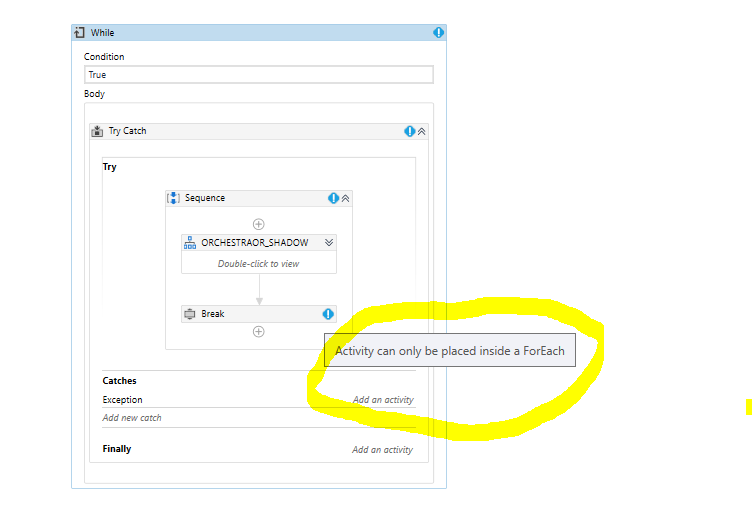
I started like this :

But it is working fine for me @Soudios
its not the same break activity i think, did i need to download something else ? @NIVED_NAMBIAR
What is ur version @Soudios
I have this version, that works with ForEach @NIVED_NAMBIAR