Help with Filter Pivot Table

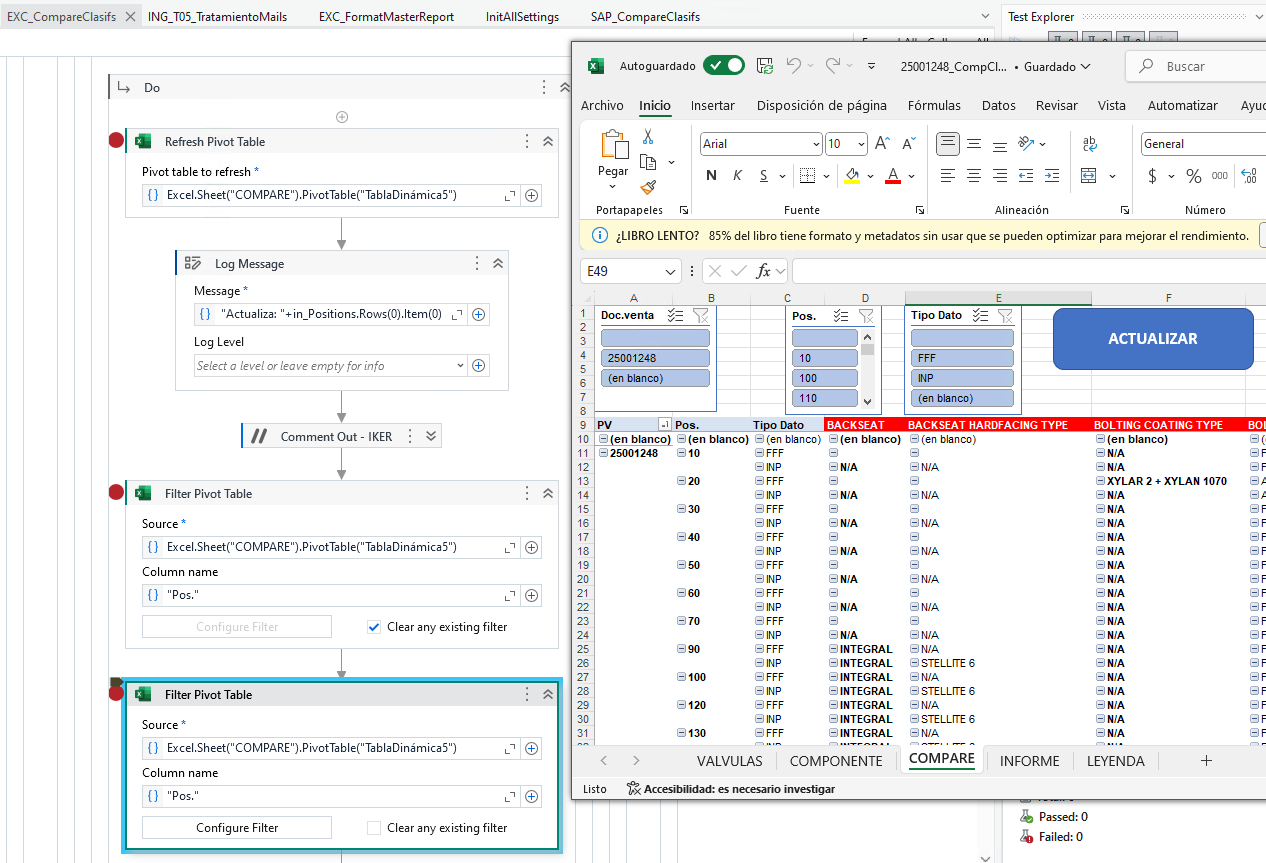
Hey, i have a issue with the Filter Pivot Table Activity, I have a dynamic table in excel where i have to filer by position.


As you can see in the image, im trying to filter by the position 10. The way i do that is, first step clear the filter, i have a “String.Empty” in the first filter, by executing i can see how it clears the dynamic table but manteining the position 80, after that i use in the second filter pivot table the value seen in the log message, in_Positions.Rows(0).Item(0).ToString.

I dont know what else to try, thanks.

@itorre

in first one you just need to check the clear any filter option then in next one add the filters you need

cheers

I’ve tryied but doesn’t clear it

@itorre,

This could be due to data is being filtered using excel slicer and not by pivot table filter

You will have to use VBA code to filter the data by changing the slicer selections.

@itorre

  1. Clear filtwr is basically to have no filters that means all would be displayed
  2. Also if slicer are used other than gilter then filter pivot would not work

Cheers

So, what should i use?

@itorre

You need to go with macros and use invoke vba or execute macro activities

Cheers

@itorre please check this answer

  • Use Nothing (not String.Empty) to clear filter.
  • Ensure this is a string:
    in_Positions.Rows(0).Item(0).ToString.Trim
  • Add “Refresh Pivot Table” before filtering.
  • Double-check field name is exact match (“Position”).