Hi All,
I am working in a VM, and the project is located on a shared drive on the server. The project is working perfectly, but when I try to select GitInit, I receive the following message: ‘UiPath repository path is not owned by the current user.’
Does anyone have an idea about this issue?
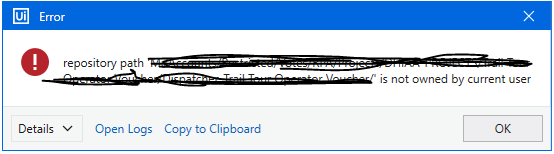
Do you have access to the git repository?
yes I have access, and it is no problem when I copy the project into the VM desktop I can push and commit, but the issue appears in the original project share dolder
Check if your user has write access to the Shared Folder or not.
Because while pushing the project to git, it create some files inside the project, so verify that once.
Hi @RPA_Dev13,
Go to your gitconfig file, in this case:
- C:\Program Files\git\etc\gitconfig file (if git is installed)
Or - C:\ProgramData\Git\config (if git is not installed)
Open it and add the following line:
[safe] directory = *
Hope it helps you!
Both paths are wrong
Hi @RPA_Dev13,
Please, try to install Git.
Cheers!

I found the config an did that but same result
Hi,
That usually happens because, on a different computer, you did the Git Init first, then moved the entire folder to a different computer including the .git hidden folder, and tried the Git Init again.
Since git was already initialized, you tried to initialize it again on a different computer with a different user.
See, when you Git Init the repository, this hidden folder appears.

Suppose you are already working with version control and you want to have the project somewhere else. In that case, you have to Git Clone the repository to another folder, not initialize it again.
If you want to initialize a project, create a completely new project move the needed .xaml files to your new project and Git initialize the project.
I hope it helps.
Juan P.
You are completely right, thanks.