Anyone who can help me to get the path file look like on the screenshot 1?
Because i want to open and start from the Sequence Major which is the file is inside the GetDataMandiri folder look like on the screenshot 2.
I want to start running the workflow on the SequenceMajor file that is inside the GetDataMandiri folder. I asked how to get the position (directory) of the folder so that the existence of the file can always be known (if the GetDataMandiri folder is moved anywhere, the folder can always be easily accessed)
Hi we can mention as arr_files = Directory.GetFiles(“E:/GetDataMandiri/Data”,”.”)
This will give all the files from the folder
Or if we know the file extension then we can specify them in second argument like this arr_files = Directory.GetFiles(“E:/GetDataMandiri/Data”,”*.xaml”)
Which will give us all xaml files in that folder
@Brian_Henokh1
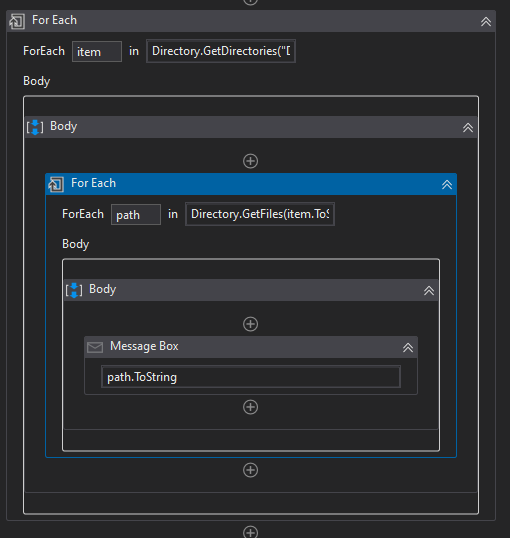
item = Directory.GetDirectories(“Your Path”)
path = Directory.GetFiles(item.ToString,“*”,SearchOption.AllDirectories)
It will give path of all the files inside a directory. Even if it’s inside a sub directory.