Hi all.
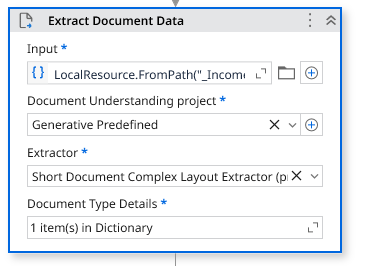
I am making use of the Extract Document Data activity in a workflow. I want to use it to extract certain values from a document. I have added one prompt for the field that I want to extract but the activity returns the entire text in the document and I am not sure how to fix it. I would really appreciate your help.
I have attached screenshots of the configuration in the activity.
Please share more details like the field you are trying to extract and the prompt you are using for it. Also show the result from the locals panel what’s being returned.
Hello, It happens because the Extract Document Data activity needs a very specific prompt, and if the prompt is too general, the model returns the whole document text.Retry rewriting your prompt to be very direct, e.g.: “Extract only the value after the label ‘“Invoice Number:”’ and return nothing else.Also enable Return as JSON and define the expected field name.If the label is always the same, use an anchor-based or regex-based extraction instead of a pure prompt.When the prompt is precise and the expected output format is clear the model will stop returning the full document.It would be great if you provide the input you are giving and the result output
I ran into this a lot during early testing. The key is what they said-
Extreme Specificity- You have to treat the prompt like a command line instruction, not a friendly request. The model needs to be told exactly what to extract and, crucially, exactly what NOT to return (“return nothing else”).
Return as JSON- Enforcing a specific, predictable output structure using the Return as JSON checkbox is the most reliable way to force the model to limit its scope to only the fields you defined.
If you can post the exact prompt you’re using and the output you’re getting, it would make debugging a lot faster for the community!