Aayushi_S
July 17, 2022, 10:53am
1
Hi Experts,
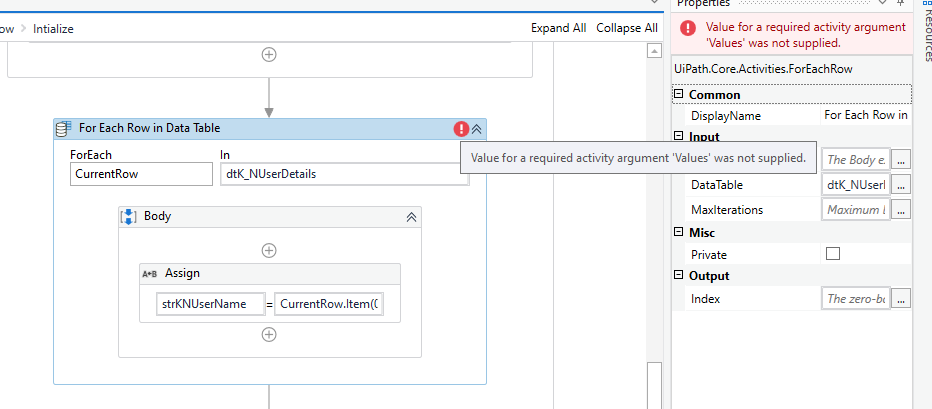
Error- value for required activity argument ‘Value’ was not supplied
I’m new to community. Can you please help me. I’m getting unusual error in for each data table. my variables are also correct datatype. I could not understand please help. Attaching screenshot.
Yoichi
July 17, 2022, 11:36am
2
Hi,
I guess it’s a bug of ForEachRow in UiPath.System.Activities package 22.7.0-preview. As workaround, can you try to downgrade it to 22.4.1 etc.
The ForEachRow activity of the 22.7.0 preview requires a value for the argument Values, but there is no input field Values. Am I overlooking something or is it actually missing?
[image]
At a complete loss on this one. Got all my variables declared and global so different sequences in a Flowchart can see it, but getting this weird error:
Error ERROR Validation Error Value for a required activity argument ‘Values’ was not supplied. Main.xaml
UIPath has recently updated so unsure if it’s done something in the background?
If I replicate this in a pre-existing flow, i don’t get the errors either [image]
Regards,
Hey @Aayushi_S
That’s the bug in the latest preview release.
Kindly go for a stable version by downgrading a step lower. That should help.
Thanks#nK
Aayushi_S
July 17, 2022, 4:23pm
4
Nithinkrishna:
ding a s
I’m using the stable version. How can I go back can you suggest
Aayushi_S
July 17, 2022, 4:24pm
5
should I fix the uipath.excel.activities
What’s the current version please ?
Hello @Aayushi_S
Can go to manage package and select UiPath.System.Activities, then choose the version which is just lower to the currently selected one.
Thanks