Hi everyone,
I am running a capturing process where I am reading emails from outlook and capture the data on the email to a system, after it should send an outlook notification email when it’s done.
it also has a count activity after it’s done.
Bit if it has to prices 5 emails…it sends the notification for only 1 and after it processes another and there would a different one.
I want it to process and count all all then send 1 email notifications
@Anelisa_Bolosha1,
You need to move the Send Outlook Mail Message activity outside the For Each loop. Inside the loop, capture and process all emails, maintain a counter, then after the loop ends send one notification email with the total count. This way only a single summary notification is sent after all items are processed.
Hi,
That happens because the Send Outlook Mail is inside your loop, so it’s sending once per item. To fix it:
- Move the Send Outlook Mail activity outside the loop.
- Inside the loop just increment a counter (e.g.
emailsProcessed = emailsProcessed + 1).
- After the loop finishes, use Send Outlook Mail once, including the total count in the body.
This way, you’ll only get one notification after all emails are processed.
@Anelisa_Bolosha1
If I understand correctly, you want to send an email after processing every 5 emails in the loop.
Hi @Mir.Jasimuddin , My process is like this:
This is the only foreach I have in the process (API_AutocaseSUB) where I am checking the attachment in a particular file
On this sequence that is that has been invoked from main.

From the foreach it goes down to here: foreach ends here then
and then
The send outlout activity is after the IF condition where the foreach is.
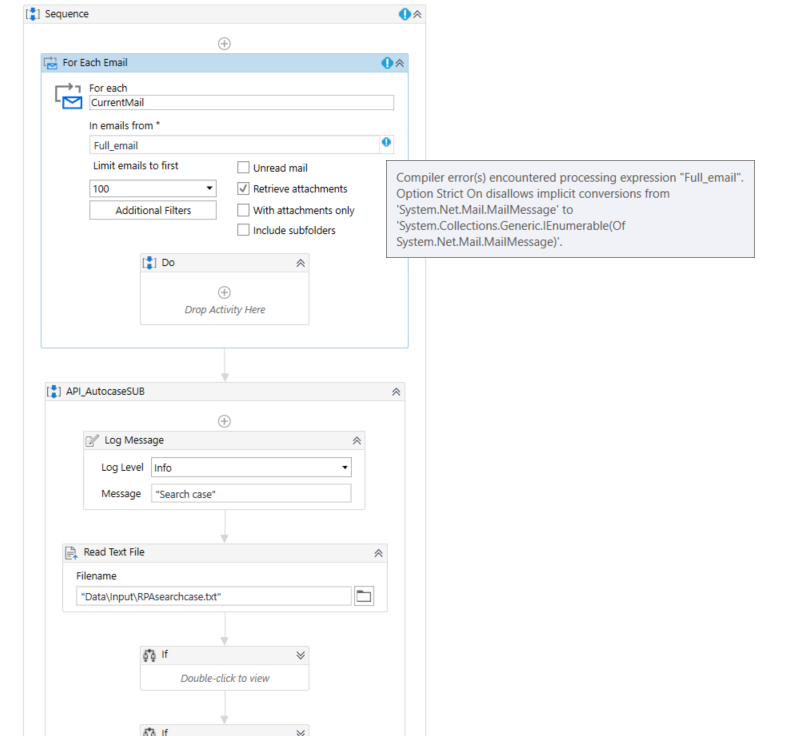
So I wanted to maybe put a foreach at the beginning of the process (API_AutocaseSUB)…foreach email then I can be able to put the email outside of that loop but the way my process is it does that.
My flow from top to bottom:
So I am trying to see If I am not able to pput a foreach at the beginning, but I get an error
I want to process all those 5 email then send one email that says all the 5 have been processed instead of sending each email for every processed
Use assign Activity before the loop of processing the mail and use
processedList variable of type string and pass "" in value then in the end of the loop but inside the loop use assign activity and pass
processedList = processedList + Email.Subject + vbCrLf then after the loop in sending the mail pass this
"The following emails were processed:" & vbCrLf & processedList
Cheers
Hi @bhavesh.choubey ,
My process structure is like this on the second sequence :
where do I put the loop?
This starts processing from the main sequence

The loop in which you’re processing all the 5 email share me where are you processing all the 5 emails ?