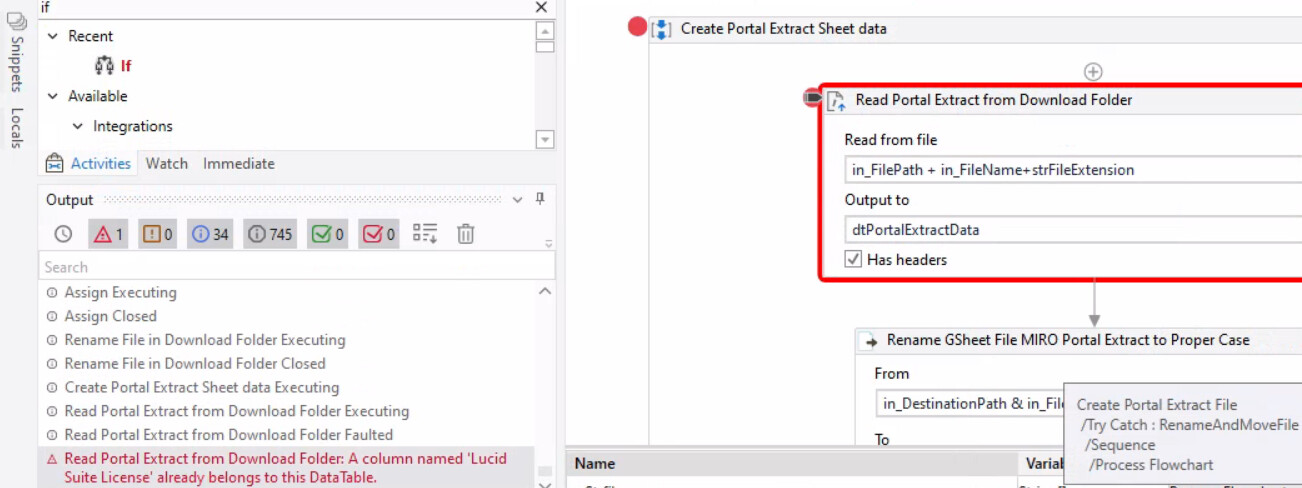
A bot of mine downloads a csv file from a portal and copies it a Google sheet. Today, it happened to see that there occured 2 columns with the same name . Hence, bot threw error saying that column already exists in the data table. So, in future, if any columns appear more than one time, I need to delete it in the data table itself and later write it to the google sheet. Could anyone help me how to do this.
Below attaching the csv file downloaded file from portal:
when i removed the headers checkbox, i am getting the below error.
[Column1,Column2,Column3,Column4,Column5,Column6,Column7,Column8,Column9,Column10,Column11,Column12,Column13,Column14,Column15,Column16
First Name,Last Name,Email,Username,Role,Account Created,Groups (sharing),Organizational Group,Lucid Suite License,Lucid Suite License,Lucidscale Creator License,Lucidscale Explorer License,Trial - Lucid Suite License,Trial - Lucid Suite License,Trial - Lucidscale Creator License,Trial - Lucidscale Explorer License
You have to find the index of the column you want to remove. In this example, Organizational Group is index 7 (8th column). Use that column index in the ColumnIndex property of Remove Data Column.
You can’t remove the column by name because the column names are Column1, Column2, etc and your headers are the first data row after the headers.
I’m curious why you’re removing Organizational Group, though, since it’s not a duplicate.
I had to remove that column as per a business requirement. Additionally, i would need to add 3 columns - Status, Product Name and Extract date. With this index , how to change it ?