Create Task App in Studio doesnt Find Deployed App

Hi! I want to create an Action App, but when i try to select the deployed app on the studio i dont get anything.

Studio :

image

Orchestrator Deployed App:

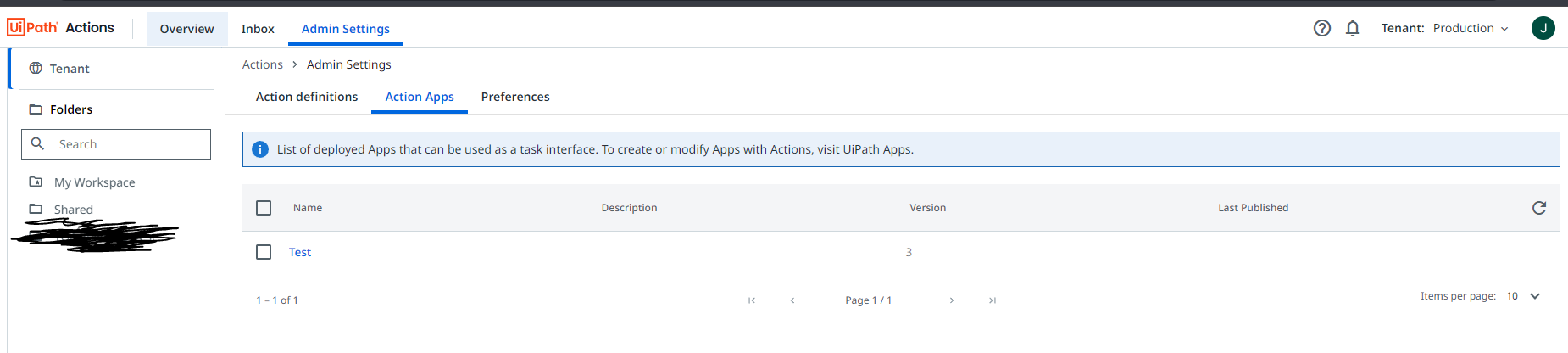
Action Center recognize the app :

Yes, Tenant and Orchestrator folders are the same.

Update 1 :

I have no idea why the Submit Action Rule keeps dissapearing from the Rules page, even when i save the app and everything, when i deploy the app that rule dissapears.

@Joaquin_Bracci

Is the studio version higher than 22.10?

Also does the robot have permissions to view and edit actions…please check the roles

Cheers

@Joaquin_Bracci ,

Seems that you are trying to get standalone app into activity. Inorder to come into activity you must need to enable action on apps and then published it.

Hi! The symbol after the name of the app suggest that it is an action app.
image

Also it appears as an action app in Action Center.

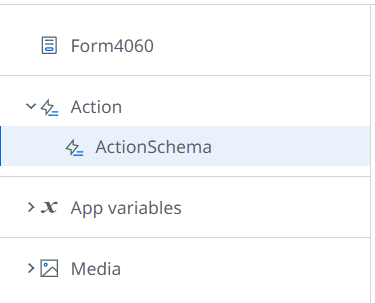
Also you can see that i added the action inside the app.

The image shows a section of a user interface with a highlighted "ActionSchema" item under the "Action" category, alongside "Form4060," "App variables," and "Media" categories. (Captioned by AI)

Thanks!

Hi @Anil_G !

The Studio is 2024.10.1, im using my developer account with admin rights,

Hi. Did you get the resolution to this ? I am facing same issue. I can’t even see the app in Action Apps section of Action Center. However, in UiPath Apps, it shows published.

image

Not really, I sent an email to UiPath and they said that it is probably a bug so they are working on finding out what happened. I will post the solution if they give me one.

Thanks!

Hi There,
Hope you got solution for this. I am facing similar kind of issue. Can you or anyone else please share the solution here.