I’m trying to send the following jsonPayload through a HTTP Request activity where first I use the assign activity to create this string and then I add the jsonPayload in the Body part of the HTTP Request properties.
where createdAt is supposed to be a timestamp of the exact time the bot got executed - I’m using System.DateTime.Now.ToString(“yyyy-MM-dd HH:mm:ss”) and processInstanceId is supposed to be a random UUID - I generate it like this Guid.NewGuid.ToString
my jsonPayload looks like this "{""createdAt"":""" + System.DateTime.Now.ToString("yyyy-MM-dd HH:mm:ss") + """,""serviceId"":""DMSCOMPACTTRIAGE"",""processInstanceId"":""" + Guid.NewGuid.ToString + """,""origin"":""UIPATH""}" but I’m getting error 400 Bad Request as a response, so I’m wondering what I’m doing wrong?
thank you for this remark, unfortunately I’m still getting the same 400 bad request when I try to preview the response from the http request wizard. But when I run the whole process the status code is 0 and the response and headers are empty.
I’m still getting a 400 bad request. I checked on Postman and it works as desired, I have added the same endpoint and authorization token.
this is my workflow
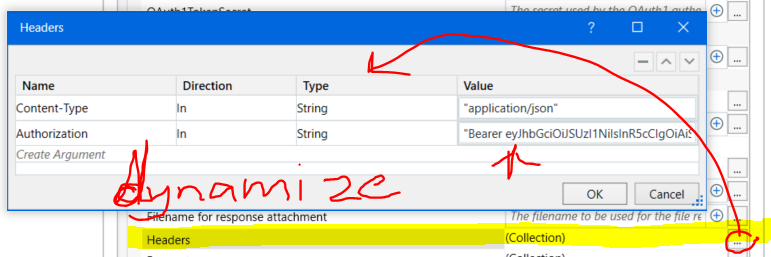
I’m unable to paste the http request config image but I have added the following in the properties:
Request Method - POST
Request URL - correct URL that I need to send the POST method to (checked on Postman and I am sure its the right one)
OAuth2Token - in order to reach this endpoint I need an Authorization Bearer token
Body - jsonPayload (created with the assign activity from the screenshot above -
thank you for your help! I was escaping the double quotes incorrectly which is why I kept getting 400 Bad Request.
the solution that worked for me in the end was the following: "{""createdAt"": """+Now.ToString("u").Replace(" ","T")+""", ""serviceId"": ""DMSCOMPACTTRIAGE"", ""processInstanceId"": """+Guid.NewGuid.ToString+""", ""origin"": ""UIPATH""}"