Hi, I am trying to use UiPath StudioX’s feature HTTPS Request.
In the updated UiPath StudioX we are provided with two features, either paste the curl or configure the API manually using the Configure option.
When I am trying to paste the curl and validate it, it throws an error:

But even after ignoring this message, if I import the API and click on preview instead of getting the output, I get the error:

This API is working fine in Postman, can you help me find the issue?
Plus, how am I supposed to sore the values that I get after calling the API? which could be used later in the same automation process?
From the curl just remove —location and then import …it should work as expected
In the http request you have ouput variables which is responsestatus and response …which will give the api response in variable which can be used later on
Cheers
1 Like
Hi,
I removed the --location tag as well, but the error message still persists.

I imported the API after removing the location tag and it shows me a screen like this in the Configure pane.
When I hit on preview, I still get the same error:

The same curl if I use in Postman gives the correct result.
As per the preview we can see that the status code is 200…so call is successful
Can you say what is expected result?
If you remove location import will be successful
Cheers
1 Like
Yeah sure. When the same API is hit using Postman, this is the desired output:

But it’s not coming in UiPath.
Also, the import was successful after I removed the --location tag, thanks for that.
Change access response as needed from the dropdown
Also run it and not in preview and check
Cheers
1 Like
Sure, will try that. Thank you so much.
1 Like
I also want to know that how will I be able to solve this issue:
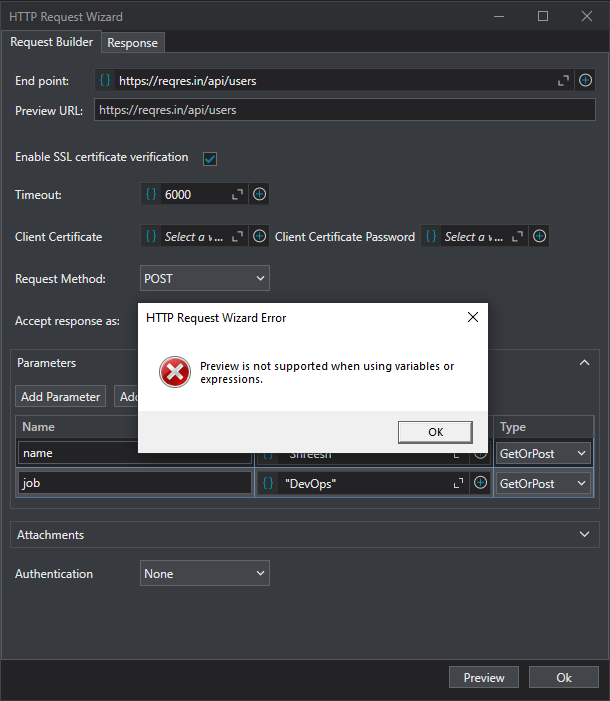
And if I am directly supposed to run this automation, where can I store the data generated, because in the new StudioX update, I am unable to find the output variable.
Hi, I have discovered how to get this working, I was looking for the properties pane for this project, I have found it and will resume my work.

The above place one can find the properties pane.
Thanks for the help.
error": “400 Bad Request: Failed to decode JSON object: Expecting value: line 1 column 1 (char 0)”
Hi all, I have got this error response while executing an API call from UiPath, what could this mean?
Response type is given as application/json i guess…please use correct response format
cheers
1 Like
I need the response in json only, hence I have set the format for same, as you can see here:

Am I missing something?
two things here
- you will set the format here, what you are showing is the input body format

- As per screenshot you provided the response does not seem to be json but seems a
text/plain.please check the same
cheers
1 Like
Oh, let me try with that as well.
1 Like
This topic was automatically closed 3 days after the last reply. New replies are no longer allowed.