Agent deployment in orchestrator

Hi,

While deploying the agent in orchestrator I’m facing an issue. Strangely it’s only happening when I use context grounding and gave index in my agent otherwise it deploy smoothly.
After publishing when I’m deploying the agent first of at validation it’s saying “Index already existed in tenant” when I click on the “Link to existing” the validation gets successful but when try to run the agent from orchestrator the agent traces shows an error stating “Failed to find index with the name = ‘index name’”

I’m attaching the img of the issue any help would be appreciated. Thanks

Hi @Pranav_Labhe2

Welcome to UiPath,

Just try to delete the existing index manually from the tenant or ensure the agent is correctly referencing the linked index name.

If you found helpful, Mark as a solution tick .
Happy Automation

Hi Prashant,
Thanks for the reply, I tried deleting the index created manually and then creating the one from agent but the same validation error came again. If possible could you please tell me the correct way to create index and deploy the agent step by step?

@Pranav_Labhe2

is the index created long back?

it might be an issue as the indexes have been moved from ops to orchestrator …so please try to recreate and check

cheers

Hi Anil,
Thanks for your reply, no the index is created at the time of providing the index to agent and at the same time its getting created in the specific UiPath folder. When I link the index to agent and run it on clud the agent works but when I’m publishing it and try to deploy it shows validation error and when click on the use existing the validation gets successful but when try to run the agent from orchestrator the agent traces shows an error attached

@Pranav_Labhe2

is it created in the right folder and tenant?

cheers

Yes, the index is created in right tenant and in the right folder

Thanks

I have the exact same problem, I can create the index and add it to an agent and usually I can use it right there if I run a test. But if I publish the agent it fails to find it, nothing I do seems to get around it.

Hello @Pranav_Labhe2
I was facing the same issue and @V_Roboto_V was able to help with some suggestions in this post:

Along with checking that the account for my agent was permissioned on the agent, I was able to get it working.

1 Like

Hi @Pranav_Labhe2

Could you try My Solution given in the following post as mentioned,

  1. Go to “Edit” option of the Agent
  2. Then, Go to “Package Requirements” → “Overwrite”
  3. Click on the Index that you really want the Agent to map to.
  4. The status MUST CHANGE to Available. Then click “Update”

If it Solves your issue, Do mark it as a solution.
If it does not, Do let me know, I’ll try providing a solution.
Happy Automation :star_struck:

Hi @V_Roboto_V thanks fortl the reply, I published my agent in orchestrator and tried to deploy but still its giving me a warning for linking the index as its already existed. I linked it and tried the solution you mentioned but still got the same issue. If possible could you please share the steps for publishing and deploying the agent in orchestrator?
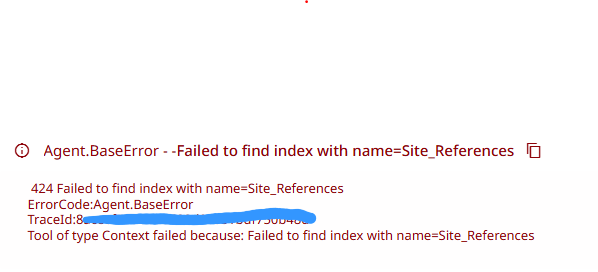
Thanks

Hi @Pranav_Labhe2

Sure. Let me help.

I need some more info, Could you share the screenshots of the steps you’ve done till now?
I’ll understand better what might have gone wrong.

Hi @V_Roboto_V ,

Following are the steps Which I’m performing -

  1. Created an Index in Orchestrator in a parent folder under which the agent folder will get created.
  1. Added the created index in the Agent which can use for context grounding.
  1. Tested the Agent on cloud and run went successful.
  1. Once tested successfully, publish the agent on Orchestrator Tenant.
  1. Once published successfully, deploy the agent package.
  1. Once clicked on Deploy Package a dialog box appear for selecting the folder and after selection clicked on “Review”
  1. Once “Review” is clicked, there open a new page with an option of “Validate” deployment. Once I clicked Validate “Index” conflict appears.

o resolve conflict by “use existing” index from tenant and once clicked that, conflict gets resolve and no further validation issue.