Hi,
I have 2 excel file (Old, New). Old file have Name, Address, PhoneNumber New file have Name, Address. Now i want delete old file column Name and Address then add New file Name address.
Regards
Hi,
I have 2 excel file (Old, New). Old file have Name, Address, PhoneNumber New file have Name, Address. Now i want delete old file column Name and Address then add New file Name address.
Regards
Assign activity: oldDataTable = (From rowOld In oldDataTable.AsEnumerable()
                                Join rowNew In newDataTable.AsEnumerable()
                                On rowOld("Name").ToString() Equals rowNew("Name").ToString() And rowOld("Address").ToString() Equals rowNew("Address").ToString()
                                Select oldDataTable.Clone().Rows.Add(rowNew("Name"), rowNew("Address"), rowNew("Department"))).CopyToDataTable()
Hi @MD_Farhan1
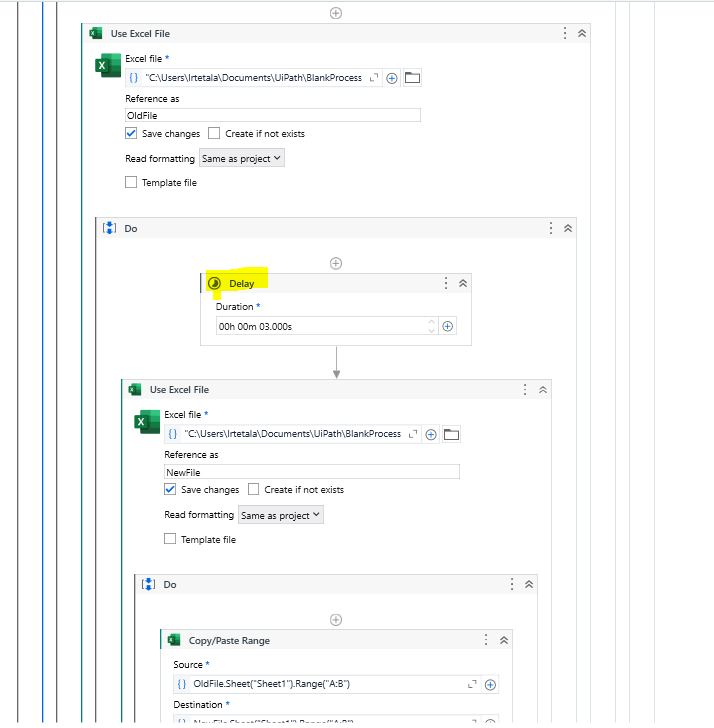
Use copy paste range activity
This is to copy toin the same excel with 2 sheets
If you have 2 excel files then use 2 use excels and reference as Excel and Excel1 as below
Hope it helps!!
i have so many columns . without mention column name is possible?
You Have to mention column names
In Excel Process Scope activity Properties Mark Show Excel Window as False
or try to set a delay of 3 seconds between two activities.
You can try it once too. 
Hi @MD_Farhan1
Can you try the below linq query:
dtOld = (From rowOld In dtOld.AsEnumerable()
            Join rowNew In dtNew.AsEnumerable()
            On rowOld("Name").ToString() Equals rowNew("Name").ToString() And rowOld("Address").ToString() Equals rowNew("Address").ToString()
            Select dtOld.Clone().Rows.Add({rowNew("Name"), rowNew("Address"), rowNew("Department")})).CopyToDataTable()
Regards
give me full steps please.
this method also take more time to execute…
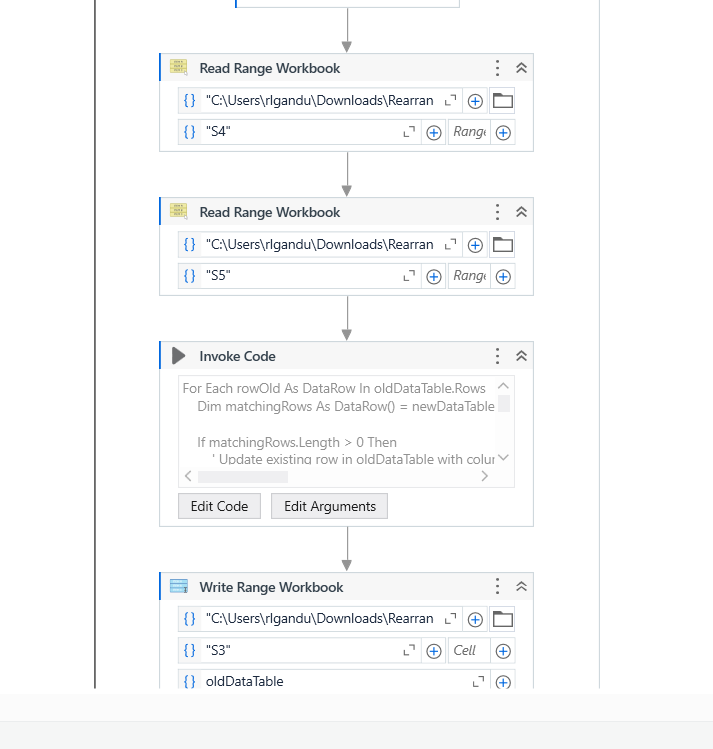
→ Read Range both the excels.
Old Excel File-> Output-> dtOld
New Excel File-> Output-> dtNew
Use the given query:
dtOld = (From rowOld In dtOld.AsEnumerable()
            Join rowNew In dtNew.AsEnumerable()
            On rowOld("Name").ToString() Equals rowNew("Name").ToString() And rowOld("Address").ToString() Equals rowNew("Address").ToString()
            Select dtNew.Clone().Rows.Add({rowNew("Name"), rowNew("Address"), rowNew("Department")})).CopyToDataTable()
Write Range dtOld to new excel.
Regards
For Each rowOld As DataRow In oldDataTable.Rows
    Dim matchingRows As DataRow() = newDataTable.Select("Name = '" & rowOld("Name").ToString() & "' AND Address = '" & rowOld("Address").ToString() & "'")

    If matchingRows.Length > 0 Then
        ' Update existing row in oldDataTable with columns from matching row in newDataTable
        For Each column As DataColumn In newDataTable.Columns
            If Not oldDataTable.Columns.Contains(column.ColumnName) Then
                oldDataTable.Columns.Add(New DataColumn(column.ColumnName, column.DataType))
            End If

            rowOld(column.ColumnName) = matchingRows(0)(column.ColumnName)
        Next
    End If
Next
Input 1

Input2

Output
In this you don’t need to mention the column names
Hope it helps
i got error :Cannot assign from type ‘System.Object’ to type ‘System.Data.DataTable’ in Assign activity ‘Assign’.
Hi @MD_Farhan1
Delete the assign activity and reassign the query and there is a small correction. Please use the below code:
dtOld= (From rowOld In dtOld.AsEnumerable()
            Join rowNew In dtNew.AsEnumerable()
            On rowOld("Name").ToString() Equals rowNew("Name").ToString() And rowOld("Address").ToString() Equals rowNew("Address").ToString()
            Select dtNew.Clone().Rows.Add({rowNew("Name"), rowNew("Address"), rowNew("Department")})).CopyToDataTable()
Regards
but you mention column name right.
Dim matchingRows As DataRow() = newDataTable.Select(“Name = '” & rowOld(“Name”).ToString() & “’ AND Address = '” & rowOld(“Address”).ToString() & “'”)