Hello,
I have a sequence of activities that loads CSV files into SQL.
Can someone help me remove Blanks from the CSV header row inside a For Each loop? I’m looping through each Item inside an Array of files. I believe it would need to be placed after the Read CSV activity.
Any help would be greatly appreciated.
Thanks,
Tim
ppr
October 23, 2023, 2:02pm
2
After the read CSV File Activity we can do
For each Activity | col in YourDataTableVar.Columns | TypeArgument: DataColumn
Assign Activity: col.ColumnName = col.ColumnName.Replace(" ","")
Maybe you can share some more details with us, as more a trimming is needed
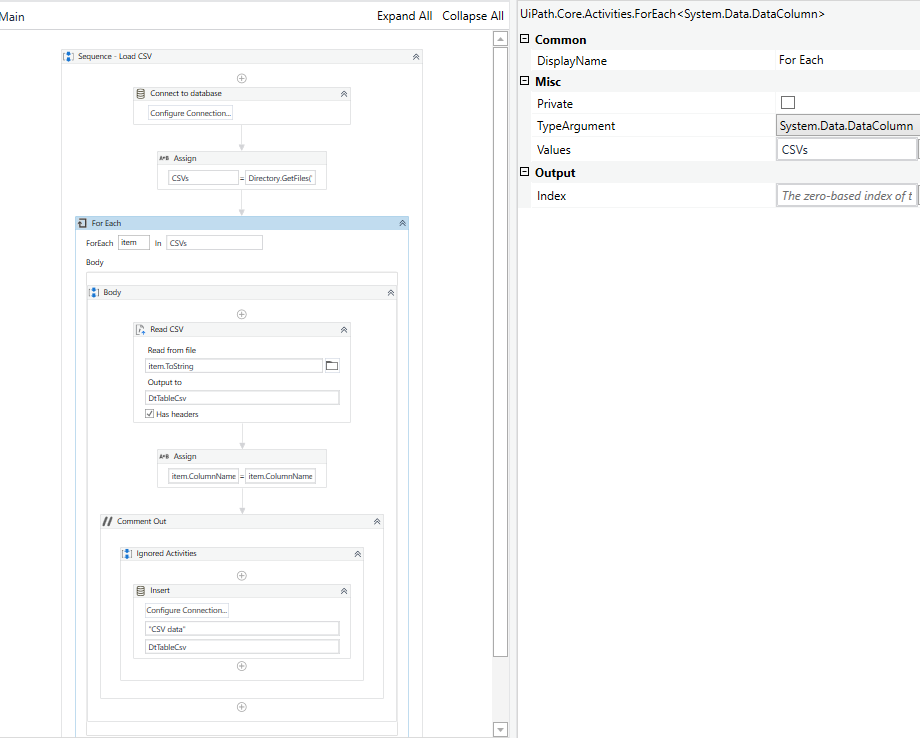
here is visual of the sequence
ppr
October 23, 2023, 2:18pm
4
Just place the above mentioned modelling between ReadCSV and Inset
All Spaces within the ColumnNames will be replaced by an empty string
BTW: we suggest to avoid VariableNames which are equal to Keywords / .Net Classes…
So instead of files just use a more different Variable Name e.g. myFiles, arrFilePaths…
I don’t see .ColumnName available. Should this be the actual column in my csv file?
ppr
October 23, 2023, 2:27pm
6
Ensure that the For Each Activity (when it is offered) option TypeArgument is set to DataColumn
A DataTable has Columns and a Column has a property ColumnName reflecting the Name of the Column
is col a variable? it wont let me set it
Actually I think I figured it out. I had the variable typed wrong from Read CSV