I have an excel file with 343564 rows and 113 columns i.e. A1:DI343564 full range. I want to read it in chunks of 50000 i.e. as below:
1st Iteration: A1:DI50000
How to achieve this?
vrdabberu
July 6, 2024, 11:33am
2
Hi @Rohit_Nandwani
=> Read Range Workbook
=> Use the below condition in Assign:
List_Dt = dt.AsEnumerable.Chunk(50000).Select(Function(a) a.CopyToDataTable).ToList
List_Dt is of DataType System.Collections.Generic.List(System.Data.DataTable)
=> You can use For Each loop to iterate through List_Dt and continue with further process
Regards
I have to read it in chunks not split it in chunks after reading it as whole
Hi @Rohit_Nandwani ,
Add Variables :
chunkSize (Int32) = 50000totalRows (Int32) = 343564dataTableChunk (DataTable)ranges (List of Anonymous Type)
Generate Ranges Using Assign Activity :
Use an “Assign” activity to generate the ranges:
ranges = Enumerable.Range(0, (int)Math.Ceiling((double)totalRows / chunkSize))
                   .Select(i => new { StartRow = i * chunkSize + 1, EndRow = Math.Min((i + 1) * chunkSize, totalRows) })
                   .ToList()
Loop Through Ranges and Read Chunks :
Use a “For Each” activity to loop through ranges.
For Each range In ranges
    Excel Application Scope
        WorkbookPath = "path\to\your\file.xlsx"
        ' Define the Read Range activity
        Read Range
            Range = String.Format("A{0}:DI{1}", range.StartRow, range.EndRow)
            Output: dataTableChunk
        ' Process the chunk data in dataTableChunk
Next
Regards
rlgandu
July 6, 2024, 11:46am
5
@Rohit_Nandwani
Variables:
- startRow (Int32) = 1
- endRow (Int32) = 50000
- chunkSize (Int32) = 50000
- totalRows (Int32) = 343564
- excelFilePath (String) = "path_to_your_excel_file.xlsx"

Excel Application Scope (Input: excelFilePath)
  While startRow <= totalRows
    Assign rangeAddress = "A" + startRow.ToString + ":DI" + Math.Min(endRow, totalRows).ToString
    Read Range (Range: rangeAddress, Output: DataTable dt)
    // Process DataTable dt as needed
    Assign startRow = endRow + 1
    Assign endRow = endRow + chunkSize
Hope this works for you
vrdabberu
July 6, 2024, 11:53am
6
Hi @Rohit_Nandwani
Try this:
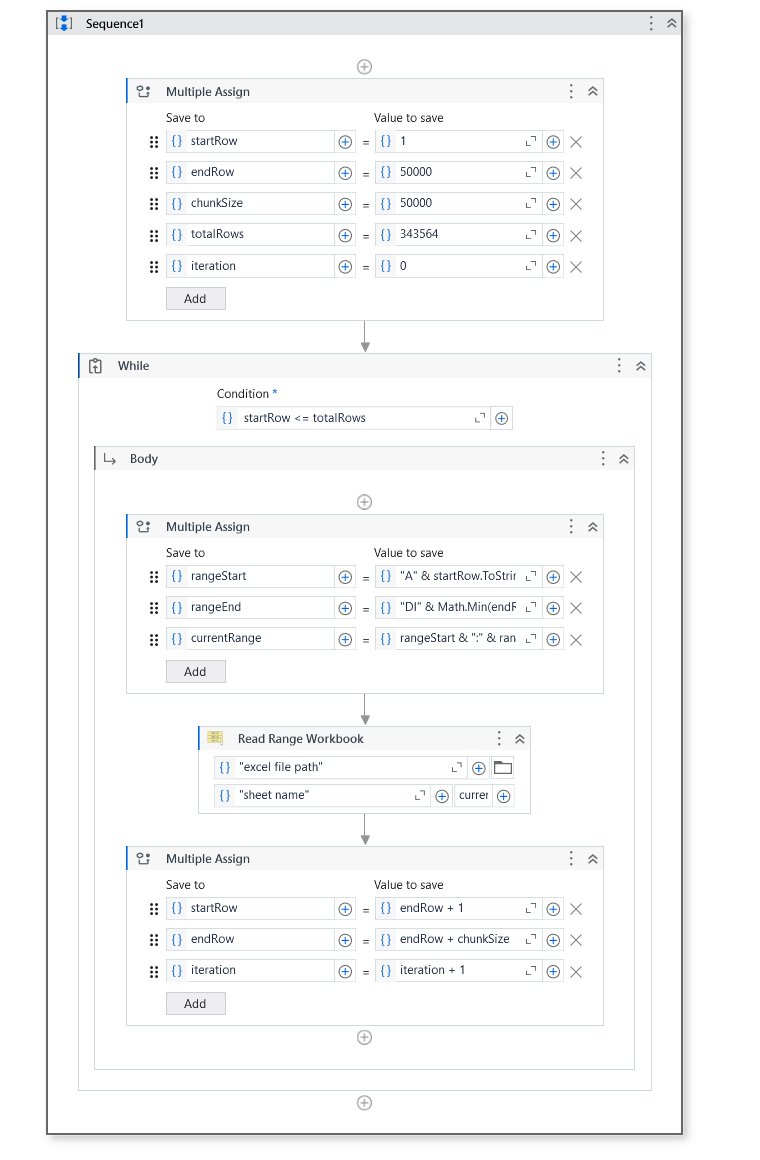
startRow = 1
endRow = 50000
chunkSize = 50000
totalRows = 343564
iteration = 0

While startRow <= totalRows
    rangeStart = "A" & startRow.ToString()
    rangeEnd = "DI" & Math.Min(endRow, totalRows).ToString()
    currentRange = rangeStart & ":" & rangeEnd

   => Read Range Workbook

    ' Update startRow and endRow for the next iteration
    startRow = endRow + 1
    endRow = endRow + chunkSize
    iteration = iteration + 1
End While
Regards
vrdabberu
July 6, 2024, 12:00pm
7
Hi @Rohit_Nandwani
You flow will look like this:
WORKFLOW: Sequence1.xaml (14.5 KB)
VARIABLE DATATYPES:
Regards
Thanks for the solution @rlgandu
1 Like
system
July 9, 2024, 2:06pm
9
This topic was automatically closed 3 days after the last reply. New replies are no longer allowed.