Hello,
I call an API every 4 hours that returns me an update of some data by project.
I need to put the new values bellow the existing ones in an Excel file (append).
Here is an example of the API output:
example-json-data.json (517 Octets)
example-json-data
{
    "extrapolationLevel": 1,
    "columnNames": [
      "Project",
      "Satisfied",
      "Tolerating",
      "Frustrated"
    ],
    "values": [
      [
        "Project name 1",
        1722,
        1735,
        0
      ],
      [
        "Project name 2",
        8929,
        1827,
        10
      ],
      [
        "Project name 3",
        5243,
        229,
        7
      ],
      [
        "Project name 4",
        1625,
        2025,
        18
      ]
    ]
  }
I use StudioX 2023.10.7
I get my data from the API and I’m able to put the value node in a JSON Array:


From there, I convert my JSON array to a DataTable with the following expression:

The result of the dataTableValues.RowCount is 12 (I don’t know why 12 and not 16 as I have 4 group of 4 values in the array “values”…)
I also tried the expression JSonArrayValues.ToObject(Of DataTable)() with the same following result.
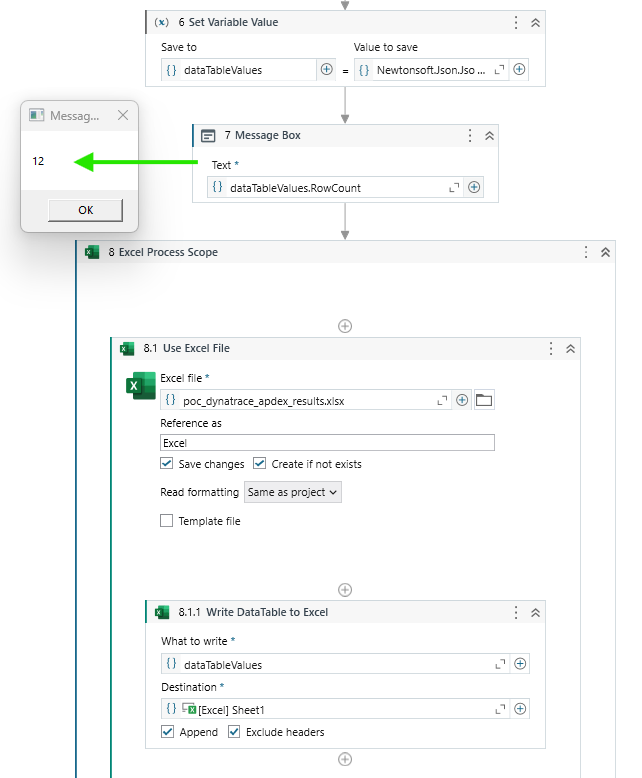
The next step is to open an Excel file and write the datatable to a sheet in an Append mode.
The problem is that the Excel file isn’t completed at all and beside my headers, the cells remains empty.

The variables I use and that can be seen in the screenshots are:
dataTableValues:Data Type = System.Data.DataTable,Default Value = new DataTable()JSonArrayValues:Data Type = Newtonsoft.Json.Linq.JArray, no default value
The process doesn’t look complicated but I’m surely missing a step to set the DataTable correctly so it reflects in the Excel file  .
.
Thank you
