Hey there!
I have been facing the same challenge and found the solution. It is possible to connect to the existing terminal session (I mean the session, which has been manually started before the automation job) via IBM EHLL API.
To do that, you require the following info:
- Path to the EHLL library file. Usually it goes with your terminal app.
- The existing session name. Usually it is “A” (if you have only one session open on your machine). Here you can find where to double check/configure it in BlueZone (make sure the multiple connection checkbox is checked):

To connect to the existing session, you should provide the following info in the Terminal Session activity. If you face some issues with accessing treminal screen buffer (f.e. when using Get Text or Move Cursor activities), make sure that “EHLL enhanced” option is disabled and “Basic mode” is enabled. This should solve the problem.
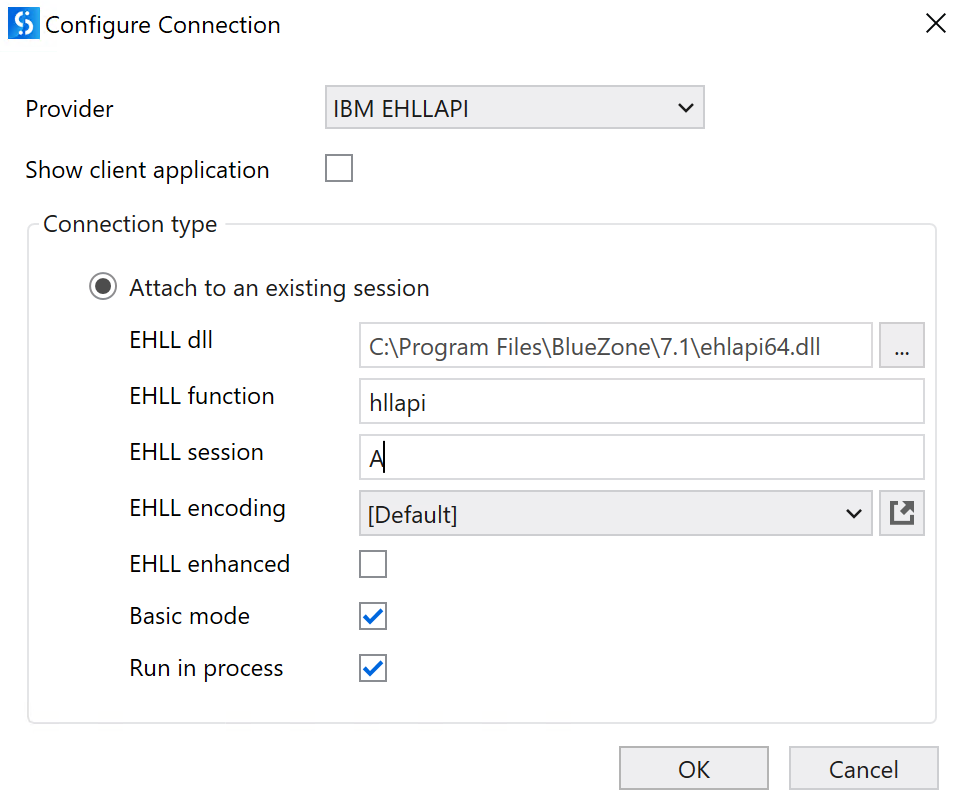
After that you are able to get the output connection variable and use it in your project. However, please remember that it will always be Null (Nothing) if you forget to put some activities in the Terminal Session container.

That’s how you can interact with pre-open terminal session in your automation. I am using Rocket BlueZone, but this should work for other apps too, because everything is based on the EHLL API.