[Update] WebAPI 2.5.0-preview
Two big themes this release: coded workflows and AI-aided diagnostics. Plus a localization bonus.
Chapter 1 — Coded workflows, meet WebAPI
The WebAPI package is now a first-class citizen in coded workflows. No more bouncing between low-code XAML and HttpClient boilerplate when you want to script an integration in C# — the same activities you know from the designer are reachable as service accessors:
http— fire HTTP requests with the full set of options you’d configure on the HTTP Request activity (headers, query params, body, auth, timeouts, decompression, proxy, certificates…).soap— call SOAP endpoints and bind to WSDL operations without hand-rolling envelopes.curl— import and execute cURL commands directly from code, reusing the same parser the activity uses.
A quick taste:
// Simple GET — returns an HttpResponseSummary
var response = await http.GetAsync("https://api.example.com/orders/42");

if (response.IsSuccessStatusCode())
{
    string body = response.TextContent;
    // ... deserialize with your JSON library of choice
}
// Import a cURL command, then send it via the same HTTP pipeline
var import = curl.Import(
    "curl -X POST https://api.example.com/login " +
    "-H 'Content-Type: application/json' " +
    "-d '{\"user\":\"a\",\"pwd\":\"b\"}'");

var response = await http.SendRequestAsync(import.Options);
// SOAP — WSDL resolution, envelope construction and version negotiation are handled for you
var response = await soap.CallAsync(new SoapRequestOptions
{
    EndPoint     = "http://www.dneonline.com/calculator.asmx?WSDL",
    ContractName = "CalculatorSoap",
    Method       = "Add",
    Parameters   = new Dictionary<string, object>
    {
        ["intA"] = 2,
        ["intB"] = 3,
    },
});
Same request pipeline, same response model, same diagnostics — just expressed in code. You can mix designer-built automations and coded workflows in the same project and still talk to your APIs the exact same way.
Chapter 2 — Coding-agent-friendly guidance, baked into the package
Coding agents are only as good as the context they have. v2.5.0 ships that context inside the package: structured, machine-readable guidance for the HTTP Request activity, delivered through the coded documentation.
What that means in practice:
- The package now carries first-party guidance describing how the HTTP Request activity behaves, the common failure modes (TLS handshake, redirects, auth, decompression, proxies, timeouts…), and the recommended remediations for each.
- Any coding agent — Claude Code, OpenAI Codex, Cursor, Gemini CLI, GitHub Copilot, Autopilot, or your own — can read this guidance straight from the package when inspecting a failing run. No guessing, no out-of-date blog posts.
- You get contextual, activity-specific suggestions instead of generic “did you check your network?” answers: e.g. “this 415 is most likely because the body is form-encoded but the Content-Type header was set manually to application/json — let the activity infer it or align the two.”
In short: the activity now ships with the knowledge needed to help fix it, and the coding agent on your shoulder can consume that knowledge automatically.
And one more thing —  Romanian localization
The WebAPI activity package now supports Romanian, joining the existing localized experiences. Colleagues building automations in Romanian get a fully translated activity UI.
[Update] WebAPI 2.4.0
Official release notes:
A small but useful round of improvements for the HTTP Request activity:
- Smarter cURL import. The importer now understands more flags, so pasting a real-world
curlcommand from a tutorial or API doc is more likely to “just work” end-to-end. - Bash vs CMD auto-detection. No more guessing which shell the command came from — the importer figures it out and parses quoting/escaping accordingly.
- System proxy support. The activity now honors the machine’s system proxy, so corporate networks with a configured proxy work out of the box.
- Automatic response decompression (bug fix).
gzip/deflate/brresponses are now decoded automatically, so you read the actual payload instead of a compressed blob.
[Update] WebAPI 2.3.2 GA
Official release notes:
It is stable, powerful and now also offers a debugging mode which makes the activity output extra information when testing the request:

See it in action below, where our debug output and Studio Autopilot do all the work for you:

(start the video at 7:30)
[Update] WebAPI 2.2.0-preview
Hi everyone, we released the WebAPI 2.2.0-preview as a follow-up to the original preview:
It introduces two huge improvements: design-time testing and cURL import features.
You can read more about it here:
It is really cool 
[Update] WebAPI 2.1.0-preview
To follow-up on the original preview, we are following it up with a new one.
Learn more about it here:
Introduction
We are pleased to announce the release of the new Http Request activity, included in the WebAPI 2.0.0-preview package.
You can already try it out by:
- updating to the WebAPI 2.0.0-preview package version
- on our Cloud Community
This activity replaces the legacy version (the old activity was renamed to Http Request (legacy)) and delivers a more robust, highly configurable solution designed to meet the demands of modern HTTP workflows.
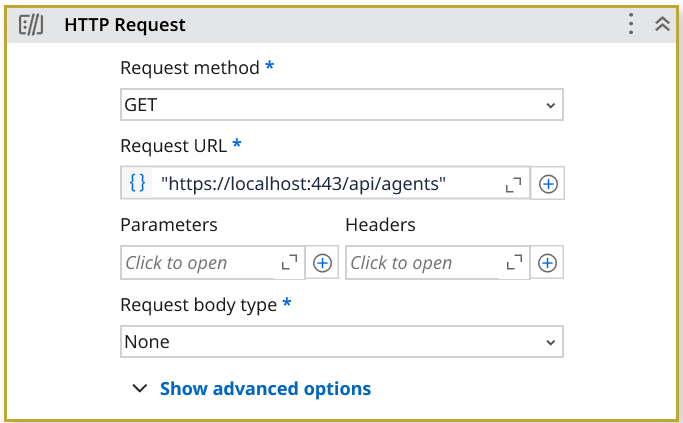
Built on top of the state-of-the-art .NET HttpClient, this updated activity provides a solid foundation for everything from simple API calls to complex integrations involving authentication, retries, cookie handling, streaming, and more.
Highlights at a Glance
- Full retry policy support – customizable retry count, delays, backoff, jitter and specific status codes
- SSL and client certificate support
- Automatic cookie handling with with the possibility to manually add more
- Redirect support with configurable limits
- Full proxy support – configure custom proxies, including support for authentication and bypass lists
- Flexible request body formats – JSON, form-encoded, multipart (including file uploads), binary and stream
- Built-in fault tolerance – optional Continue on Error lets workflows recover gracefully
Note 1: The activity will offer the best experience on the latest Studio version, with data mapping widget support used on several properties. Older Studio versions will fall back to the expression editor.
Full Proxy Configuration Support
The new Http Request activity introduces full proxy configuration through the WebProxyConfiguration class. This enables users to define proxy address, bypass rules, and credentials with fine-grained control. It integrates seamlessly with the Data Mapping widget, ensuring a smooth and user-friendly experience when configuring values dynamically at runtime.

If the Data Mapping widget is not available, the expression editor can be used, following these examples:
C#:
new WebProxyConfiguration
{
    Address = new Uri("http://localhost:8080"),
    ProxyCredentials = new System.Net.NetworkCredential("alexandru.marinescu@uipath", orchSecurePass),
    BypassOnLocal = true,
    BypassList = new string[]
    {
        "http://first.bypass.list.com",
        "http://second.bypass.list.com"
    }
}
VB:
New WebProxyConfiguration() With {
	.Address = New Uri("http://localhost:8080"),
	.ProxyCredentials = New System.Net.NetworkCredential("alexandru.marinescu@uipath", orchSecurePass),
	.BypassOnLocal = True,
	.BypassList = New String() {"http://first.bypass.list.com", "http://second.bypass.list.com"}
}
A Closer Look at Multipart Form Data
When sending multipart form data, the HTTP Request activity gives you complete control over how each part of the request body is built—whether you’re uploading files, submitting form values, or mixing different content types

You can configure any of the options you require at the same time, and we’ll automatically bundle everything into a single multipart request for you.
You can add:
- Files: Either Local files (file path strings) or Resource files, via the two provided collections.
- Url-encoded Form data: Basic key-value pairs encoded using application/x-www-form-urlencoded format.
- Form data parts: For full flexibility, you can also compose a collection of
FormDataPartobjects, using either the Data Mapping widget or the Expression editor
FileFormDataPart– for file streams based on a given pathBinaryFormDataPart– for raw byte arraysTextFormDataPart– for string payloads like JSON or plain text, with customizable encoding and MIME type

Note: The automatically inserted options serve as examples and will not be computed for the request until further configuration. You can configure them based on the content type of each attachment:

By combining these parts, you can construct a precise and compliant HttpRequestMessage body for any API that requires multipart/form-data. The multipart boundary delimiter is automatically generated and correctly inserted into the Content-Type header—no manual configuration needed. Whether you’re sending a complex form or handling file uploads with metadata, this model ensures you’re covered.
Here’s how you might combine all three in a single multipart form-data request, if the Data Mapping widget is not available:
C#:
New List<FormDataPart>()
{
    New TextFormDataPart("{\"jsonKey\":\"jsonValue\"}", "textPart", "application/json", System.Text.Encoding.UTF8),
    New BinaryFormDataPart(System.Text.Encoding.UTF8.GetBytes("binaryContent"), "binaryPart", "application/octet-stream"),
    New FileFormDataPart("C:/Work/tmp-453.txt", "filePart", "text/plain", "testfile.txt")
};
VB:
New List(Of FormDataPart) From {
	New TextFormDataPart("{""jsonKey"":""jsonValue""}", "textPart", "application/json", System.Text.Encoding.UTF8),
	New BinaryFormDataPart(System.Text.Encoding.UTF8.GetBytes("binaryContent"), "binaryPart", "application/octet-stream"),
	New FileFormDataPart("C:/Work/tmp-453.txt", "filePart", "text/plain","testfile.txt")
}
Each type of FormDataPart comes with several constructors, allowing the user to benefit from commonly used defaults. Each default is mentioned in the IntelliSense context menu like so:

Understanding FileTypeMapper
The FileTypeMapper is a behind-the-scenes utility designed to streamline how Content-Type headers are assigned when uploading files in HTTP requests. As its name suggests, it maps file extensions to their appropriate MIME types — exactly as advertised.
What It Does
Whenever a file is added to an HTTP request, FileTypeMapper steps in to determine the correct Content-Type header based on the file extension. This happens in two primary scenarios:
-
Stream Body Type
When the request is configured to send a Stream body (e.g. uploading a single file), theFileTypeMapperautomatically assigns the correctContent-Typeheader. You can override this header manually if needed.
Note: if a Resource file is provided instead, and its MIME Type is configured, we will use that value before inferring with the FileTypeMapper. -
MultipartFormData Body Type
When using multipart form data,FileTypeMapperwill:
- Assign a
Content-Typeheader for each file added viaFileFormDataPartor via lists of local/resource files. - For
FileFormDataPart, users can explicitly override the default content type. - For file lists, the automatically assigned content type cannot be overridden.
- For resource file lists, the MIME Type will be used, if available.
How It Works
Under the hood, FileTypeMapper uses a predefined dictionary of file extensions mapped to their MIME types. It covers most common types — including images, documents, audio/video files, archives, and common web content like .json, .xml, .html, and more. If a file extension is unknown or missing, it safely defaults to “application/octet-stream”
Long story short - you will rarely have to configure your Content-Type yourself, it should mostly happen automatically
Retry Policies
We have added support for two customizable retry strategies to help manage transient failures in HTTP-based workflows:
Basic Retry
This is a straightforward policy where users can configure:
- Retry Count – how many times to retry the request
- Delay – fixed delay between retries (in milliseconds)

Exponential Backoff
For more advanced scenarios, this strategy offers:
- Retry Count – number of attempts
- Initial Delay – wait time before first retry
- Multiplier – controls exponential growth of delay
- Jitter – optional randomization to avoid overloading

Common Features (Both Policies)
- Retry-After Header Support: If the response contains a
Retry-Afterheader, you can choose to honor it. To maintain control, a maximum delay cap can be set to avoid excessively long waits from server instructions. - Retry Conditions:
- Automatically retries on
HttpRequestException– this covers most network-related issues, such as timeouts, unreachable servers, or broken connections. - Retries on specific HTTP status codes (customizable). The default set includes:
408 Request Timeout429 Too Many Requests500 Internal Server Error502 Bad Gateway503 Service Unavailable504 Gateway Timeout
- Automatically retries on
These policies aim to offer both simplicity and flexibility depending on your use case.
Result Output
The new HTTP Request activity now returns a structured result that captures key details from the server’s response. It includes:
StatusCode– the HTTP status code returned by the serverTextContent– the response body as a string, if availableBinaryContent– raw response bytes, for handling non-text contentFile– anILocalResourcerepresenting the response as a local file, if applicable- Saves the content to the user’s Downloads folder.
- The filename is first extracted from the response headers; if missing or invalid, a unique name is generated in such a way to avoid overwriting existing files.
Headers– all response headers, including those related to caching, authentication, and moreContentHeaders– headers specifically related to the body content (e.g.,Content-Type,Content-Length)

The use of ILocalResource provides seamless access to file-based responses. Whether you’re downloading a PDF, an image, or a CSV, this abstraction lets you handle the result as a locally accessible file—ready for downstream processing or inspection.
Cookies
We implemented a shared cookie container that will seemingly pass cookies between the HTTP Requests that have the Enable cookies property set to True:

Such requests will now automatically interpret the Set-Cookie header of each request, and properly attach them to the requests respecting all domain restrictions.
You can also add additional cookies to your requests via the Additional cookies property:

Variable input is available on (almost) all properties
Nearly all properties can now be configured dynamically by passing a variable, instead of forcing a static, design-time configuration.
Built for Peace of Mind
Between the sensible default values the activity initializes with, the flexibility of the retry mechanisms, the convenience of automatic redirects, and the resilience offered by the Continue on Error option, we’ve built an HTTP activity designed to be reliable, forgiving, and easy to work with—whether you’re just starting out or deploying at scale. It just works. No surprises, no headaches.
Migration Notes
There is no action needed for existing workflows.
The old activity has simply been renamed to HTTP Request (legacy) when you’ll search for it. The new activity is what you’ll now find under the HTTP Request activity name. We recommend switching to the new one for all future development.
Learn More
We encourage you to explore the full capabilities of the new Http Request activity in our upcoming official documentation page. There, you’ll find detailed explanations, property breakdowns, examples, and best practices to help you make the most out of every feature.
Feedback?
We’d love to hear how this new version works for you. Questions? Feature suggestions? Let’s discuss below.


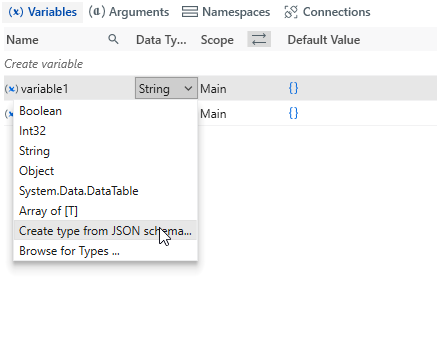


 Goal
Goal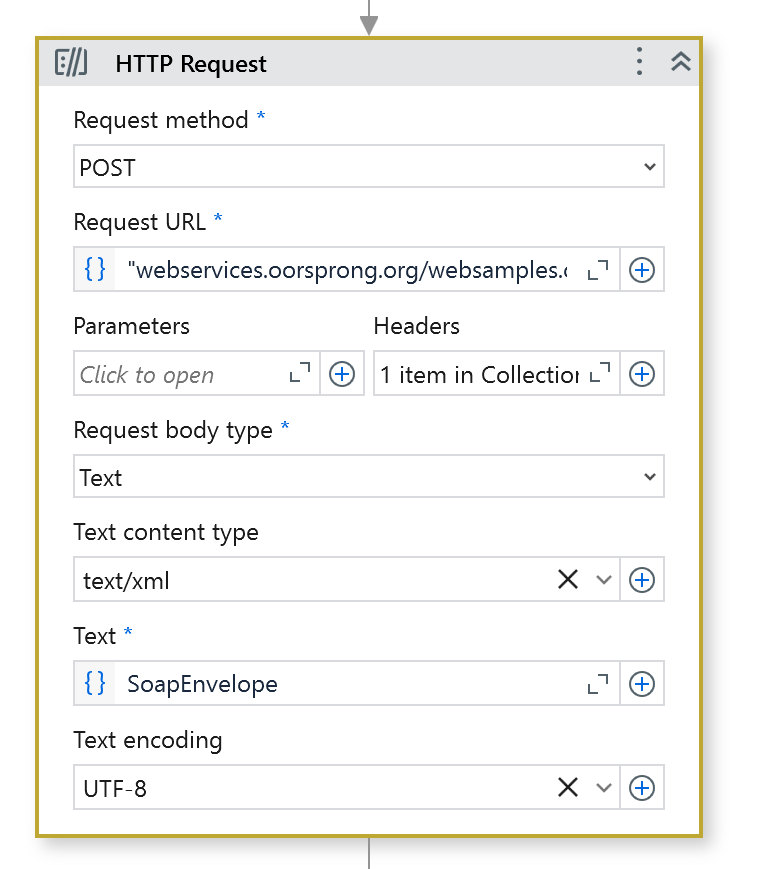
 Response Example