// datatable1
		DataTable dt1 = new DataTable();
		dt1.Columns.Add("name", typeof(string));
		dt1.Columns.Add("age", typeof(int));
		dt1.Columns.Add("mother", typeof(string));
		dt1.Columns.Add("father", typeof(string));

		dt1.Rows.Add("xyz", 14, "dkjv", "vdfvdf");
		dt1.Rows.Add("abc", 16, "dfvfd", "vfvfd");
		dt1.Rows.Add("mno", 19, "vdfv", "sas");
		dt1.Rows.Add("pqr", 20, "vdfv", "vfr");

		// datatable2
		DataTable dt2 = new DataTable();
		dt2.Columns.Add("name", typeof(string));
		dt2.Columns.Add("age", typeof(int));
		dt2.Columns.Add("gender", typeof(string));
		dt2.Columns.Add("address", typeof(string));

		dt2.Rows.Add("xyz", 14, "male", "texas");
		dt2.Rows.Add("gdf", 16, "female", "chicago");
		dt2.Rows.Add("igerf", 18, "male", "new york");
		dt2.Rows.Add("ffrht", 17, "male", "ontario");
		dt2.Rows.Add("pqr", 20, "female", "mexico");
		dt2.Rows.Add("vff", 22, "male", "argentina");
		dt2.Rows.Add("xyZ", 15, "female", "africa");


		// join
		/*	Query Syntax
		var query = from t1 in dt1.AsEnumerable()
					join t2 in dt2.AsEnumerable()
					on new { name = t1.Field<string>("name").ToLower(), age = t1.Field<int>("age") }
					equals new { name = t2.Field<string>("name").ToLower(), age = t2.Field<int>("age") }
					select new
					{
						name = t1.Field<string>("name"),
						age = t1.Field<int>("age"),
						mother = t1.Field<string>("mother"),
						father = t1.Field<string>("father"),
						address = t2.Field<string>("address")
					};
		*/
		// Method Syntax
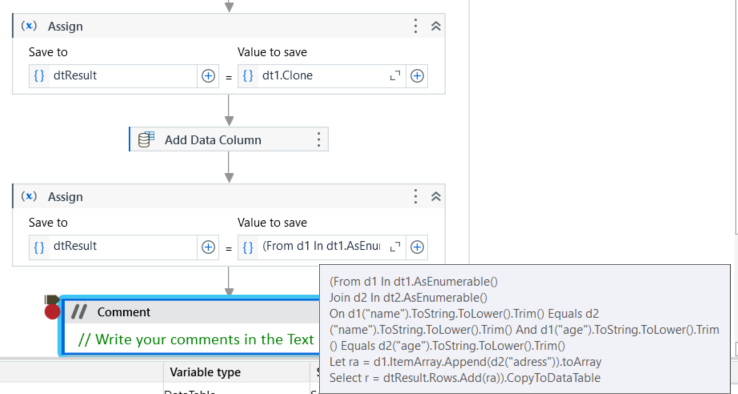
		var query = dt1.AsEnumerable()
			.Join(dt2.AsEnumerable(),
				t1 => new { name = t1.Field<string>("name").ToLower(), age = t1.Field<int>("age") },
				t2 => new { name = t2.Field<string>("name").ToLower(), age = t2.Field<int>("age") },
				(t1, t2) => new
				{
					name = t1.Field<string>("name"),
					age = t1.Field<int>("age"),
					mother = t1.Field<string>("mother"),
					father = t1.Field<string>("father"),
					address = t2.Field<string>("address")
				});
		// Result DataTable
		DataTable result = new DataTable();
		result.Columns.Add("name");
		result.Columns.Add("age", typeof(int));
		result.Columns.Add("mother");
		result.Columns.Add("father");
		result.Columns.Add("address");

		foreach (var row in query)
		{
			result.Rows.Add(row.name, row.age, row.mother, row.father, row.address);
		}

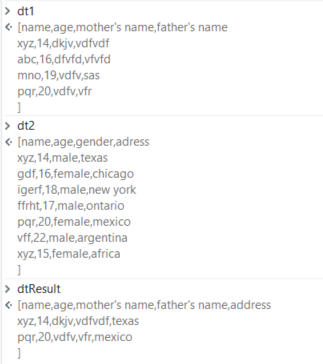
		// print result
		foreach (DataRow r in result.Rows)
		{
			Console.WriteLine($"{r["name"]} | {r["age"]} | {r["mother"]} | {r["father"]} | {r["address"]}");
		}
		//If use Linqpad, you can output result like this:
		/*
		dt1.DumpTell();
		dt2.DumpTell();
		result.DumpTell();
		*/


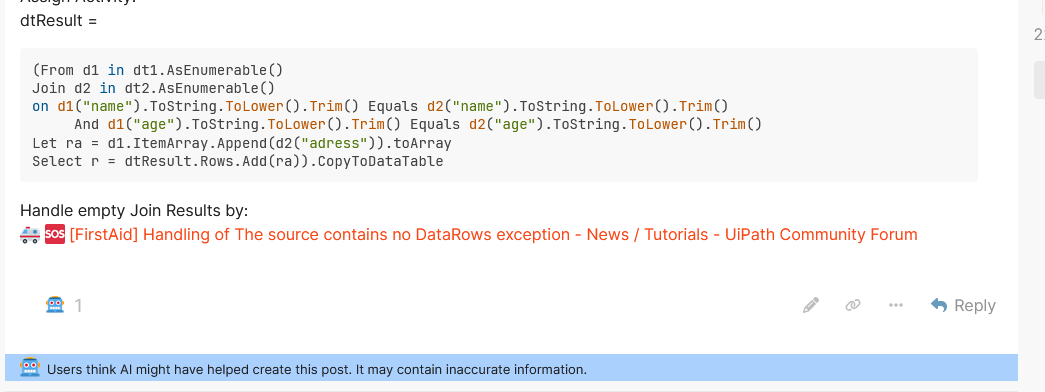
 [FirstAid] Handling of The source contains no DataRows exception - News / Tutorials - UiPath Community Forum