Integration Service: API Usage View
How to monitor and understand your API Usage
Questions? Please reach out to @Charlie_Greenberg
Integration Service API Usage View enables customers to monitor, assess, and make informed decisions about controlling their API usage. The API usage View enables users to consistently manage their available licensed API allocation. It also allows them to proactively control and choose the API bundle licensing that best fits their needs.
Benefits of managing your API usage:
Informed licensing choices: easy access to API usage data enables you to choose the necessary licensing bundles that align your resources with actual needs.
Usage monitoring: consistent tracking of usage patterns allows you to take control of your API consumption.
Proactive management: take advantage of available, proactive actions to manage and control your usage, when necessary, as well as making strategic licensing decisions.
Discovering and understanding your organization’s API Licenses and bundles
UiPath provides significant flexibility for licensing and bundling API calls. In other words, we do not offer a one-size-fits-all approach.
Take these steps to view your organization-wide license distribution:
Log into Automation Cloud and go to Admin > Your Organization > Licenses.
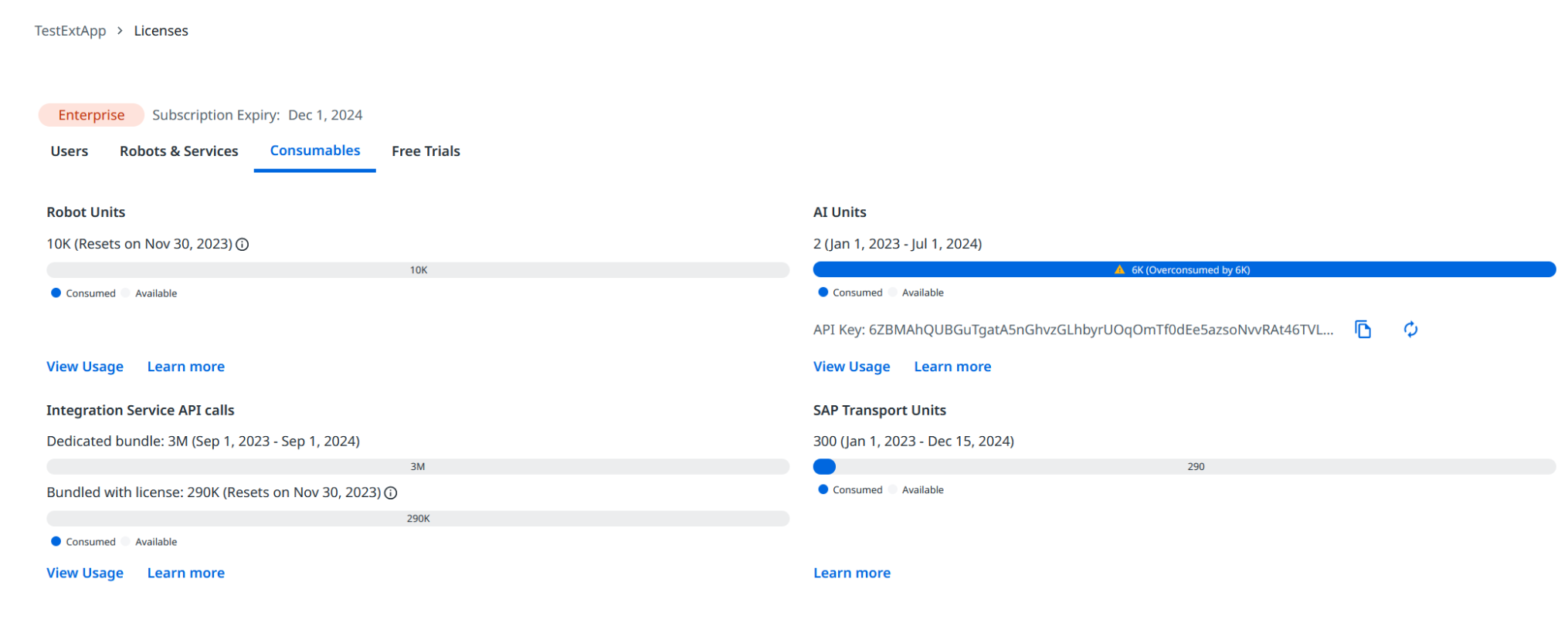
This Licenses page displays the number of all purchased licenses in your organization. You can also switch to the Consumables tabs to view license information for API Calls directly generated through Integration Services.
Discovering License types:
To view license types, hover over the progress bar. Now you’ll see the number of allocated Integration Service API licenses Services as part of the total number of purchased licenses in your organization.
License bundles defined:
- Dedicated Bundle: Represents the Platform SKU your organization has licensed. Your allocated API Calls are contained within one of the below Platform Individual SKUs:
UiPath - Flex - Integration Service API Calls Bundle - 3M (3,000,000)
UiPath - Flex - Integration Service API Calls Bundle - 6M (6,000,000)
- Bundled with license: Represents the API calls bundled with the User, Bot and Automation Express licenses your organization has licensed.
Please note API calls allocated on this plan expire by the end of every month and reset on the 1st date of the next month.
Enterprise license : along with API Calls allocated for User and Bot, this pool includes the additional 100K API calls allocated from the Automation Express license.
Pro and ProTrial licenses : along with API Calls allocated for User and Bot, this pool includes the additional 25K API calls allocated from the Automation Express license.
Free license : The pool includes the 0-25K API calls allocated from the Automation Express license.
How API Usage is Calculated and Displayed
One API Call counts as ‘consumed’ when one call is made to the external third-party application via UiPath Integration Services. Consumption is calculated by the number of times a call is made to the third-party applications, irrespective of how a call is initiated (manually, attended, unattended).
For Organizations that have API allocation from Dedicated Bundle and Bundle with license, the consumption of API calls is first done from the monthly pool of Bundle with license before using the Dedicated Bundle pool.
Example General Distributors—a customer with10 User Tier licenses (UiPath - Flex - Automation Developer - Named User) and 1 Robot Tier license (UiPath - Flex - Unattended Robot) – has licensed a total of (10 * 5000 + 10 * 5000) 100000 API calls per month.
General Distributors also has the Platform Individual SKU (UiPath - Flex - Integration Service API Calls Bundle - 3M), which provides users an additional 3,000,000 API calls per year.
Let’s say that for Oct 2023, the total number of API calls consumed by General Distributors is 125,000. Meaning the organization first consumes all the 100,000 API Calls from their monthly allocation, and then another 25000 from the 3M bundle.
Starting November 1, 2023, General Distributor now has 100,000 API calls for November and 2,975,000 calls from the 3M bundle.
Addendum: More on license usage
For Integration Service API Call consumption, The License Usage for API Calls graph shows the usage for the past 12 months. The consumption is displayed based on the license type the organization purchased (Dedicated Bundle and Bundle with license). The displayed consumption is tracked from the first to the last day of the month.
NOTE: The consumption is displayed from the month of October 2023, when the feature is turned on for all organizations. Some customers might encounter the situation where they can also view some data for September 2023. This must be ignored as this might be partial, and not reflect the full month’s usage.

Sales FAQ:
Q: What is an API Call?
A: An API Call is a single transaction between an external third-party application via UiPath Integration Services. Consumption is calculated by the number of times a call is made to the third-party applications, irrespective of how a call is initiated (manually, attended, unattended).
Q: Which customers can make API Calls within Integration Service?
A: API calls can be generated by all users assigned activated Integration Service licenses and who use connectors to initiate API calls.
Q: What happens when customers do not use their monthly allotment of API Calls?
A: The monthly allotment is use-it, or lose it, and will be reset at the beginning of each month.
Q: If my customer exhausts their licensed allocation, will they lose access rights to Integration Service?
A: Absolutely not! They will still be able to use and expand their Integration Service use cases. However, this would be a good opportunity to offer an upgrade to their current API bundle.
Q: Are there transactions—or API Calls-- that do not count, or are not calculated against a bundle allocation?
A: Yes, there are certain API calls that are free of charge.
Free API calls can be made using the following Integration Service connectors without impact on functionality:
Gmail, Google Sheets, Google Drive, Microsoft OneDrive (including SharePoint and Excel), Microsoft Outlook365, Microsoft Outlook 365EWS, Amazon Web Services, Microsoft Azure, Microsoft Azure AD, Google Cloud Platform, Citrix, VMware, and NetIQ.
Caveat: The above will incur consumption charges when the calls trigger, authentication, and test connection API calls.
Q: My customers are asking why they are using up so many API calls, when they believe they have limited automation/connectors?
A: A single API Call is considered as consumed when a request is made to the external third-party application through UiPath Integration Services. Consumption is calculated on the total number of times a call is made to the third-party applications, irrespective of how a call is initiated (Manually, attended, unattended).
We recommend you please check on the trigger setup. We observed that one of the primary factors leading to high usage, even with a single automation and one connector, is the trigger setup. Configuring triggers at a very low frequency can significantly increase API consumption. To optimize your API usage, we advise you to review and adjust the trigger setup to align with your automation needs. This will help to manage the API consumption more effectively.
Refer to the UiPath documentation page Integration Service Triggers for information on ‘Changing your polling interval’
Example: Here, a single organization has multiple tenants, and each tenant has an Outlook connection with trigger configuration to run at 1 min.
Q: From what point-in-time is the API consumption calculated? For example, we came across this new feature today, but observed that it seemed to be calculating retroactively.
A: The new feature that you observed displaying your API consumption was released on Oct 5, 2023, for all Integration Service customers. This calculated consumption started in the Month of September 2023. Please refer to the section ‘License Usage’ in the UiPath Integration Service Licensing Documentation.