Initializing a JObject with key value pair

I have a Json Object which I want to use to make an HTTP request.

I am using HTTP activity block.

Here’s how I want my json structure to be:

{
    "sheetName": "abc",
    "jsonArray": <JsonString>
}

Note that I want to convert to a Json object and then assign this entire json to a variable named operationProps I am having a hard time doing this. Can anyone suggest a way for the same.

Assign to your JObject variable this expression:

JObject.FromObject(
 New With {
  .sheetName = "abc",
  .jsonArray =  JsonString
  }
 }
)

I’m not sure if inserting an entire jsonarray will result in the correct output though, but the literals will definately work.
If you need nested json fields this can be a format instead of the jsonarray variable insert:

JObject.FromObject(
 New With {
  .someParentNode = New With {
    .someChildNode = "childvalue"
   }
  }
 }
)

I am trying to convert Datatable to array of Objects using: JsonConvert.SerializeObject(resultTable) where resultTable is the datatable and then supplying this value to my jObject. Do you suggest any better way?

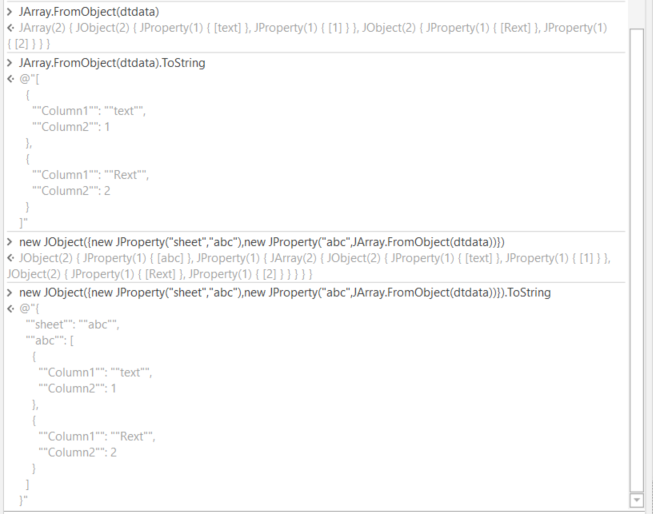
There are many methods:
grafik

Line2: From an Object
Line3: Serialize the Object
Line: with a collection of Properties within the constructor

And also for sure via the plain API on scratch

This is another case as mentioned on above or title. Just share with us the datatable sample input and the expected output. Thanks for support

So my datatable is something like this:


I want to convert this datatable into a json array of objects which would be something like this:

[ { userName: 'sedhha',
    Date: '11/10/2021 15:54:52:328',
    skills: 'python,cpp,solidworks,matlab,ui,arduino,linux,raspberry-pi,computer-vision,react,flask,mongodb,c++,iot,gcp',
    interests: 'AR/VR,Blockchain,Cybersecurity,DevOps,Gaming,Health,IoT,Machine Learning/AI,Productivity,Social Good,Web',
    projectCount: 8,
    hackathonCount: 17,
    achievementCount: 9,
    followerCount: 5,
    followingCount: 0,
    likesCount: 2 } ,{ userName: 'sedhha',
    Date: '11/10/2021 15:54:52:328',
    skills: 'python,cpp,solidworks,matlab,ui,arduino,linux,raspberry-pi,computer-vision,react,flask,mongodb,c++,iot,gcp',
    interests: 'AR/VR,Blockchain,Cybersecurity,DevOps,Gaming,Health,IoT,Machine Learning/AI,Productivity,Social Good,Web',
    projectCount: 8,
    hackathonCount: 17,
    achievementCount: 9,
    followerCount: 5,
    followingCount: 0,
    likesCount: 2 }]

My final request body should look like this:

{
sheetName: "abc",
operationProps: <The Json which I showed above>
}
Stack overflow:

JsonConvert.SerializeObject(YourDataTable, Formatting.Indented);

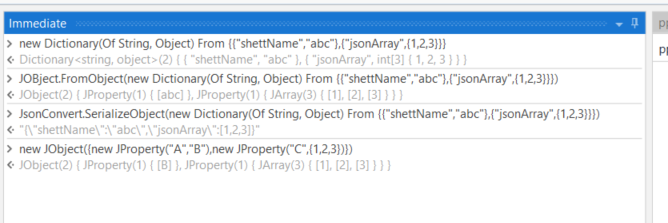
all mentioned options can reused. have a look below (also including the serializing mentioned by Jeroen)

grafik

Screenshot is done within UIPath debug session. You can used for exploration and prototyping. For furthe help on this have a look here:
Understanding the 6 Debugging Panels of UiPath in the easiest way possible! - News / Tutorials - UiPath Community Forum

EDIT: added an additional alternate:

Main.xaml (8.5 KB)

Roughly the same, in a working example including the datatables.

Can’t thank you enough for the efforts and attempts you did. Thanks again this is exactly what I was looking for.