(This is just random sample table)
I want to fetch the data of each row one by one. This means I want to fetch data of the first row and then the second row. so on. How can I achieve this?

We can iterate through the table by using for each after extracting tabular data.

Hope it helps!!
Hello @Samraat_Maharjan ,
First Extract the Data from the Website using ‘Extract table Data’ activity, then use the For Each row activity and loop through this DataTable.

Hope This helps you.
Regards;)
You can use the Extract Datatable activity to extract the table data from webpage.
Steps of the process -
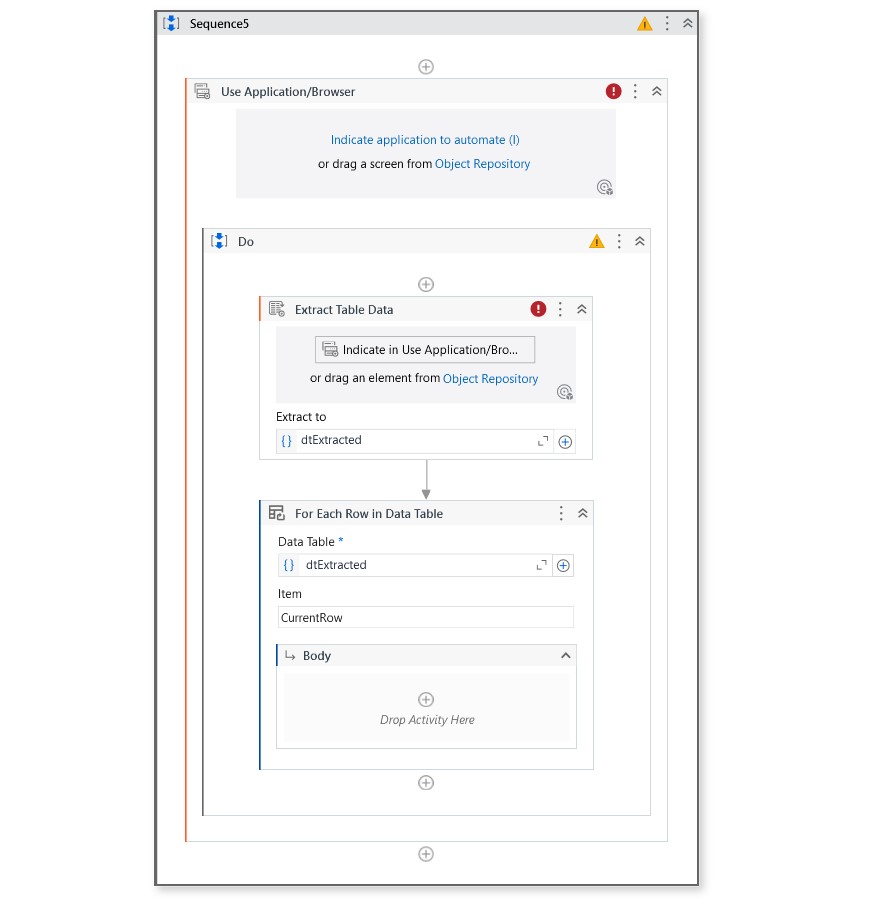
→ Use extract datatable activity inside the use application\browser activity, indicate the table and validate, the output of extract datatable is Datatable datatype variable let’s call it as dtExtracted.
→ After Extracted datatable activity insert the for each row in datatable activity to loop through the each row in the datatable (dtExtracted).
→ Inside for each you can use the other activities for the further proces.
Check the below image for better understanding,
@Akshay_B I don’t need to fetch whole table. I just need to first row’s value and pass that values through API in Json Format. Like I need to fetch 3/4 values from the second row Company = Alfred FutterKiste, Contact = Maria Anders and Country = Germany. Once I checked the data from API, I would do certain action like clicking button after which the data in the second row will be removed and value in the third row will come at second row. So, I only need to values of second row all the time.
I don’t need to fetch whole table. I just need to first row’s value and pass that values through API in Json Format. Like I need to fetch 3/4 values from the second row Company = Alfred FutterKiste, Contact = Maria Anders and Country = Germany. Once I checked the data from API, I would do certain action like clicking button after which the data in the second row will be removed and value in the third row will come at second row. So, I only need to values of second row all the time.
@pravallikapaluri I don’t need to fetch whole table. I just need to first row’s value and pass that values through API in Json Format. Like I need to fetch 3/4 values from the second row Company = Alfred FutterKiste, Contact = Maria Anders and Country = Germany. Once I checked the data from API, I would do certain action like clicking button after which the data in the second row will be removed and value in the third row will come at second row. So, I only need to values of second row all the time.