What activities should I use to count the number of rows with the same variable?
For instance, employee no 2 has a total of 9 rows and employee no 3 has a total of 4 rows.
What activities should I use to count the number of rows with the same variable?
For instance, employee no 2 has a total of 9 rows and employee no 3 has a total of 4 rows.
@helpplease
Variables:
Activities:
Excel Application Scope (or any other activity to read the data):
Assign:
Write Range (Optional - to output the result to an Excel sheet):
@helpplease
Read Datatable and use linq query to get number of rows against each group
groupedData = From row In dt.AsEnumerable()
                  Group row By Name = row.Field(Of String)("Employee Name (No)") Into Group
                  Select Employee Name, Count = Group.Count()
We can group the data and count the group members
Assign Acitvity
dictStatistic | Dictionary(Of String, int32) =
YourDataTableVar.AsEnumerable.GroupBy(Function (x) x("Employe Name (No)").toString.Trim.ToDictionary(Function (g) g.Key, Function (g) g.Count
OR
Build DataTable - 2 cols: Key, Count - dtStatistic
Assign Activity:
(From d in YourDataTableVar.AsEnumerable
Group d by k=d("Employe Name (No)").toString.Trim into grp=Group
Let ra = new Object(){k, grp.Count}
Select r = dtStatistic.Rows.Add(ra)).CopyToDataTable
CopyToDatatable() mention Parenthesis
Hi @helpplease
Read Range (Excel or CSV) → DataTable
Assign: employeeData = dataTable.AsEnumerable().GroupBy(Function(row) row("EmployeeNumber").ToString()).ToDictionary(Function(g) g.Key, Function(g) g.Count())
Log Message or Further Processing:
- For Each key-value pair in employeeData, you can log or process the employee number and its corresponding count as needed.
Hope it helps!!
Hi @helpplease
Use the below syntax:
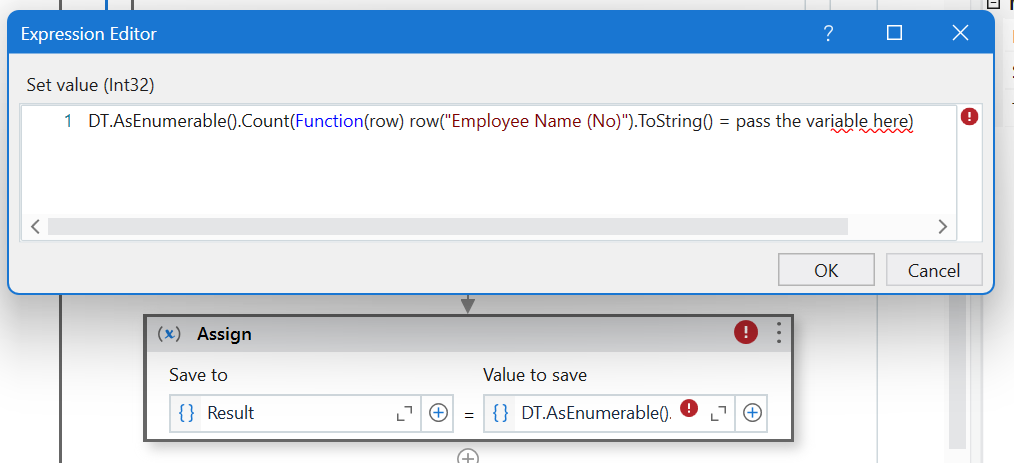
Result= Dt.AsEnumerable().Count(Function(row) row("column Name").ToString() = pass the variable here) (Datattype: system.Int32)
Hope it works!!
Its the variable you want to get count of
what does this mean?
@helpplease
It’s the variable name in which you store the numbers. If you want count of 2 pass 2 there.
Regards,
(From row In DT.AsEnumerable()
Group row By EmployeeNumber = row(“EmployeeNumber”) Into Group
Select DT.clone.Rows.Add({EmployeeNumber, Group.Count})).CopyToDataTable
Assign: Expression Activity type ‘VisualBasicValue`1’ requires compilation in order to run. Please ensure that the workflow has been compiled.
Hi @helpplease
Result= Dt.AsEnumerable().Count(Function(row) row("column Name").ToString() = "2") (Datattype: system.Int32)
Hope it works!!
Remove double quotes and reassign
no, i want it to count without me inputting the employee number
The quotes are to be entered again
I am so sorry, I tried all the methods but it did not work. Is it possible if I can see the actual sequence, using the data I have for columns A and B? I don’t know what is wrong with the way I do…