Hi all
I am creating an automation that first downloads an excel file. This file always has the format JEsCommissionsAmortizationResults123, this means, it is always the words JEsCommissionsAmortizationResults and a random number.
Once the file is downloaded I set a variable value:
Directory.GetFiles("C:\Users\Environment.UserName\Downloads",“JEsCommissionsAmortizationResults,*.csv”).OrderByDescending(Function(d) New FileInfo(d).CreationTime).Tolist(0)
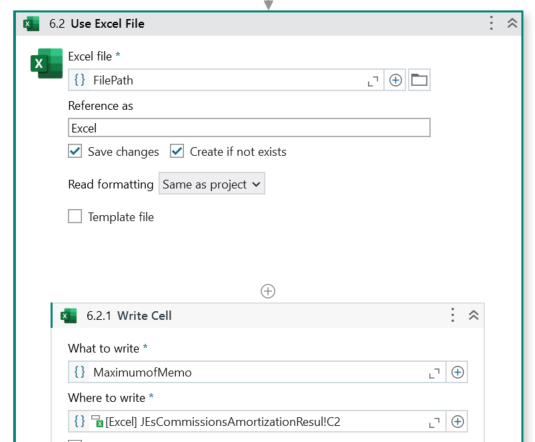
Then I have a Use Excel file to write on that FilePath that was previously saved but is given me the next error:
System.ArgumentException: Folder C:\Users\kesquivel\Documents\Backup 3.4\UiPath\Accounting_Amortization JE on NS\Directory.GetFiles("C:\Users\Environment.UserName\Downloads does not exist, please check the output path.
Directory.GetFiles(“C:\Users\Environment.UserName\Downloads”,“JEsCommissionsAmortizationResults*.csv”).OrderByDescending(Function(d) New FileInfo(d).CreationTime).Tolist(0)
please try to log the filepath variable value and check …looks like the expression you have given is considered as string..if yes then try to open advanced editor and then give the expression
Hey @Karolina_Esquivel The error you’re encountering is caused by treating the expression Directory.GetFiles(…)as a literal string, rather than evaluating it as code. In UiPath, when setting a variable like FilePath, you must ensure the expression is not inside quotes unless you’re writing a literal string.
try below expression
Directory.GetFiles("C:\Users" & Environment.UserName & “\Downloads”, “JEsCommissionsAmortizationResults*.csv”).OrderByDescending(Function(d) New FileInfo(d).CreationTime).ToList()(0)
string.Format(“Directory.GetFiles(““C:\Users\Environment.UserName\Downloads””,““JEsCommissionsAmortizationResults*.csv””).OrderByDescending(Function(d) New FileInfo(d).CreationTime).Tolist(0)”)
String.format will not use it as formula but will convert the expression as string..so please remove it
Ideally this should be the one
Directory.GetFiles("C:\Users\Environment.UserName\Downloads","JEsCommissionsAmortizationResults*.csv").OrderByDescending(Function(d) New FileInfo(d).CreationTime).Tolist(0)
The other error when you copy is because of double quotes