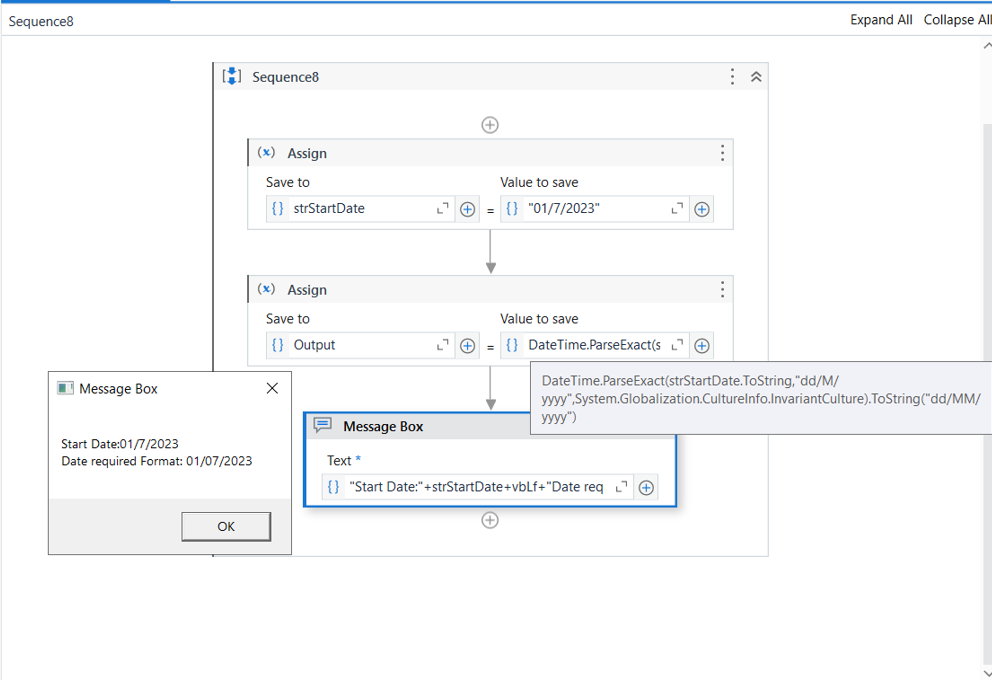
Hi All,
I want to convert my Date strStartDate:01/7/2023 into 01/07/2023.
I am using below format however its not working.
DateTime.ParseExact(strStartDate,“dd/MM/yyyy”,System.Globalization.CultureInfo.InvariantCulture)
Hi All,
I want to convert my Date strStartDate:01/7/2023 into 01/07/2023.
I am using below format however its not working.
DateTime.ParseExact(strStartDate,“dd/MM/yyyy”,System.Globalization.CultureInfo.InvariantCulture)
Please try this
DateTime.ParseExact(strStartDate,"dd/M/yyyy",System.Globalization.CultureInfo.InvariantCulture).ToString("dd/MM/yyyy")
Cheers
Use this syntax:
DateTime.ParseExact(strStartDate,“dd/M/yyyy”,System.Globalization.CultureInfo.InvariantCulture).ToString("dd/MM/yyyy")
Store it an string variable.
Regards,
Try with
DateTime.ParseExact("01/7/2023",{"dd/M/yyyy", "d/M/yyyy"},System.Globalization.CultureInfo.InvariantCulture).ToString("dd/MM/yyyy")
Regards
Hi,
FYI, another approach using regex.
System.Text.RegularExpressions.Regex.Replace(strStartDate,"(?=\b\d\b)","0")
Regards
my strStartDate is of String type. When I am using
DateTime.ParseExact(strStartDate,“dd/M/yyyy”,System.Globalization.CultureInfo.InvariantCulture).ToString(“dd/MM/yyyy”)
It throws me an error.

StrStartdate is string …and what is the datatype of the variable in assign on the left side? It should be string too
Cheers
Use this syntax and store the output in string variable
DateTime.ParseExact(strStartDate.ToString,“dd/M/yyyy”,System.Globalization.CultureInfo.InvariantCulture).ToString("dd/MM/yyyy")
Regards,
Hey @marina.dutta ,
Below is the code
DateTime.ParseExact(strStartDate,"dd/M/yyyy",System.Globalization.CultureInfo.InvariantCulture).ToString("dd/MM/yyyy")
Below is the screenshot of the output

below is the file for your refernce
Testt.zip (10.4 KB)
Hope it helps you
This topic was automatically closed 3 days after the last reply. New replies are no longer allowed.