Date Format errorr

Hi everyone, can you please assist. I am converting a date from ‘//’ to ‘–’

I am using this activity to convert:


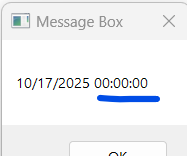
and when I process the first record from the excel file(first row) the date is converted fine but when I process the second one ‘2025/10/17’ it comes out with zero’s(time format) at the end like below that I do not want

How do I work around this one

string currDate = “2025/11/04”;
DateTime mydateTimeVar = DateTime.ParseExact(currDate, “yyyy/MM/dd”, System.Globalization.CultureInfo.InvariantCulture);

Console.WriteLine(mydateTimeVar.ToString(“dd-MM-yyyy”)); // assign it to some variable.

Regards
SG.

2 Likes

you can using same code?

@Anelisa_Bolosha1

instead of resolveddate.ToString use ResolvedDate.Trim.Split(" "c).First

ideally cdate should convert both of the formats as most of the excels would be in system date format cdate should autohandle cdate(resolveddate).ToString("Format you need")

cheers

1 Like

Hi @Anil_G ,thank you.
The Cdate format solved it:
cdate(resolveddate).ToString(“Format you need”)

1 Like

This topic was automatically closed 3 days after the last reply. New replies are no longer allowed.