E.T.S
January 4, 2024, 11:49am
1
Hello,
I have a string value and a data table. I would like to match the string value to a row in the data table, and retrieve that row.
Please note a similar post I have made to this exists, in which I have used this code to retrieve the corresponding row in the data table:
drCorrespondingRow = dtCorrespondingTab.AsEnumerable.Where(Function(x)x(“ColumnName”).ToString.Equals(strKeyArea)).FirstOrDefault
However I get this error:
I have attempted to use filter data table however this does not seem to work.
Any suggestions as to how I can edit the code above?
Thanks
lrtetala
January 4, 2024, 11:54am
2
Hi @E.T.S
Can you try below
drCorrespondingRow= dtCorrespondingTab.Select("ColumnName = '" & strKeyArea & "'").FirstOrDefault
Sharath_HK
January 4, 2024, 12:27pm
3
@E.T.S
E.T.S
January 4, 2024, 12:54pm
4
Hi,
Thank you for your suggestion - using the above am I getting the following error:
Sharath_HK
January 4, 2024, 3:02pm
5
Hi @E.T.S
try the below linq
dataTable.AsEnumerable().Where(function(row) row(“name”).ToString = “abc”).First()
replace “name” with your column name and “abc” with your desired value.
E.T.S
January 4, 2024, 3:35pm
6
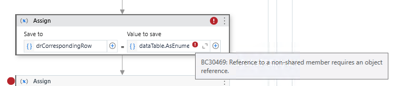
Hi,
Thank you for your suggestion.
I am getting the following error with the suggested method: