Terry_Marr
(Terry Marr)
February 20, 2024, 1:12am
1
I’m following along academy here .
Here’s what we’re trying to do:
Loop through a few excel files, test the first worksheet in Excel and if it’s not named “Sheet1” then rename it.
We set up an If statement with this condition:
InputFile.SelectedSheet.Name isNot "Sheet1"
And then in the Then statement we rename the spreadsheet to “Sheet1”
I also added a log statement in the Then block to test.
Here’s what’s happening:
The file where the error is is simply adding a NEW spreadsheet called “Sheet1” instead of renaming the original one.
Every single file is logging the error (reached the then statement), which is not supposed to happen.
I followed the tutorial exactly, I believe. What did I do wrong?
vrdabberu
(Varunraj Dabberu)
February 20, 2024, 1:19am
2
Hi @Terry_Marr
Try this way in the meanwhile some screenshots of your process will help me find the error.
Condition used in If:
Excel.SelectedSheet.Name isNot "Sheet1"
Regards
Yoichi
(Yoichi)
February 20, 2024, 3:33am
4
Terry_Marr:
We set up an If statement with this condition:
InputFile.SelectedSheet.Name isNot "Sheet1"
And then in the Then statement we rename the spreadsheet to “Sheet1”
Can you try to use <> instead of isNot because isNot operator is for compare object and not check equality.
InputFile.SelectedSheet.Name <> "Sheet1"
Regards,
Terry_Marr
(Terry Marr)
February 20, 2024, 4:55pm
5
Yoichi thanks for responding. I put in the <> in the condition and here’s what’s happening.
The other files with “Sheet1” as the first sheet are now not erroring. They are not caught in the condition.
The erroring file, the one with the first sheet saying “Sales”, is being caught, but instead of renaming that first sheet to “Sheet1” it is creating a NEW sheet and calling that “Sheet1”.
Is there not a command that will take the first sheet (it is also the only sheet) perhaps by the number 0, and rename it to what we want?
Terry_Marr
(Terry Marr)
February 20, 2024, 4:58pm
6
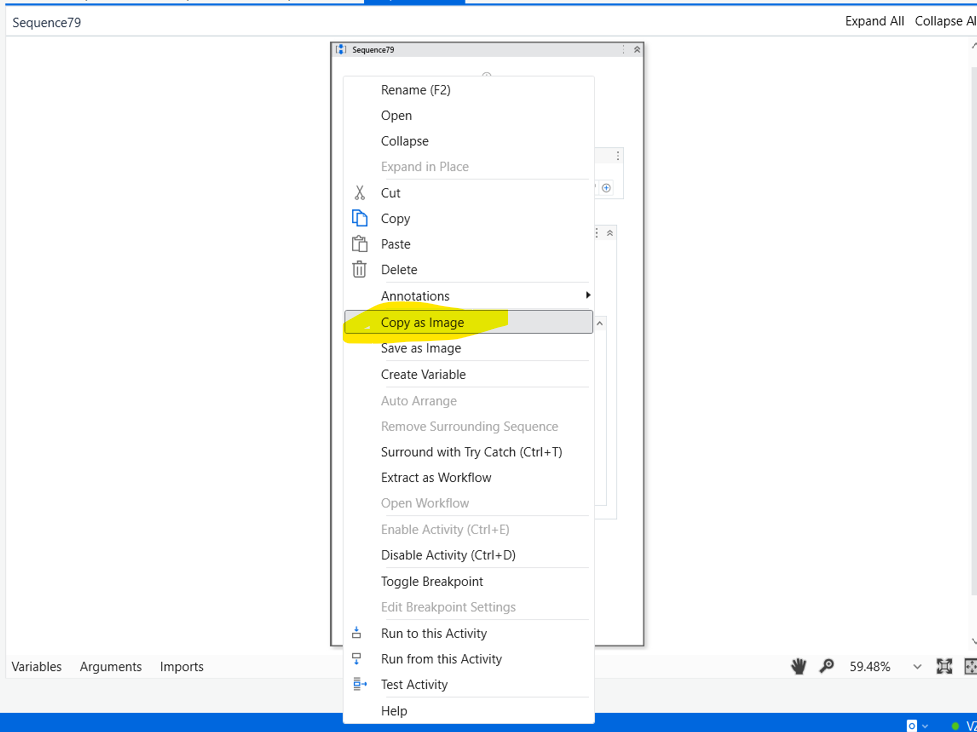
Hi Varunraj – I’m new. Can you quickly tell me how you got that screenshot into the post above?
1 Like
vrdabberu
(Varunraj Dabberu)
February 20, 2024, 5:03pm
7
Hi @Terry_Marr
Right click on the sequence you will see the option Copy As Image click on that. Paste it wherever you want. You can also save the image by right clicking on the sequence and Click Save As Image.
Regards
Terry_Marr
(Terry Marr)
February 20, 2024, 5:14pm
8
Aha! I figured it out! I had put a log message above the condition that tried to show the number of rows for that sheet. It put it in like this:
InputFile.Sheet("Sheet1).RowCount
And since the code didn’t find “Sheet1” there, it sneakily created one. Once I took that activity away, the condition worked correctly
system
(system)
Closed
February 23, 2024, 5:15pm
9
This topic was automatically closed 3 days after the last reply. New replies are no longer allowed.