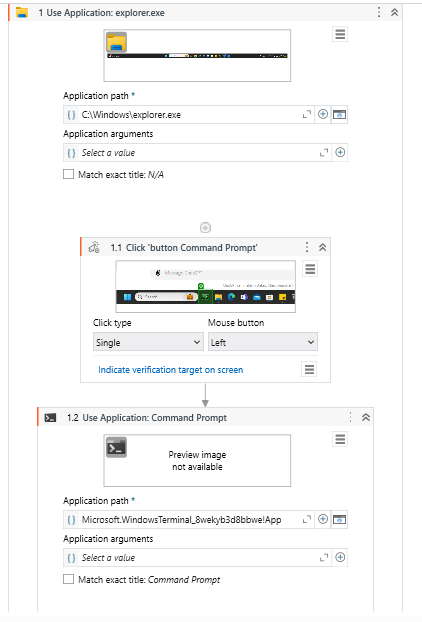
I am trying to get the bot to execute a Python script. The steps I took were:
- Add Use application activity: explorer.exe
– 1.1 Click open the program Command Prompt
– 1.2 Add Use application activity: Command Prompt
– 1.2.1 Type into: [Directory of the python script <[enter]>]
- Proceed to some other tasks.
I’m wondering why the bot keeps repeating step 1.2.1 after it is done. Is there something I’ve subconsciously created a loop in these 2 steps?
I should add that the Python script is working fine (runs and exits) if I executed it manually on Command Prompt.
Hi!
Could you please share a screenshot of your process and the properties of your Type Into activity
Additionally - why not use this package instead of opening up cmd?
Activities - About the Python activity package (uipath.com)
Hi Sven, this is my workflow
I’ve also tried the Python activity package but it went into another unsolvable error that UiPath cannot find the specified Python path (bizarre).
Sorry I’m a new learner on this.
Hi @punggol612 ,
Instead of executing your python code using command prompt, You can use the Python activities .
You need to save your python code and save it as .py file. and try to execute your code using Python activities. Adding screenshot on how to use the python activities for your reference
In this example, “Compare_address_similarity” is my python method which I want to execute.
Thanks,
Pallavi
Thanks @lchirathapudi for your reply. I wasn’t able to use Python activities because for some reason UiPath wasn’t able to find my Python exe even though I toggled with various Python versions (3.9, 3.10, 3.12).
That’s why I had to go with Command Prompt, but with this method, the bot kept repeating the step of writing into cmd [CORRECTION: I noticed it will repeat 3 times, not sure why it’s the case, maybe there’s some property I need to change/uncheck?]
Hi!
Can’t see anything wrong here.
I see you’re having difficulties with the python package, could you instead of typing into the command prompt start it as a process with arguments?
Activities - Start Process (uipath.com)