Hi, thank you, could you please explain how it should work? I tested it but I do not see how it can help with my issue. I need to have an array of strings assigned to one datatable column.
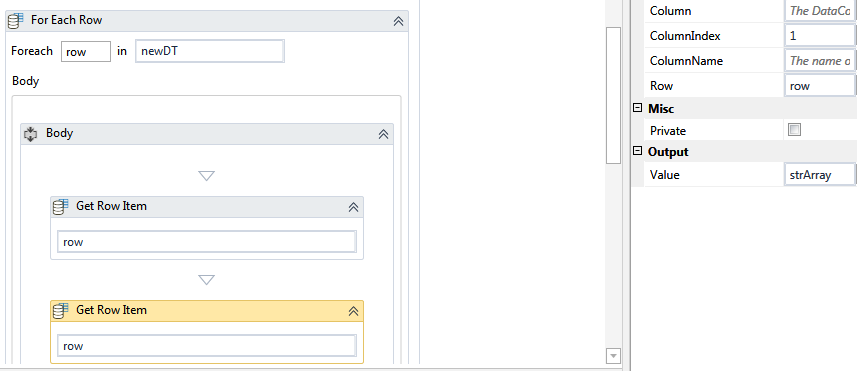
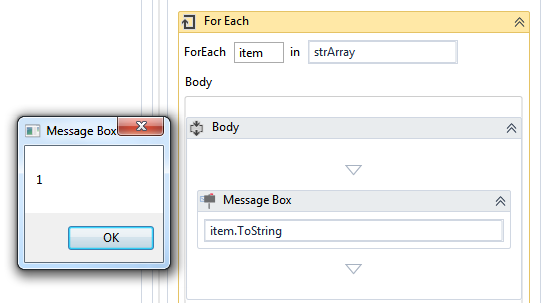
See your problem was you were not able to insert array in column now that we have inserted the array, how do you want to retrieve? See the attached sample in which I have inserted an array of strings {“1”,“2”,“3”} in data table, then retrieved the same in for each row of data table -
Could you specify which versions of the Studio are you using? I am pretty sure some packages are different between the stable 2018.2.3 and the beta 2018.3.
I tried once to open a workflow in stable 2018.2.3 that was earlier converted to beta 2018.3 and it would display similar error for some activities (the packages are not matching)
Just to be sure, I tested the solution of prankurjoshi and it works
As to the missing activity, I can be wrong here, but I think that you cannot install the new packages from beta for your stable release. They did a split of some activities in those packages and I think the stable release does not understand the beta ones
Dependencies per Project
(…)
For each new project there are 4 default dependencies: UIAutomation, System, Excel and Mail. UIAutomation and System packages are formerly known together as CoreActivities package. We decided to split and decouple .
I am pretty sure I tested it and I got the same activity missing on a workflow that went from Stable to Beta and then was opened in Stable again.
@Ancher @PrankurJoshi
Thank you! It works! One thing though, I was hoping there is a way I could use Build Data Table activity to store and update values (pretty much as a config file). Which works perfectly fine with Strings, I can see them, but Arrays are not visible.
I believe it to be a limitation of the Build Data Table activity. I think it is able to only initialize the basic types and the Array of String is probably not supported.