Hello guys,
I have 2 query
I have an excel it should write the data only column “Comments” containing “Proceed” to sheet1
So after the process completed Excel looks like this
2 ) If i reran the process it should take the data which contain proceed in comment column and append to this sheet1 and it should not duplicate.
nisarga
December 6, 2023, 5:35am
2
Hii @Gokul_Murali ,
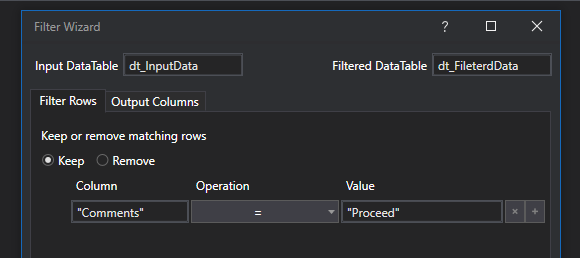
You can use filter data table to read the column “Comments” containing “Proceed” and use write range to write the data into sheet1
Find the attachment for your reference
2.You can use remove duplicate activity before writing the data into the excel
or you can use this syntax
dt_RemoveDuplicates = dt_Filtered.DefaultView.ToTable(True)
Regards,
I done it the thing is that it is overwriting the data which is already exist.
See i rerun the process the status column will be replaced.
nisarga
December 6, 2023, 9:09am
4
@Gokul_Murali ,
Does input varies from each run?
If this is the case and you are using the same output excel to write the data it will overwrite the existing data.
Possible solution to overcome this
use different output excel or different sheet to write the data
or else use append range to append the data to Existing output excel file
Thanks,
Hi @Gokul_Murali ,
Use the filer datatable to filter the column based on ur value ,
Regards