This is another post related to my original post here:
I think I probably know the answer to this question already but figured I’d ask. So the method described in my previous post works great for angular elements as long as the elements within this line are physically defined:
var grid = angular.element('.slickGridDimensionsWithFilter').scope().d.gridOptions.grid;
Where it fails I have found this week is when the individual that did the angular coding (using Slickgrid) in this cases uses a different approach to doing the same thing on a different page. What I found is to get to the Slickgrid I need on another page the above line now looks like this:
var grid = angular.element('#unplacedAdUnitsViewerView\\.grid').scope().prototype.gridOptions.grid;
Note the use of “.prototype.” vs “.d.”. On the former “var grid” example above and for that web page, “d” physically exists and is found/seen within the scope() structure for angular.element(‘.slickGridDimensionsWithFilter’).scope() when using the Chrome console. “d” and a number of other physically defined elements exist as well. The injected JS has access to that d elements and its children and so on so the JS Inject works great.
On this new page I’m looking at, the method I got working before does not work for where its Slickgrid is stored because of the “.protoype.” below:
var grid = angular.element('#unplacedAdUnitsViewerView\\.grid').scope().prototype.gridOptions.grid;
When I run this through UiPath JS Inject, the chrome console shows this error 
Uncaught TypeError: Cannot read properties of undefined (reading 'prototype')
    at UPAdUnitsUnplReasonsByExceptions (<anonymous>:1:218)
    at <anonymous>:1:1189
Unfortunately, there is literally nothing physical available after the scope() for the above “var grid”:
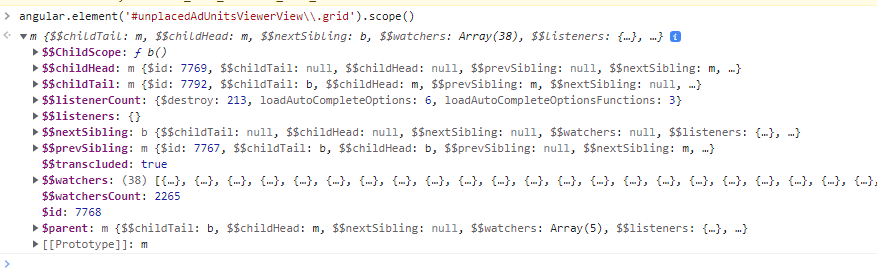
So the question … is there any magic to get this working ?
I’m not a JS developer and I don’t understand the whole Chrome security side of things for injected JS which I think is where my challenge is coming from.
Granted I can still use Inject JS having JS ignore the whole angular element path (which is so fast when it works !!!) and instead address the HTTP elements themselves checking and scrolling where necessary. I was really hoping to adapt/adopt what I got working on another page to work on this page here