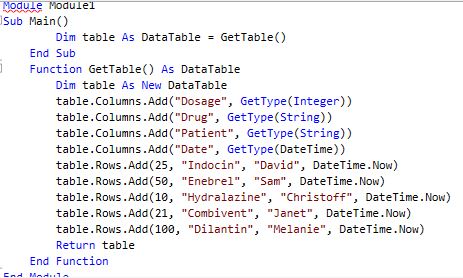
Trying to create datatable through code (i’m kind of new to this so any help would be great)
Error i’m getting:
No compiled code to run
error BC30289: Statement cannot appear within a method body. End of method asssumed. At line 1
error BC30429: ‘End Sub’ must be preceded by a matching ‘Sub’. At line 19
You can use Invoke Code activity and paste following code in it,
Dim dt As DataTable
dt = New DataTable()
Console.WriteLine(“Datatable created”)
dt.Columns.Add(“Name”, GetType(System.String))
dt.Columns.Add(“Contry”, GetType(System.String))
Console.WriteLine(“Columns created”)
You can add rows to columns like,
dt.rows.add(“TCS”, “India”)
dt.rows.add(“UiPath”, “Romania”)