안녕하세요,
입력 매개변수(string, int 등)를 사용해 Python 스크립트를 호출하고 싶습니다.
UiPath에서 Invoke Powershell 활동을 사용해 어떻게 호출하면 되나요?
최신 버전의 Python을 사용 중이며 Invoke Python scope는 사용하고 싶지 않습니다.
도움에 미리 감사드립니다!
안녕하세요,
입력 매개변수(string, int 등)를 사용해 Python 스크립트를 호출하고 싶습니다.
UiPath에서 Invoke Powershell 활동을 사용해 어떻게 호출하면 되나요?
최신 버전의 Python을 사용 중이며 Invoke Python scope는 사용하고 싶지 않습니다.
도움에 미리 감사드립니다!
안녕하세요 @voranir
이 용도로 Python 액티비티를 직접 사용하지 않으려는 특별한 이유가 있나요?
PowerShell로만 실행하려는 경우, Invoke PowerShell 액티비티의 명령 텍스트에 아래와 같은 코드를 입력하고 작동하는지 확인해 보세요.
python “path\to\your\script.py” arg1 arg2
감사합니다.
Sonali
CommandText “python
‘C:\Path\To\YourScript.py’”
IsScript False (단일 명령이므로)
Output 선택 사항 (Python의 출력을 캡처하려는 경우)
3. 예시:
CommandText = “python ‘C:\Users\YourName\Documents\my_script.py’”
IsScript = False
도움이 되었기를 바랍니다
C#용 Invoke Code를 사용하는 이 방법을 시도해 보세요.
UiPath.Studio.24.10.14
UiPath.System.Activities.24.10.7
설치
다음 네임스페이스를 가져옵니다.
System
System.Diagnostics
언어를 C#으로 설정한 Invoke Code 액티비티:
        // Python 실행 파일 경로
        //string pythonPath = @"C:\Program Files\Python312\python.exe";

        // Python 스크립트 경로
        //string scriptPath = @"C:\Users\admin_1\Documents\PythonScriptToExecute.py";

         // Python 스크립트를 실행할 새 프로세스 만들기
        ProcessStartInfo start = new ProcessStartInfo();
        start.FileName = pythonPath;
        start.Arguments = scriptPath;
        start.UseShellExecute = false;
        start.RedirectStandardOutput = true;
        start.RedirectStandardError = true;
        start.CreateNoWindow = true;

        // 프로세스 시작
        using (Process process = Process.Start(start))
        {
            // Python 스크립트의 출력 읽기
            using (System.IO.StreamReader reader = process.StandardOutput)
            {
                result = reader.ReadToEnd();
                //Console.WriteLine("Output: " + result);  // 결과를 확인하기 위해 출력
            }

            // Python 스크립트의 오류 메시지 읽기
            using (System.IO.StreamReader reader = process.StandardError)
            {
                string error = reader.ReadToEnd();
                if (!string.IsNullOrEmpty(error))
                {
                    Console.WriteLine("Error: " + error);
                }
            }
        }
Invoke Code 인수
result → out → System.String → out_PythonScript
pythonPath → in → System.String → "C:\Program Files\Python312\python.exe"
scriptPath → in → System.String → "C:\Users\your_username\Documents\PythonScriptToExecute.py"
PythonScriptToExecute.py의 내용
def add_numbers(a, b):
    return a + b

# 사용 예
out_results = add_numbers(5, 3)
print(out_results)
결과:
안녕하세요 @marian.platonov님,
공유해 주셔서 감사합니다.
입력 매개변수가 필요한 스크립트가 있습니다.
param1 = input (“Enter Name”)
print (“Hello” + param1)
코드에서 인수를 어떻게 전달하나요?
감사합니다
Python 코드:
import sys

# 인수가 제공되었는지 확인
if len(sys.argv) > 1:
    param1 = sys.argv[1]  # 첫 번째 명령줄 인수 가져오기
else:
    param1 = input("Enter Name: ")  # 인수가 없으면 사용자 입력을 사용

print("Hello " + param1)
UiPath.Studio
UiPath.System.Activities.24.10.7
출력값이 System.String out_Name인 Input Dialog 액티비티를 추가합니다.
C#용 Invoke Code 액티비티
    // Python 실행 파일 경로
        //string pythonPath = @"C:\Program Files\Python312\python.exe";

        // Python 스크립트 경로
        //string scriptPath = @"C:\Users\admin_1\Documents\PythonScriptToExecute.py";

         // Python 스크립트를 실행할 새 프로세스 만들기
        ProcessStartInfo start = new ProcessStartInfo();
        start.FileName = pythonPath;
        start.Arguments = scriptPath;
        start.UseShellExecute = false;
        start.RedirectStandardOutput = true;
        start.RedirectStandardError = true;
        start.CreateNoWindow = true;

        // 프로세스 시작
        using (Process process = Process.Start(start))
        {
            // Python 스크립트의 출력 읽기
            using (System.IO.StreamReader reader = process.StandardOutput)
            {
                result = reader.ReadToEnd();
                //Console.WriteLine("Output: " + result);  // 결과를 확인하기 위해 출력
            }

            // Python 스크립트의 오류 메시지 읽기
            using (System.IO.StreamReader reader = process.StandardError)
            {
                string error = reader.ReadToEnd();
                if (!string.IsNullOrEmpty(error))
                {
                    Console.WriteLine("Error: " + error);
                }
            }
        }
Invoke Code 인수:
result → out → System.String → out_PythonScript
pythonPath → in → System.String → “C:\Program Files\Python313\python.exe”
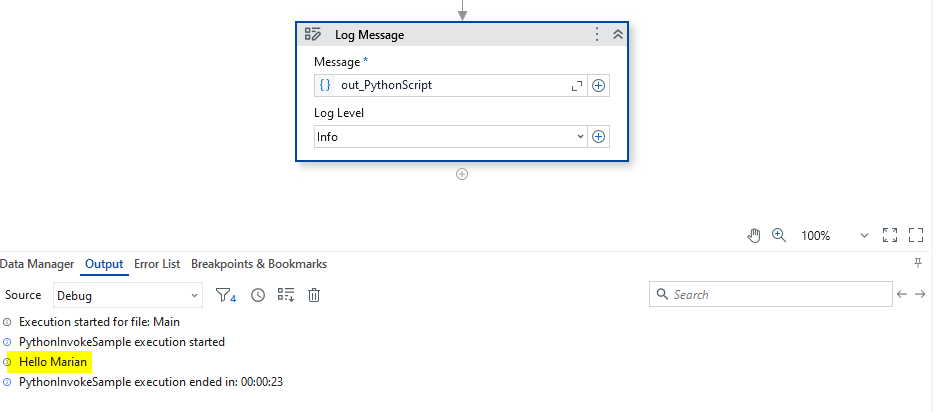
scriptPath → in → System.String → string.Format("""C:\Marian\Python Projects\test\sample_script_with_input.py"" {0}", out_Name)
실행 결과:
프로젝트와 Python 코드를 공유해 주세요.
위와 같은 단계를 따르셨나요, 아니면 무언가를 건너뛰셨나요?
안녕하세요 @marian.platonov님,
이제 작동합니다.
파이썬 스크립트에 명령줄 인수를 전달하지 않고 있었습니다.
해결 방법을 알려주셔서 감사합니다.