¿Hay alguna razón en particular por la que no quieras usar actividades de Python directamente para esto?
Si solo quieres hacerlo mediante PowerShell, prueba a usar un código como el siguiente en el texto del comando de la actividad Invoke PowerShell y comprueba si funciona:
Usa la actividad «Invoke PowerShell»:
Valor de las propiedades:
CommandText “python
‘C:\Path\To\YourScript.py’”
IsScript False (porque es un único comando)
Output Opcional (si quieres capturar la salida de Python)
3. Ejemplo:
        // Ruta al ejecutable de Python
        //string pythonPath = @"C:\Program Files\Python312\python.exe";

        // Ruta al script de Python
        //string scriptPath = @"C:\Users\admin_1\Documents\PythonScriptToExecute.py";

         // Crea un nuevo proceso para ejecutar el script de Python
        ProcessStartInfo start = new ProcessStartInfo();
        start.FileName = pythonPath;
        start.Arguments = scriptPath;
        start.UseShellExecute = false;
        start.RedirectStandardOutput = true;
        start.RedirectStandardError = true;
        start.CreateNoWindow = true;

        // Inicia el proceso
        using (Process process = Process.Start(start))
        {
            // Lee la salida del script de Python
            using (System.IO.StreamReader reader = process.StandardOutput)
            {
                result = reader.ReadToEnd();
                //Console.WriteLine("Output: " + result);  // Imprime el resultado para verificarlo
            }

            // Lee los mensajes de error del script de Python
            using (System.IO.StreamReader reader = process.StandardError)
            {
                string error = reader.ReadToEnd();
                if (!string.IsNullOrEmpty(error))
                {
                    Console.WriteLine("Error: " + error);
                }
            }
        }
Argumentos de Invoke Code
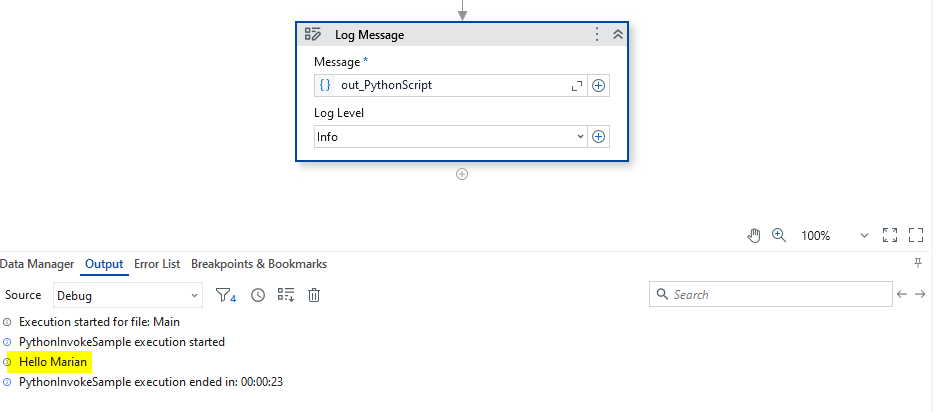
result → out → System.String → out_PythonScript
pythonPath → in → System.String → "C:\Program Files\Python312\python.exe"
scriptPath → in → System.String → "C:\Users\your_username\Documents\PythonScriptToExecute.py"
import sys

# Comprobar si se ha proporcionado un argumento
if len(sys.argv) > 1:
    param1 = sys.argv[1]  # Obtener el primer argumento de la línea de comandos
else:
    param1 = input("Enter Name: ")  # Solicitar datos al usuario si no se proporciona ningún argumento

print("Hello " + param1)
UiPath.Studio
UiPath.System.Activities.24.10.7
Añade una actividad de cuadro de diálogo de entrada con la salida System.String out_Name
    // Ruta al ejecutable de Python
        //string pythonPath = @"C:\Program Files\Python312\python.exe";

        // Ruta al script de Python
        //string scriptPath = @"C:\Users\admin_1\Documents\PythonScriptToExecute.py";

         // Crear un proceso para ejecutar el script de Python
        ProcessStartInfo start = new ProcessStartInfo();
        start.FileName = pythonPath;
        start.Arguments = scriptPath;
        start.UseShellExecute = false;
        start.RedirectStandardOutput = true;
        start.RedirectStandardError = true;
        start.CreateNoWindow = true;

        // Iniciar el proceso
        using (Process process = Process.Start(start))
        {
            // Leer la salida del script de Python
            using (System.IO.StreamReader reader = process.StandardOutput)
            {
                result = reader.ReadToEnd();
                //Console.WriteLine("Output: " + result);  // Imprimir el resultado para verificarlo
            }

            // Leer los mensajes de error del script de Python
            using (System.IO.StreamReader reader = process.StandardError)
            {
                string error = reader.ReadToEnd();
                if (!string.IsNullOrEmpty(error))
                {
                    Console.WriteLine("Error: " + error);
                }
            }
        }
Argumentos de Invoke Code:
result → out → System.String → out_PythonScript
pythonPath → in → System.String → “C:\Program Files\Python313\python.exe”
scriptPath → in → System.String → string.Format("""C:\Marian\Python Projects\test\sample_script_with_input.py"" {0}", out_Name)