voranir
15. Juni 2025 um 20:05
1
Hallo,
ich möchte ein Python-Skript mit Eingabeparametern (String, Integer usw.) aufrufen.
Wie kann ich es mit der Aktivität Invoke Powershell in UiPath aufrufen?
Ich verwende die neueste Python-Version und möchte nicht den Invoke Python Scope verwenden.
Vielen Dank im Voraus für eure Hilfe!
Hallo @voranir
Gibt es einen bestimmten Grund, warum Sie für diesen Zweck keine direkten Python-Aktivitäten verwenden möchten?
Wenn Sie es nur über PowerShell ausführen möchten, probieren Sie bitte den folgenden Code im Befehlsfeld der Invoke-PowerShell-Aktivität aus und sehen Sie, ob es funktioniert:
python “path\to\your\script.py” arg1 arg2
Viele Grüße
Hallo,
Oder
du kannst eine Use Application-Aktivität verwenden, wie im Screenshot gezeigt, und den Befehl in eine Type Into-Aktivität eingeben.
Verwende die Aktivität „Invoke PowerShell“:
CommandText “python
CommandText = “python ‘C:\Users\YourName\Documents\my_script.py’”
Hope this help
voranir
16. Juni 2025 um 20:11
5
Hallo @sonaliaggarwal47
Vielen Dank für deine Antwort.
Wir verwenden keine Python-Aktivitäten, weil die neueste Python-Version nicht mit UiPath integriert werden kann.
Probiere diesen Ansatz mit Invoke Code für C#:
UiPath.Studio.24.10.14
Installiere
Importiere diese Namespaces:
System
Invoke Code-Aktivität für die Sprache C#:
        // Pfad zur ausführbaren Python-Datei
        //string pythonPath = @"C:\Program Files\Python312\python.exe";

        // Pfad zum Python-Skript
        //string scriptPath = @"C:\Users\admin_1\Documents\PythonScriptToExecute.py";

         // Einen neuen Prozess zum Ausführen des Python-Skripts erstellen
        ProcessStartInfo start = new ProcessStartInfo();
        start.FileName = pythonPath;
        start.Arguments = scriptPath;
        start.UseShellExecute = false;
        start.RedirectStandardOutput = true;
        start.RedirectStandardError = true;
        start.CreateNoWindow = true;

        // Den Prozess starten
        using (Process process = Process.Start(start))
        {
            // Die Ausgabe des Python-Skripts lesen
            using (System.IO.StreamReader reader = process.StandardOutput)
            {
                result = reader.ReadToEnd();
                //Console.WriteLine("Output: " + result);  // Ergebnis zur Überprüfung ausgeben
            }

            // Fehlermeldungen des Python-Skripts lesen
            using (System.IO.StreamReader reader = process.StandardError)
            {
                string error = reader.ReadToEnd();
                if (!string.IsNullOrEmpty(error))
                {
                    Console.WriteLine("Error: " + error);
                }
            }
        }
Argumente für Invoke Code
result → out → System.String → out_PythonScript"C:\Program Files\Python312\python.exe""C:\Users\your_username\Documents\PythonScriptToExecute.py"
Inhalt von PythonScriptToExecute.py
def add_numbers(a, b):
    return a + b

# Anwendungsbeispiel
out_results = add_numbers(5, 3)
print(out_results)
Ergebnisse:
voranir
16. Juni 2025 um 20:46
7
Hallo @marian.platonov ,
vielen Dank fürs Teilen.
Ich habe ein Skript, das Eingabeparameter benötigt.
param1 = input (“Enter Name”)
Wie übergebe ich das Argument im Code?
Danke
Python-Code:
import sys

# Prüfen, ob ein Argument übergeben wurde
if len(sys.argv) > 1:
    param1 = sys.argv[1]  # Erstes Befehlszeilenargument abrufen
else:
    param1 = input("Enter Name: ")  # Auf Benutzereingabe zurückgreifen, wenn kein Argument übergeben wurde

print("Hello " + param1)
UiPath.Studio
Füge eine Input Dialog-Aktivität mit der Ausgabe System.String out_Name hinzu
Invoke Code-Aktivität für C#
    // Pfad zur Python-Executable
        //string pythonPath = @"C:\Program Files\Python312\python.exe";

        // Pfad zum Python-Skript
        //string scriptPath = @"C:\Users\admin_1\Documents\PythonScriptToExecute.py";

         // Einen neuen Prozess zum Ausführen des Python-Skripts erstellen
        ProcessStartInfo start = new ProcessStartInfo();
        start.FileName = pythonPath;
        start.Arguments = scriptPath;
        start.UseShellExecute = false;
        start.RedirectStandardOutput = true;
        start.RedirectStandardError = true;
        start.CreateNoWindow = true;

        // Den Prozess starten
        using (Process process = Process.Start(start))
        {
            // Die Ausgabe des Python-Skripts auslesen
            using (System.IO.StreamReader reader = process.StandardOutput)
            {
                result = reader.ReadToEnd();
                //Console.WriteLine("Output: " + result);  // Das Ergebnis zur Überprüfung ausgeben
            }

            // Fehlermeldungen des Python-Skripts auslesen
            using (System.IO.StreamReader reader = process.StandardError)
            {
                string error = reader.ReadToEnd();
                if (!string.IsNullOrEmpty(error))
                {
                    Console.WriteLine("Error: " + error);
                }
            }
        }
Argumente für Invoke Code:
result → out → System.String → out_PythonScriptstring.Format("""C:\Marian\Python Projects\test\sample_script_with_input.py"" {0}", out_Name)
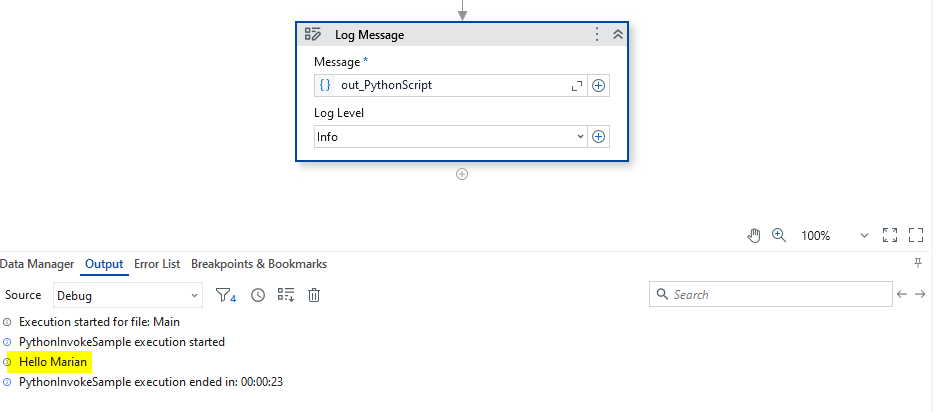
Ausführungsergebnisse:
voranir
18. Juni 2025 um 14:36
9
Hallo @marian.platonov ,
vielen Dank für die ausführlichen Informationen.
Ich erhalte die folgende Fehlermeldung:
Ich verwende UiPath.System.Activities - 24.10.6
Teile das Projekt und den Python-Code.
voranir
19. Juni 2025 um 20:57
11
Hallo @marian.platonov ,
es funktioniert jetzt.
Ich habe die Befehlszeilenargumente nicht an das Python-Skript übergeben.
Vielen Dank für die Lösung.