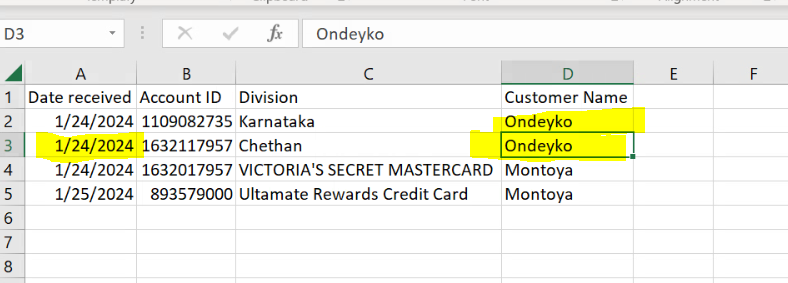
Here you go!!

Regards
Can you guys please help me in this
requirement: We have a DtTable and in that data table we are filtering in below condition.
Condition: Table have Date received, Customer name, Account ID and Division.
Bot Should check Same receive data are present are not in the existing table(dtTable) if date is present then check the other column Date received, Customer name, Account ID and Division if any one of the column have duplicate value we need to filter that and keep that data table in one variable called “duplicateDT” and if no duplicate present I need to keep in “tempDt”.
Note: Hear we need to check the previous row.
Input:

Output:

I tried above solutions not worked.
@rlgandu @lrtetala @Parvathy @mkankatala @vrdabberu @Anil_G @ppr @pikorpa @Nawazish_Ahmad @Parvathy
Thanks,
CopyWrites
@copy_writes
when the work from above was not solving the use case we recommend reworking the use case description
However in the meanwhile we will start and look at the case and the topic discussion
Thanks for support
Hi @copy_writes ,
Could you maybe check the below workflow :
DT_GroupBy_ColumnWise.zip (10.0 KB)
It uses a Mix of both For Each activity and Linq Groupby methods to provide us with the grouped rows containing more than 1 row and we are then merging it with the other Unique rows (Group on Date received rows count =1)
The Duplicate data is also captured (Not sure whether the definition of duplicity from your end would match for this case)
Let us know if it doesn’t satisfy your requirements, and do provide the data used for testing for that failure cases, so that we can confirm the changes if any from our end.
Thanks for the replay But when I try to open the zip file I’m getting error like document is invalid
Please let me know what action i need to take.
If It possible prese provide screen capture and paste code.
Hi @copy_writes ,
Could you let us know what is the Studio Version that you are using and if you have openend the zip file in another project or separately ?
Studio Version: 2020.10.2.
I Opened zip file in separate folder
Could you check with the below updated workflow :
DT_GroupBy_ColumnWise_Legacy.zip (9.8 KB)
Thanks for your reply and the your time it worked for the data which is in the input. But when I replace that data with below I am not getting the proper data.
Input:
Output:
This is not expected data.
Best regards,
Chethan P
Also I tried for the different data.
Input Data:

Output:
Which I showed Yellow It was repeated, check the date also same then it should not present in Output sheet.
Could you provide the Test data that was used in the form of an Excel file ? It will be faster to Debug and correct the area of changes in this manner.
Sure Please check the below test data.
Test.xlsx (11.9 KB)
We need to look first date received if it match with previous data rows
Then
need check the Account Number, division, and customer name.
If any one of the column data is match with previous rows.
Then
It is consider as duplicate.
Else keep the row in output sheet.