# 路線検索ソフトで定期代金をスクレイピングしたい。

**URL:** <https://forum.uipath.com/t/topic/267097>\
**Category:** フォーラム\
**Created:** [November 5, 2020, 7:32am UTC](https://forum.uipath.com/t/topic/267097 "2020-11-05T07:32:55Z")\
**Posts on this page:** 20\
**Page:** 1

<div class="post-metadata">

**Author:** ![gorby](https://sea2.discourse-cdn.com/uipath/user_avatar/forum.uipath.com/gorby/32/543563_2.png) [@gorby](https://forum.uipath.com/u/gorby)\
**Post date:** [November 5, 2020, 7:32am UTC](https://forum.uipath.com/t/topic/267097/1 "2020-11-05T07:32:55Z")

</div>

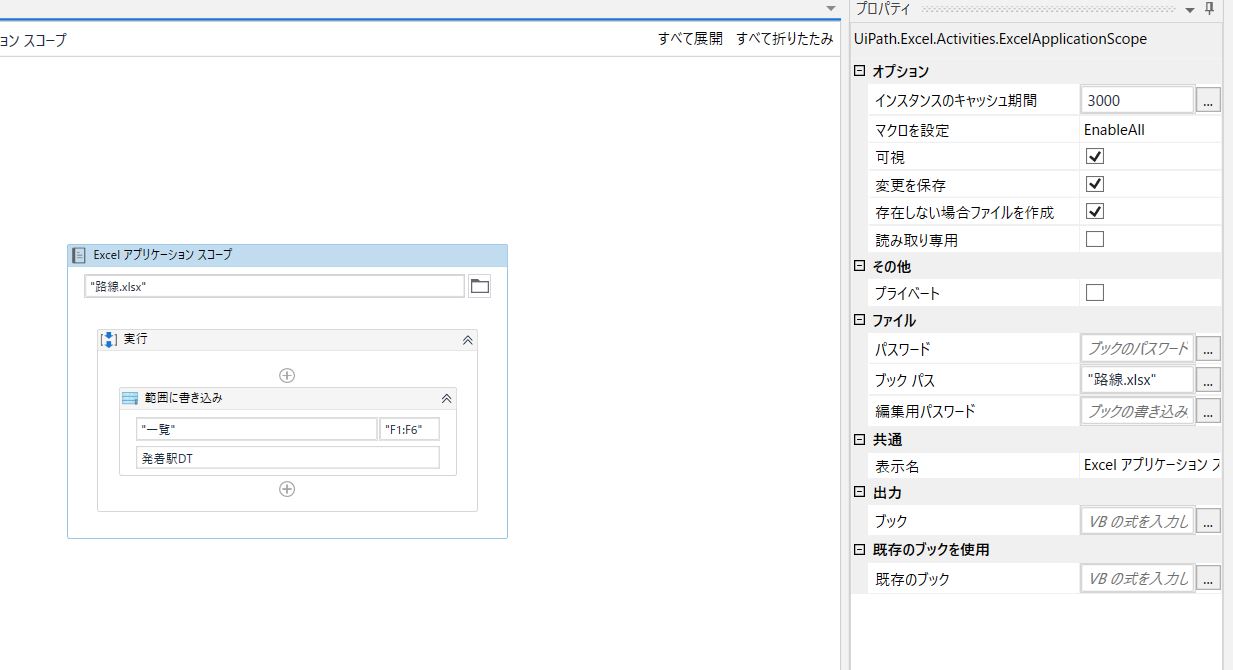
![全体フロー](https://global.discourse-cdn.com/uipath/original/3X/2/1/211a2c7923a68ae7a1902930cc2108417f4a06f6.jpeg) ![アクティビティ１](https://global.discourse-cdn.com/uipath/original/3X/3/2/326211d604e5046313aacfd52a0dfbbb9404020c.jpeg) ![アクティビティ２](https://global.discourse-cdn.com/uipath/original/3X/f/d/fd19add32eb1cb570980f89106ed8ac3a53d3ca9.jpeg) ![アクティビティ３](https://global.discourse-cdn.com/uipath/original/3X/7/9/790da328b8dfbba38282ac7a8b62f969e23437c7.jpeg) ![アクティビティ４](https://global.discourse-cdn.com/uipath/original/3X/0/7/07ff2a8a72b80e357add2ef168cbbd3b006d2f39.jpeg)  
 ![繰り返しの中のWebレコ―ディング](https://global.discourse-cdn.com/uipath/original/3X/7/6/7674848117816fde0828254beb6c058c9b7fca81.jpeg)

今までWinActorを使ってきて最近UiPath Community Editionの勉強を始めた者です。  
（つまりUiPath初心者です）

やりたいことは以下の通りです。

目的：Excelから発駅と着駅を読み込んで、ジョルダン乗換案内に入力し、6か月通勤定期代金をExcelに書き込みたい。

具体的なワークフロー作成イメージは下記のとおりです。

1. Excelアプリケーションスコープの 範囲を読み込み で、excelファイルを読み込み  
↓
2. 繰り返し各行で 変数「出発」「到着」にDataTable変数の値を代入  
↓
3. Web自動レコーディングで作成したWebアクティビティで変数「出発」「到着」の値をWebに自動入力  
↓
4. 検索ボタンー安い順ー定期代 のボタンを順番にクリックすると、添付画像が表示されます。  
↓
5. 添付画像の74,310円の中の"74310"をテキストデータとして変数「定期代」に取得  
↓
6. 変数「定期代」の値をExcelに書き出す。

全体のフローと5個のアクティビティのプロパティを添付画像で付けましたが、だいたい合っていますか？

個人的に気になるのは以下の3点です。  
1.最後のExcelアプリケーションスコープアクティビティでDataTable変数から「定期代」をExcelに書き込むところで、F1:F6に範囲指定して書き込んでいるが、きとんと定期代が書き込めているか？  
2.Do文のないブラウザにアタッチ・アクティビティでジョルダン乗換案内ページが開けるか？  
3.繰り返しの中でジョルダン乗換案内のページを開いているが、ブラウザの複数オープンにならないか？

詳しい方、ご指南をお願いします。

---

<div class="post-metadata">

**Author:** ![gorby](https://sea2.discourse-cdn.com/uipath/user_avatar/forum.uipath.com/gorby/32/543563_2.png) [@gorby](https://forum.uipath.com/u/gorby)\
**Post date:** [November 5, 2020, 7:43am UTC](https://forum.uipath.com/t/topic/267097/2 "2020-11-05T07:43:59Z")

</div>

![run](https://global.discourse-cdn.com/uipath/original/3X/e/3/e386881839d86fe81c191968174259d741f20435.jpeg)  
 ![tokyo](https://global.discourse-cdn.com/uipath/original/3X/2/3/23f42bb3e359934be9aa9ec3e9e23b4de8fcc310.jpeg)  
すみません。投稿を修正できなかったので、ここで追加質問させてください。  
上記ワークフローを実行すると、表示中のテキストを取得で添付のエラーが出ました。原因は何でしょうか？ プロパティも添付画像で付けました。

---

<div class="post-metadata">

**Author:** ![cheez\_RPA](https://sea2.discourse-cdn.com/uipath/user_avatar/forum.uipath.com/cheez_rpa/32/278069_2.png) [@cheez\_RPA](https://forum.uipath.com/u/cheez_RPA)\
**Post date:** [November 5, 2020, 9:30am UTC](https://forum.uipath.com/t/topic/267097/3 "2020-11-05T09:30:55Z")

</div>

アプリケーションとの接続の仕組みのところで問題が発生していたようです。  
まず、再現するかどうか確認していただけますか？再現するようであれば、別の手法を検討する必要があるかもしれません。

---

<div class="post-metadata">

**Author:** ![gorby](https://sea2.discourse-cdn.com/uipath/user_avatar/forum.uipath.com/gorby/32/543563_2.png) [@gorby](https://forum.uipath.com/u/gorby)\
**Post date:** [November 6, 2020, 1:02am UTC](https://forum.uipath.com/t/topic/267097/4 "2020-11-06T01:02:00Z")

</div>

再現しました。止まったところは、同じ「表示中のテキストを取得」です。ログ（下記参照）を見ましたが、素人にはチンプンカンプンですね。。。  
引き続きサポートをお願いいたします。別の手法でないとダメでしょうか？  
ーー＜ログはここから＞ーーーーー  
20.10.2+Branch.master.Sha.cf481ddc1ae94ab83e743f85d96fbfeca8fc705c

ソース: 表示中のテキストを取得 ‘TD’

メッセージ: Could not find the UI element corresponding to this selector:  
[1]   
[2]   
[3]

Search failed at selector tag:  
[1]

The closest matches found are:  
[68%]   
[68%]   
[19%]   
[9%]   
[0%]   
[0%]   
[0%]

例外の型: UiPath.Core.SelectorNotFoundException

RemoteException wrapping UiPath.Core.SelectorNotFoundException: Could not find the UI element corresponding to this selector:  
[1]   
[2]   
[3]

Search failed at selector tag:  
[1]

The closest matches found are:  
[68%]   
[68%]   
[19%]   
[9%]   
[0%]   
[0%]   
[0%]   
場所 UiPath.Core.Activities.ObsoleteTaskAsyncCodeActivity`1.EndExecute(AsyncCodeActivityContext context, IAsyncResult result)  
場所 System.Activities.AsyncCodeActivity.System.Activities.IAsyncCodeActivity.FinishExecution(AsyncCodeActivityContext context, IAsyncResult result)  
場所 System.Activities.AsyncCodeActivity.CompleteAsyncCodeActivityData.CompleteAsyncCodeActivityWorkItem.Execute(ActivityExecutor executor, BookmarkManager bookmarkManager)  
ーー＜ログはここまで＞ーーーーー

---

<div class="post-metadata">

**Author:** ![cheez\_RPA](https://sea2.discourse-cdn.com/uipath/user_avatar/forum.uipath.com/cheez_rpa/32/278069_2.png) [@cheez\_RPA](https://forum.uipath.com/u/cheez_RPA)\
**Post date:** [November 6, 2020, 3:14am UTC](https://forum.uipath.com/t/topic/267097/5 "2020-11-06T03:14:16Z")

</div>

エラーのメッセージが変化していますので、当初のエラーの再現ではありませんね。  
貼り付けていただいたエラーは、「セレクターが見つからない」ことによるエラーと記載されています。

お手数かと思いますが、エラーメッセージの一部が消えてしまっているので、次のようにして貼り付けていただけませんか。

- ````` （ ` を3つ連続） を入力したあとに改行する
- その状態でログを貼り付ける
- その状態で改行し、さらに ````` （ ` を3つ連続） を入力する

---

<div class="post-metadata">

**Author:** ![cheez\_RPA](https://sea2.discourse-cdn.com/uipath/user_avatar/forum.uipath.com/cheez_rpa/32/278069_2.png) [@cheez\_RPA](https://forum.uipath.com/u/cheez_RPA)\
**Post date:** [November 6, 2020, 8:34am UTC](https://forum.uipath.com/t/topic/267097/7 "2020-11-06T08:34:21Z")

</div>

すみません、上手く貼り付けられていないみたいです。「,」（カンマ）ではなく、「`」です（Shift + @ で入力できます。出てこなければ私のポストからコピーしてください）。

---

<div class="post-metadata">

**Author:** ![cheez\_RPA](https://sea2.discourse-cdn.com/uipath/user_avatar/forum.uipath.com/cheez_rpa/32/278069_2.png) [@cheez\_RPA](https://forum.uipath.com/u/cheez_RPA)\
**Post date:** [November 6, 2020, 9:07am UTC](https://forum.uipath.com/t/topic/267097/9 "2020-11-06T09:07:34Z")

</div>

たびたびありがとうございます。ですが、表示されておりません（今度はシングルクォートになっていました）。難しいようでしたら画像にしていただくか、該当部分を抜き出したテキストファイルをアップロードいただければと思います。  
なお正しく入力できているかどうかは、入力欄の右側にあるプレビューでも確認いただけると思いますので、送信前にいちどご確認ください。

---

<div class="post-metadata">

**Author:** ![gorby](https://sea2.discourse-cdn.com/uipath/user_avatar/forum.uipath.com/gorby/32/543563_2.png) [@gorby](https://forum.uipath.com/u/gorby)\
**Post date:** [November 6, 2020, 2:29pm UTC](https://forum.uipath.com/t/topic/267097/10 "2020-11-06T14:29:01Z")

</div>

```auto

09:57:06.4771 => [ERROR] [UiPath.Studio.App.Logging.OutputLogger] [28] 表示中のテキストを取得 'TD': Could not find the UI element corresponding to this selector:
[1] <html app='chrome.exe' title='【定期代】自由が丘（東急）→豊洲｜乗換案内｜ジョルダン'/>
[2] <webctrl parentid='bR1' tag='TABLE'/>
[3] <webctrl isleaf='1' tableCol='4' tableRow='5' tag='TD'/>

Search failed at selector tag:
[1] <html app='chrome.exe' title='【定期代】自由が丘（東急）→豊洲｜乗換案内｜ジョルダン'/>

The closest matches found are:
[68%] <html app='chrome.exe' title='恵比寿（東京） → 豊洲｜乗換案内｜ジョルダン'/>
[68%] <html app='chrome.exe' title='恵比寿（東京） → 豊洲｜乗換案内｜ジョルダン'/>
[19%] <html app='chrome.exe' title='ジョルダン乗換案内chrome - OneDrive'/>
[9%] <html app='chrome.exe' title='路線検索ソフトで定期代金をスクレイピングしたい。 - 日本 / フォーラム - UiPath Community Forum'/>
[0%] <html app='chrome.exe' title='UiPath Academy'/>
[0%] <html app='chrome.exe' title='UiPath Academy'/>
[0%] <html app='chrome.exe' title='Microsoft Office ホーム'/>
09:57:06.5276 => [ERROR] [UiPath.Studio.App.Logging.OutputLogger] [1] RemoteException wrapping UiPath.Core.SelectorNotFoundException: Could not find the UI element corresponding to this selector:
[1] <html app='chrome.exe' title='【定期代】自由が丘（東急）→豊洲｜乗換案内｜ジョルダン'/>
[2] <webctrl parentid='bR1' tag='TABLE'/>
[3] <webctrl isleaf='1' tableCol='4' tableRow='5' tag='TD'/>

Search failed at selector tag:
[1] <html app='chrome.exe' title='【定期代】自由が丘（東急）→豊洲｜乗換案内｜ジョルダン'/>

The closest matches found are:
[68%] <html app='chrome.exe' title='恵比寿（東京） → 豊洲｜乗換案内｜ジョルダン'/>
[68%] <html app='chrome.exe' title='恵比寿（東京） → 豊洲｜乗換案内｜ジョルダン'/>
[19%] <html app='chrome.exe' title='ジョルダン乗換案内chrome - OneDrive'/>
[9%] <html app='chrome.exe' title='路線検索ソフトで定期代金をスクレイピングしたい。 - 日本 / フォーラム - UiPath Community Forum'/>
[0%] <html app='chrome.exe' title='UiPath Academy'/>
[0%] <html app='chrome.exe' title='UiPath Academy'/>
[0%] <html app='chrome.exe' title='Microsoft Office ホーム'/> 
   場所 UiPath.Core.Activities.ObsoleteTaskAsyncCodeActivity`1.EndExecute(AsyncCodeActivityContext context, IAsyncResult result)
   場所 System.Activities.AsyncCodeActivity.System.Activities.IAsyncCodeActivity.FinishExecution(AsyncCodeActivityContext context, IAsyncResult result)
   場所 System.Activities.AsyncCodeActivity.CompleteAsyncCodeActivityData.CompleteAsyncCodeActivityWorkItem.Execute(ActivityExecutor executor, BookmarkManager bookmarkManager)
15:21:20.9506 => [ERROR] [UiPath.Studio.App.Logging.OutputLogger] [3] 表示中のテキストを取得 'TD': Could not find the UI element corresponding to this selector:
[1] <html app='chrome.exe' title='【定期代】自由が丘（東急）→豊洲｜乗換案内｜ジョルダン'/>
[2] <webctrl parentid='bR1' tag='TABLE'/>
[3] <webctrl isleaf='1' tableCol='4' tableRow='5' tag='TD'/>

Search failed at selector tag:
[1] <html app='chrome.exe' title='【定期代】自由が丘（東急）→豊洲｜乗換案内｜ジョルダン'/>

The closest matches found are:
[68%] <html app='chrome.exe' title='恵比寿（東京） → 豊洲｜乗換案内｜ジョルダン'/>
[9%] <html app='chrome.exe' title='路線検索ソフトで定期代金をスクレイピングしたい。 - 日本 / フォーラム - UiPath Community Forum'/>
[6%] <html app='chrome.exe' title='メール - Koji Hirata（平田 幸路）(Group) - Outlook'/>
[5%] <html app='chrome.exe' title='原稿案 - OneDrive'/>
[5%] <html app='chrome.exe' title='原稿案 - OneDrive'/>
[3%] <html app='chrome.exe' title='PPTX ファイル ビューアー | Microsoft Teams'/>
[3%] <html app='chrome.exe' title='20201021 今後の審議の進め方案.docx - Microsoft Word Online'/>
[0%] <html app='chrome.exe' title='＃３会議 | Microsoft Teams'/>
[0%] <html app='chrome.exe' title='Microsoft Office ホーム'/>
[0%] <html app='chrome.exe' title='20200715 Chapter 01 WinActor理解編.docx - Microsoft Word Online'/>
15:21:20.9954 => [ERROR] [UiPath.Studio.App.Logging.OutputLogger] [1] RemoteException wrapping UiPath.Core.SelectorNotFoundException: Could not find the UI element corresponding to this selector:
[1] <html app='chrome.exe' title='【定期代】自由が丘（東急）→豊洲｜乗換案内｜ジョルダン'/>
[2] <webctrl parentid='bR1' tag='TABLE'/>
[3] <webctrl isleaf='1' tableCol='4' tableRow='5' tag='TD'/>

Search failed at selector tag:
[1] <html app='chrome.exe' title='【定期代】自由が丘（東急）→豊洲｜乗換案内｜ジョルダン'/>

The closest matches found are:
[68%] <html app='chrome.exe' title='恵比寿（東京） → 豊洲｜乗換案内｜ジョルダン'/>
[9%] <html app='chrome.exe' title='路線検索ソフトで定期代金をスクレイピングしたい。 - 日本 / フォーラム - UiPath Community Forum'/>
[6%] <html app='chrome.exe' title='メール - Koji Hirata（平田 幸路）(Group) - Outlook'/>
[5%] <html app='chrome.exe' title='原稿案 - OneDrive'/>
[5%] <html app='chrome.exe' title='原稿案 - OneDrive'/>
[3%] <html app='chrome.exe' title='PPTX ファイル ビューアー | Microsoft Teams'/>
[3%] <html app='chrome.exe' title='20201021 今後の審議の進め方案.docx - Microsoft Word Online'/>
[0%] <html app='chrome.exe' title='＃３会議 | Microsoft Teams'/>
[0%] <html app='chrome.exe' title='Microsoft Office ホーム'/>
[0%] <html app='chrome.exe' title='20200715 Chapter 01 WinActor理解編.docx - Microsoft Word Online'/> 
   場所 UiPath.Core.Activities.ObsoleteTaskAsyncCodeActivity`1.EndExecute(AsyncCodeActivityContext context, IAsyncResult result)
   場所 System.Activities.AsyncCodeActivity.System.Activities.IAsyncCodeActivity.FinishExecution(AsyncCodeActivityContext context, IAsyncResult result)
   場所 System.Activities.AsyncCodeActivity.CompleteAsyncCodeActivityData.CompleteAsyncCodeActivityWorkItem.Execute(ActivityExecutor executor, BookmarkManager bookmarkManager)

```

---

<div class="post-metadata">

**Author:** ![cheez\_RPA](https://sea2.discourse-cdn.com/uipath/user_avatar/forum.uipath.com/cheez_rpa/32/278069_2.png) [@cheez\_RPA](https://forum.uipath.com/u/cheez_RPA)\
**Post date:** [November 7, 2020, 1:43am UTC](https://forum.uipath.com/t/topic/267097/11 "2020-11-07T01:43:46Z")

</div>

ありがとうございます。今度は正しく内容が確認できました。  
過去にセレクターを取得したとき「自由が丘→豊洲」の経路の検索結果を利用してセレクターを取得したようですが、その次に検索したときに検索した経路が上記と異なる（恵比寿→豊洲）ことで、同じタイトルのページが見つけられず、それが「セレクターが見つからない」というエラーになって表示されていると思われます。

対象のセレクターの1行目の `title` 属性を、下記のように変更してみてください。こうすれば、タイトルがどのような状態でも（=検索した経路がどれであっても）正しく要素取得できるようになると思います（私の手元で確認したわけではないですが）。

```auto
title="*｜乗換案内｜ジョルダン"

```

---

<div class="post-metadata">

**Author:** ![cheez\_RPA](https://sea2.discourse-cdn.com/uipath/user_avatar/forum.uipath.com/cheez_rpa/32/278069_2.png) [@cheez\_RPA](https://forum.uipath.com/u/cheez_RPA)\
**Post date:** [November 9, 2020, 1:28am UTC](https://forum.uipath.com/t/topic/267097/12 "2020-11-09T01:28:02Z")

</div>

こちらのご質問ですが、問題やご不明点は解消されておりますでしょうか。もし解消されていましたら、解消のきっかけとなった投稿に対して「解決策」（Solution）のマークを付与いただきますようお願い致します。  
他の方がこの質問にアクセスした場合に、速やかに解決策を見つけることが出来ます。ご理解とご協力をお願いします。

---

<div class="post-metadata">

**Author:** ![gorby](https://sea2.discourse-cdn.com/uipath/user_avatar/forum.uipath.com/gorby/32/543563_2.png) [@gorby](https://forum.uipath.com/u/gorby)\
**Post date:** [November 9, 2020, 2:05am UTC](https://forum.uipath.com/t/topic/267097/13 "2020-11-09T02:05:21Z")

</div>

さすがに、私も土日に働く習慣はありません。もうしばらくお時間をください。

---

<div class="post-metadata">

**Author:** ![cheez\_RPA](https://sea2.discourse-cdn.com/uipath/user_avatar/forum.uipath.com/cheez_rpa/32/278069_2.png) [@cheez\_RPA](https://forum.uipath.com/u/cheez_RPA)\
**Post date:** [November 9, 2020, 2:21am UTC](https://forum.uipath.com/t/topic/267097/14 "2020-11-09T02:21:45Z")

</div>

お手数をおかけします。急かすような形になってしまい申し訳ありません。他のトピックについてもチェックされていないものが散見されましたので、確認のために投稿させていただきました。

ちなみにこちらのフォーラムは「コミュニティ」として有志が無償で活動しているものですので、ご認識いただけましたら幸いです。

---

<div class="post-metadata">

**Author:** ![gorby](https://sea2.discourse-cdn.com/uipath/user_avatar/forum.uipath.com/gorby/32/543563_2.png) [@gorby](https://forum.uipath.com/u/gorby)\
**Post date:** [November 9, 2020, 2:32am UTC](https://forum.uipath.com/t/topic/267097/15 "2020-11-09T02:32:28Z")

</div>

このCommunity siteに解決したら「解決策」（Solution）をマークするルールがあることを知らなかったため、マークしておりませんでした。解決済みのものはマークを終えましたので、確認をお願いします。

---

<div class="post-metadata">

**Author:** ![gorby](https://sea2.discourse-cdn.com/uipath/user_avatar/forum.uipath.com/gorby/32/543563_2.png) [@gorby](https://forum.uipath.com/u/gorby)\
**Post date:** [November 10, 2020, 5:42am UTC](https://forum.uipath.com/t/topic/267097/16 "2020-11-10T05:42:46Z")

</div>

ご指示どおり、対象のセレクターの1行目の `title` 属性を、title="\*｜乗換案内｜ジョルダン"に変更したら、同じアクティビティで下記のログを吐き出して止まりました。お手数ですが、引き続きご支援をお願いいたします。

---

<div class="post-metadata">

**Author:** ![gorby](https://sea2.discourse-cdn.com/uipath/user_avatar/forum.uipath.com/gorby/32/543563_2.png) [@gorby](https://forum.uipath.com/u/gorby)\
**Post date:** [November 10, 2020, 5:43am UTC](https://forum.uipath.com/t/topic/267097/17 "2020-11-10T05:43:05Z")

</div>

```auto

13:36:39.1106 => [WARN] [UiPath.Studio.App.Logging.OutputLogger] [24] NU3034: Package 'RestSharp 105.0.1' from source 'https://api.nuget.org/v3/index.json': This package is signed but not by a trusted signer.
13:36:39.1106 => [WARN] [UiPath.Studio.App.Logging.OutputLogger] [24] NU3034: Package 'AvalonEdit 4.4.2.9744' from source 'https://api.nuget.org/v3/index.json': This package is signed but not by a trusted signer.
13:36:39.1106 => [WARN] [UiPath.Studio.App.Logging.OutputLogger] [24] NU3034: Package 'Newtonsoft.Json 8.0.3' from source 'https://api.nuget.org/v3/index.json': This package is signed but not by a trusted signer.
13:36:44.4428 => [ERROR] [UiPath.Studio.exe] [78] $LoadAssembly: UiPath.UIAutomationNext, Version=20.10.6.0, Culture=neutral, PublicKeyToken=null: System.IO.FileNotFoundException: ファイルまたはアセンブリ 'Emgu.CV.World, Version=3.4.1.2984, Culture=neutral, PublicKeyToken=null'、またはその依存関係の 1 つが読み込めませんでした。指定されたファイルが見つかりません。
ファイル名 'Emgu.CV.World, Version=3.4.1.2984, Culture=neutral, PublicKeyToken=null' です。'Emgu.CV.World, Version=3.4.1.2984, Culture=neutral, PublicKeyToken=null'
   場所 System.RuntimeTypeHandle.GetDeclaringType(RuntimeType type)
   場所 System.RuntimeType.RuntimeTypeCache.GetEnclosingType()
   場所 System.RuntimeType.get_DeclaringType()
   場所 ActiproSoftware.Text.Languages.DotNet.Reflection.Implementation.BinaryAssemblyLoader.#gFc(Type #4Ub)
   場所 ActiproSoftware.Text.Languages.DotNet.Reflection.Implementation.BinaryAssemblyLoader.<>c.#yNk(Type #gi)
   場所 System.Linq.Enumerable.WhereArrayIterator`1.MoveNext()
   場所 ActiproSoftware.Text.Languages.DotNet.Reflection.Implementation.BinaryAssemblyLoader.#XEc(Assembly #sxc)
   場所 ActiproSoftware.Text.Languages.DotNet.Reflection.Implementation.BinaryAssemblyLoader.#iFc(Assembly #sxc)
   場所 ActiproSoftware.Text.Languages.DotNet.Reflection.Implementation.AssemblyRepositoryBase.#30j(Assembly #sxc, IAssemblyName #4tc, IBinaryAssemblyMetadata #RDb)
   場所 ActiproSoftware.Text.Languages.DotNet.Reflection.Implementation.AssemblyRepositoryBase.Create(Assembly assembly, IAssemblyName assemblyName, IBinaryAssemblyMetadata metadata)
   場所 ActiproSoftware.Text.Languages.DotNet.Reflection.Implementation.FileBasedAssemblyRepository.Create(Assembly assembly, IAssemblyName assemblyName, IBinaryAssemblyMetadata metadata)
   場所 ActiproSoftware.Text.Languages.DotNet.Reflection.Implementation.FileBasedAssemblyRepository.GetOrCreate(Assembly assembly, IAssemblyName assemblyName, String location)
   場所 ActiproSoftware.Text.Languages.DotNet.Reflection.Implementation.AssemblyRepositoryBase.#uBh(Assembly #sxc, IAssemblyName #4tc, String #bVe)
   場所 ActiproSoftware.Text.Languages.DotNet.Reflection.Implementation.AssemblyRepositoryBase.Load(Assembly assembly, IAssemblyName assemblyName)
   場所 ActiproSoftware.Text.Languages.DotNet.Reflection.Implementation.AssemblyRepositoryBase.Load(String fullName)
   場所 UiPath.Studio.Plugin.Workflow.ExpressionEditor.SyntaxService.LoadAssembly(LoadIntellisenseAssembliesContext context, String assemblyName, CancellationToken cancellationToken)

警告: アセンブリ バインドのログ記録がオフにされています。
アセンブリ バインドのエラー ログを有効にするには、レジストリ値 [HKLM\Software\Microsoft\Fusion!EnableLog] (DWORD) を 1 に設定してください。
注意: アセンブリ バインドのエラー ログに関連するパフォーマンス ペナルティがあります。
この機能をオフにするには、レジストリ値 [HKLM\Software\Microsoft\Fusion!EnableLog] を削除します。
, HResult -2147024894
13:36:44.5296 => [ERROR] [UiPath.Studio.exe] [78] $LoadAssembly: UiPath.UIAutomationNext, Version=20.10.6.0, Culture=neutral, PublicKeyToken=null: System.IO.FileNotFoundException: ファイルまたはアセンブリ 'Emgu.CV.World, Version=3.4.1.2984, Culture=neutral, PublicKeyToken=null'、またはその依存関係の 1 つが読み込めませんでした。指定されたファイルが見つかりません。
ファイル名 'Emgu.CV.World, Version=3.4.1.2984, Culture=neutral, PublicKeyToken=null' です。'Emgu.CV.World, Version=3.4.1.2984, Culture=neutral, PublicKeyToken=null'
   場所 System.RuntimeTypeHandle.GetDeclaringType(RuntimeType type)
   場所 System.RuntimeType.RuntimeTypeCache.GetEnclosingType()
   場所 System.RuntimeType.get_DeclaringType()
   場所 ActiproSoftware.Text.Languages.DotNet.Reflection.Implementation.BinaryAssemblyLoader.#gFc(Type #4Ub)
   場所 ActiproSoftware.Text.Languages.DotNet.Reflection.Implementation.BinaryAssemblyLoader.<>c.#yNk(Type #gi)
   場所 System.Linq.Enumerable.WhereArrayIterator`1.MoveNext()
   場所 ActiproSoftware.Text.Languages.DotNet.Reflection.Implementation.BinaryAssemblyLoader.#XEc(Assembly #sxc)
   場所 ActiproSoftware.Text.Languages.DotNet.Reflection.Implementation.BinaryAssemblyLoader.#iFc(Assembly #sxc)
   場所 ActiproSoftware.Text.Languages.DotNet.Reflection.Implementation.AssemblyRepositoryBase.#30j(Assembly #sxc, IAssemblyName #4tc, IBinaryAssemblyMetadata #RDb)
   場所 ActiproSoftware.Text.Languages.DotNet.Reflection.Implementation.AssemblyRepositoryBase.Create(Assembly assembly, IAssemblyName assemblyName, IBinaryAssemblyMetadata metadata)
   場所 ActiproSoftware.Text.Languages.DotNet.Reflection.Implementation.FileBasedAssemblyRepository.Create(Assembly assembly, IAssemblyName assemblyName, IBinaryAssemblyMetadata metadata)
   場所 ActiproSoftware.Text.Languages.DotNet.Reflection.Implementation.FileBasedAssemblyRepository.GetOrCreate(Assembly assembly, IAssemblyName assemblyName, String location)
   場所 ActiproSoftware.Text.Languages.DotNet.Reflection.Implementation.AssemblyRepositoryBase.#uBh(Assembly #sxc, IAssemblyName #4tc, String #bVe)
   場所 ActiproSoftware.Text.Languages.DotNet.Reflection.Implementation.AssemblyRepositoryBase.Load(Assembly assembly, IAssemblyName assemblyName)
   場所 ActiproSoftware.Text.Languages.DotNet.Reflection.Implementation.AssemblyRepositoryBase.Load(String fullName)
   場所 UiPath.Studio.Plugin.Workflow.ExpressionEditor.SyntaxService.LoadAssembly(LoadIntellisenseAssembliesContext context, String assemblyName, CancellationToken cancellationToken)

警告: アセンブリ バインドのログ記録がオフにされています。
アセンブリ バインドのエラー ログを有効にするには、レジストリ値 [HKLM\Software\Microsoft\Fusion!EnableLog] (DWORD) を 1 に設定してください。
注意: アセンブリ バインドのエラー ログに関連するパフォーマンス ペナルティがあります。
この機能をオフにするには、レジストリ値 [HKLM\Software\Microsoft\Fusion!EnableLog] を削除します。
, HResult -2147024894
13:36:45.5127 => [ERROR] [UiPath.Studio.exe] [72] $LoadAssembly: UiPath.UIAutomationNext, Version=20.10.6.0, Culture=neutral, PublicKeyToken=null: System.IO.FileNotFoundException: ファイルまたはアセンブリ 'Emgu.CV.World, Version=3.4.1.2984, Culture=neutral, PublicKeyToken=null'、またはその依存関係の 1 つが読み込めませんでした。指定されたファイルが見つかりません。
ファイル名 'Emgu.CV.World, Version=3.4.1.2984, Culture=neutral, PublicKeyToken=null' です。'Emgu.CV.World, Version=3.4.1.2984, Culture=neutral, PublicKeyToken=null'
   場所 System.RuntimeTypeHandle.GetDeclaringType(RuntimeType type)
   場所 System.RuntimeType.RuntimeTypeCache.GetEnclosingType()
   場所 System.RuntimeType.get_DeclaringType()
   場所 ActiproSoftware.Text.Languages.DotNet.Reflection.Implementation.BinaryAssemblyLoader.#gFc(Type #4Ub)
   場所 ActiproSoftware.Text.Languages.DotNet.Reflection.Implementation.BinaryAssemblyLoader.<>c.#yNk(Type #gi)
   場所 System.Linq.Enumerable.WhereArrayIterator`1.MoveNext()
   場所 ActiproSoftware.Text.Languages.DotNet.Reflection.Implementation.BinaryAssemblyLoader.#XEc(Assembly #sxc)
   場所 ActiproSoftware.Text.Languages.DotNet.Reflection.Implementation.BinaryAssemblyLoader.#iFc(Assembly #sxc)
   場所 ActiproSoftware.Text.Languages.DotNet.Reflection.Implementation.AssemblyRepositoryBase.#30j(Assembly #sxc, IAssemblyName #4tc, IBinaryAssemblyMetadata #RDb)
   場所 ActiproSoftware.Text.Languages.DotNet.Reflection.Implementation.AssemblyRepositoryBase.Create(Assembly assembly, IAssemblyName assemblyName, IBinaryAssemblyMetadata metadata)
   場所 ActiproSoftware.Text.Languages.DotNet.Reflection.Implementation.FileBasedAssemblyRepository.Create(Assembly assembly, IAssemblyName assemblyName, IBinaryAssemblyMetadata metadata)
   場所 ActiproSoftware.Text.Languages.DotNet.Reflection.Implementation.FileBasedAssemblyRepository.GetOrCreate(Assembly assembly, IAssemblyName assemblyName, String location)
   場所 ActiproSoftware.Text.Languages.DotNet.Reflection.Implementation.AssemblyRepositoryBase.#uBh(Assembly #sxc, IAssemblyName #4tc, String #bVe)
   場所 ActiproSoftware.Text.Languages.DotNet.Reflection.Implementation.AssemblyRepositoryBase.Load(Assembly assembly, IAssemblyName assemblyName)
   場所 ActiproSoftware.Text.Languages.DotNet.Reflection.Implementation.AssemblyRepositoryBase.Load(String fullName)
   場所 UiPath.Studio.Plugin.Workflow.ExpressionEditor.SyntaxService.LoadAssembly(LoadIntellisenseAssembliesContext context, String assemblyName, CancellationToken cancellationToken)

警告: アセンブリ バインドのログ記録がオフにされています。
アセンブリ バインドのエラー ログを有効にするには、レジストリ値 [HKLM\Software\Microsoft\Fusion!EnableLog] (DWORD) を 1 に設定してください。
注意: アセンブリ バインドのエラー ログに関連するパフォーマンス ペナルティがあります。
この機能をオフにするには、レジストリ値 [HKLM\Software\Microsoft\Fusion!EnableLog] を削除します。
, HResult -2147024894
13:36:45.6018 => [ERROR] [UiPath.Studio.exe] [72] $LoadAssembly: UiPath.CV, Version=20.10.6.0, Culture=neutral, PublicKeyToken=null: System.IO.FileNotFoundException: ファイルまたはアセンブリ 'Emgu.CV.World, Version=3.4.1.2984, Culture=neutral, PublicKeyToken=null'、またはその依存関係の 1 つが読み込めませんでした。指定されたファイルが見つかりません。
ファイル名 'Emgu.CV.World, Version=3.4.1.2984, Culture=neutral, PublicKeyToken=null' です。'Emgu.CV.World, Version=3.4.1.2984, Culture=neutral, PublicKeyToken=null'
   場所 System.RuntimeTypeHandle.GetDeclaringType(RuntimeType type)
   場所 System.RuntimeType.RuntimeTypeCache.GetEnclosingType()
   場所 System.RuntimeType.get_DeclaringType()
   場所 ActiproSoftware.Text.Languages.DotNet.Reflection.Implementation.BinaryAssemblyLoader.#gFc(Type #4Ub)
   場所 ActiproSoftware.Text.Languages.DotNet.Reflection.Implementation.BinaryAssemblyLoader.<>c.#yNk(Type #gi)
   場所 System.Linq.Enumerable.WhereArrayIterator`1.MoveNext()
   場所 ActiproSoftware.Text.Languages.DotNet.Reflection.Implementation.BinaryAssemblyLoader.#XEc(Assembly #sxc)
   場所 ActiproSoftware.Text.Languages.DotNet.Reflection.Implementation.BinaryAssemblyLoader.#iFc(Assembly #sxc)
   場所 ActiproSoftware.Text.Languages.DotNet.Reflection.Implementation.AssemblyRepositoryBase.#30j(Assembly #sxc, IAssemblyName #4tc, IBinaryAssemblyMetadata #RDb)
   場所 ActiproSoftware.Text.Languages.DotNet.Reflection.Implementation.AssemblyRepositoryBase.Create(Assembly assembly, IAssemblyName assemblyName, IBinaryAssemblyMetadata metadata)
   場所 ActiproSoftware.Text.Languages.DotNet.Reflection.Implementation.FileBasedAssemblyRepository.Create(Assembly assembly, IAssemblyName assemblyName, IBinaryAssemblyMetadata metadata)
   場所 ActiproSoftware.Text.Languages.DotNet.Reflection.Implementation.FileBasedAssemblyRepository.GetOrCreate(Assembly assembly, IAssemblyName assemblyName, String location)
   場所 ActiproSoftware.Text.Languages.DotNet.Reflection.Implementation.AssemblyRepositoryBase.#uBh(Assembly #sxc, IAssemblyName #4tc, String #bVe)
   場所 ActiproSoftware.Text.Languages.DotNet.Reflection.Implementation.AssemblyRepositoryBase.Load(Assembly assembly, IAssemblyName assemblyName)
   場所 ActiproSoftware.Text.Languages.DotNet.Reflection.Implementation.AssemblyRepositoryBase.Load(String fullName)
   場所 UiPath.Studio.Plugin.Workflow.ExpressionEditor.SyntaxService.LoadAssembly(LoadIntellisenseAssembliesContext context, String assemblyName, CancellationToken cancellationToken)

警告: アセンブリ バインドのログ記録がオフにされています。
アセンブリ バインドのエラー ログを有効にするには、レジストリ値 [HKLM\Software\Microsoft\Fusion!EnableLog] (DWORD) を 1 に設定してください。
注意: アセンブリ バインドのエラー ログに関連するパフォーマンス ペナルティがあります。
この機能をオフにするには、レジストリ値 [HKLM\Software\Microsoft\Fusion!EnableLog] を削除します。
, HResult -2147024894
13:36:45.6356 => [ERROR] [UiPath.Studio.exe] [72] $LoadAssembly: UiPath.UIAutomationNext, Version=20.10.6.0, Culture=neutral, PublicKeyToken=null: System.IO.FileNotFoundException: ファイルまたはアセンブリ 'Emgu.CV.World, Version=3.4.1.2984, Culture=neutral, PublicKeyToken=null'、またはその依存関係の 1 つが読み込めませんでした。指定されたファイルが見つかりません。
ファイル名 'Emgu.CV.World, Version=3.4.1.2984, Culture=neutral, PublicKeyToken=null' です。'Emgu.CV.World, Version=3.4.1.2984, Culture=neutral, PublicKeyToken=null'
   場所 System.RuntimeTypeHandle.GetDeclaringType(RuntimeType type)
   場所 System.RuntimeType.RuntimeTypeCache.GetEnclosingType()
   場所 System.RuntimeType.get_DeclaringType()
   場所 ActiproSoftware.Text.Languages.DotNet.Reflection.Implementation.BinaryAssemblyLoader.#gFc(Type #4Ub)
   場所 ActiproSoftware.Text.Languages.DotNet.Reflection.Implementation.BinaryAssemblyLoader.<>c.#yNk(Type #gi)
   場所 System.Linq.Enumerable.WhereArrayIterator`1.MoveNext()
   場所 ActiproSoftware.Text.Languages.DotNet.Reflection.Implementation.BinaryAssemblyLoader.#XEc(Assembly #sxc)
   場所 ActiproSoftware.Text.Languages.DotNet.Reflection.Implementation.BinaryAssemblyLoader.#iFc(Assembly #sxc)
   場所 ActiproSoftware.Text.Languages.DotNet.Reflection.Implementation.AssemblyRepositoryBase.#30j(Assembly #sxc, IAssemblyName #4tc, IBinaryAssemblyMetadata #RDb)
   場所 ActiproSoftware.Text.Languages.DotNet.Reflection.Implementation.AssemblyRepositoryBase.Create(Assembly assembly, IAssemblyName assemblyName, IBinaryAssemblyMetadata metadata)
   場所 ActiproSoftware.Text.Languages.DotNet.Reflection.Implementation.FileBasedAssemblyRepository.Create(Assembly assembly, IAssemblyName assemblyName, IBinaryAssemblyMetadata metadata)
   場所 ActiproSoftware.Text.Languages.DotNet.Reflection.Implementation.FileBasedAssemblyRepository.GetOrCreate(Assembly assembly, IAssemblyName assemblyName, String location)
   場所 ActiproSoftware.Text.Languages.DotNet.Reflection.Implementation.AssemblyRepositoryBase.#uBh(Assembly #sxc, IAssemblyName #4tc, String #bVe)
   場所 ActiproSoftware.Text.Languages.DotNet.Reflection.Implementation.AssemblyRepositoryBase.Load(Assembly assembly, IAssemblyName assemblyName)
   場所 ActiproSoftware.Text.Languages.DotNet.Reflection.Implementation.AssemblyRepositoryBase.Load(String fullName)
   場所 UiPath.Studio.Plugin.Workflow.ExpressionEditor.SyntaxService.LoadAssembly(LoadIntellisenseAssembliesContext context, String assemblyName, CancellationToken cancellationToken)

警告: アセンブリ バインドのログ記録がオフにされています。
アセンブリ バインドのエラー ログを有効にするには、レジストリ値 [HKLM\Software\Microsoft\Fusion!EnableLog] (DWORD) を 1 に設定してください。
注意: アセンブリ バインドのエラー ログに関連するパフォーマンス ペナルティがあります。
この機能をオフにするには、レジストリ値 [HKLM\Software\Microsoft\Fusion!EnableLog] を削除します。
, HResult -2147024894
13:36:45.6712 => [ERROR] [UiPath.Studio.exe] [72] $LoadAssembly: UiPath.CV, Version=20.10.6.0, Culture=neutral, PublicKeyToken=null: System.IO.FileNotFoundException: ファイルまたはアセンブリ 'Emgu.CV.World, Version=3.4.1.2984, Culture=neutral, PublicKeyToken=null'、またはその依存関係の 1 つが読み込めませんでした。指定されたファイルが見つかりません。
ファイル名 'Emgu.CV.World, Version=3.4.1.2984, Culture=neutral, PublicKeyToken=null' です。'Emgu.CV.World, Version=3.4.1.2984, Culture=neutral, PublicKeyToken=null'
   場所 System.RuntimeTypeHandle.GetDeclaringType(RuntimeType type)
   場所 System.RuntimeType.RuntimeTypeCache.GetEnclosingType()
   場所 System.RuntimeType.get_DeclaringType()
   場所 ActiproSoftware.Text.Languages.DotNet.Reflection.Implementation.BinaryAssemblyLoader.#gFc(Type #4Ub)
   場所 ActiproSoftware.Text.Languages.DotNet.Reflection.Implementation.BinaryAssemblyLoader.<>c.#yNk(Type #gi)
   場所 System.Linq.Enumerable.WhereArrayIterator`1.MoveNext()
   場所 ActiproSoftware.Text.Languages.DotNet.Reflection.Implementation.BinaryAssemblyLoader.#XEc(Assembly #sxc)
   場所 ActiproSoftware.Text.Languages.DotNet.Reflection.Implementation.BinaryAssemblyLoader.#iFc(Assembly #sxc)
   場所 ActiproSoftware.Text.Languages.DotNet.Reflection.Implementation.AssemblyRepositoryBase.#30j(Assembly #sxc, IAssemblyName #4tc, IBinaryAssemblyMetadata #RDb)
   場所 ActiproSoftware.Text.Languages.DotNet.Reflection.Implementation.AssemblyRepositoryBase.Create(Assembly assembly, IAssemblyName assemblyName, IBinaryAssemblyMetadata metadata)
   場所 ActiproSoftware.Text.Languages.DotNet.Reflection.Implementation.FileBasedAssemblyRepository.Create(Assembly assembly, IAssemblyName assemblyName, IBinaryAssemblyMetadata metadata)
   場所 ActiproSoftware.Text.Languages.DotNet.Reflection.Implementation.FileBasedAssemblyRepository.GetOrCreate(Assembly assembly, IAssemblyName assemblyName, String location)
   場所 ActiproSoftware.Text.Languages.DotNet.Reflection.Implementation.AssemblyRepositoryBase.#uBh(Assembly #sxc, IAssemblyName #4tc, String #bVe)
   場所 ActiproSoftware.Text.Languages.DotNet.Reflection.Implementation.AssemblyRepositoryBase.Load(Assembly assembly, IAssemblyName assemblyName)
   場所 ActiproSoftware.Text.Languages.DotNet.Reflection.Implementation.AssemblyRepositoryBase.Load(String fullName)
   場所 UiPath.Studio.Plugin.Workflow.ExpressionEditor.SyntaxService.LoadAssembly(LoadIntellisenseAssembliesContext context, String assemblyName, CancellationToken cancellationToken)

警告: アセンブリ バインドのログ記録がオフにされています。
アセンブリ バインドのエラー ログを有効にするには、レジストリ値 [HKLM\Software\Microsoft\Fusion!EnableLog] (DWORD) を 1 に設定してください。
注意: アセンブリ バインドのエラー ログに関連するパフォーマンス ペナルティがあります。
この機能をオフにするには、レジストリ値 [HKLM\Software\Microsoft\Fusion!EnableLog] を削除します。
, HResult -2147024894
13:36:45.6854 => [ERROR] [UiPath.Studio.exe] [72] $LoadAssembly: UiPath.UIAutomationNext, Version=20.10.6.0, Culture=neutral, PublicKeyToken=null: System.IO.FileNotFoundException: ファイルまたはアセンブリ 'Emgu.CV.World, Version=3.4.1.2984, Culture=neutral, PublicKeyToken=null'、またはその依存関係の 1 つが読み込めませんでした。指定されたファイルが見つかりません。
ファイル名 'Emgu.CV.World, Version=3.4.1.2984, Culture=neutral, PublicKeyToken=null' です。'Emgu.CV.World, Version=3.4.1.2984, Culture=neutral, PublicKeyToken=null'
   場所 System.RuntimeTypeHandle.GetDeclaringType(RuntimeType type)
   場所 System.RuntimeType.RuntimeTypeCache.GetEnclosingType()
   場所 System.RuntimeType.get_DeclaringType()
   場所 ActiproSoftware.Text.Languages.DotNet.Reflection.Implementation.BinaryAssemblyLoader.#gFc(Type #4Ub)
   場所 ActiproSoftware.Text.Languages.DotNet.Reflection.Implementation.BinaryAssemblyLoader.<>c.#yNk(Type #gi)
   場所 System.Linq.Enumerable.WhereArrayIterator`1.MoveNext()
   場所 ActiproSoftware.Text.Languages.DotNet.Reflection.Implementation.BinaryAssemblyLoader.#XEc(Assembly #sxc)
   場所 ActiproSoftware.Text.Languages.DotNet.Reflection.Implementation.BinaryAssemblyLoader.#iFc(Assembly #sxc)
   場所 ActiproSoftware.Text.Languages.DotNet.Reflection.Implementation.AssemblyRepositoryBase.#30j(Assembly #sxc, IAssemblyName #4tc, IBinaryAssemblyMetadata #RDb)
   場所 ActiproSoftware.Text.Languages.DotNet.Reflection.Implementation.AssemblyRepositoryBase.Create(Assembly assembly, IAssemblyName assemblyName, IBinaryAssemblyMetadata metadata)
   場所 ActiproSoftware.Text.Languages.DotNet.Reflection.Implementation.FileBasedAssemblyRepository.Create(Assembly assembly, IAssemblyName assemblyName, IBinaryAssemblyMetadata metadata)
   場所 ActiproSoftware.Text.Languages.DotNet.Reflection.Implementation.FileBasedAssemblyRepository.GetOrCreate(Assembly assembly, IAssemblyName assemblyName, String location)
   場所 ActiproSoftware.Text.Languages.DotNet.Reflection.Implementation.AssemblyRepositoryBase.#uBh(Assembly #sxc, IAssemblyName #4tc, String #bVe)
   場所 ActiproSoftware.Text.Languages.DotNet.Reflection.Implementation.AssemblyRepositoryBase.Load(Assembly assembly, IAssemblyName assemblyName)
   場所 ActiproSoftware.Text.Languages.DotNet.Reflection.Implementation.AssemblyRepositoryBase.Load(String fullName)
   場所 UiPath.Studio.Plugin.Workflow.ExpressionEditor.SyntaxService.LoadAssembly(LoadIntellisenseAssembliesContext context, String assemblyName, CancellationToken cancellationToken)

警告: アセンブリ バインドのログ記録がオフにされています。
アセンブリ バインドのエラー ログを有効にするには、レジストリ値 [HKLM\Software\Microsoft\Fusion!EnableLog] (DWORD) を 1 に設定してください。
注意: アセンブリ バインドのエラー ログに関連するパフォーマンス ペナルティがあります。
この機能をオフにするには、レジストリ値 [HKLM\Software\Microsoft\Fusion!EnableLog] を削除します。
, HResult -2147024894
13:36:46.8978 => [ERROR] [UiPath.Studio.exe] [10] $LoadAssembly: Microsoft.Exchange.WebServices.Auth, Version=15.0.0.0, Culture=neutral, PublicKeyToken=31bf3856ad364e35: System.IO.FileNotFoundException: ファイルまたはアセンブリ 'Microsoft.IdentityModel, Version=3.5.0.0, Culture=neutral, PublicKeyToken=31bf3856ad364e35'、またはその依存関係の 1 つが読み込めませんでした。指定されたファイルが見つかりません。
ファイル名 'Microsoft.IdentityModel, Version=3.5.0.0, Culture=neutral, PublicKeyToken=31bf3856ad364e35' です。'Microsoft.IdentityModel, Version=3.5.0.0, Culture=neutral, PublicKeyToken=31bf3856ad364e35'
   場所 System.Signature.GetSignature(Void* pCorSig, Int32 cCorSig, RuntimeFieldHandleInternal fieldHandle, IRuntimeMethodInfo methodHandle, RuntimeType declaringType)
   場所 System.Reflection.RuntimePropertyInfo.get_Signature()
   場所 System.Reflection.RuntimePropertyInfo.get_PropertyType()
   場所 ActiproSoftware.Text.Languages.DotNet.Reflection.Implementation.BinaryAssemblyLoader.#aFc(#Lrc #wAf, MemberInfo #xAf)
   場所 ActiproSoftware.Text.Languages.DotNet.Reflection.Implementation.BinaryAssemblyLoader.#cFc(#hsc #4Ub, Type #uAf)
   場所 ActiproSoftware.Text.Languages.DotNet.Reflection.Implementation.BinaryAssemblyLoader.#XEc(Assembly #sxc)
   場所 ActiproSoftware.Text.Languages.DotNet.Reflection.Implementation.BinaryAssemblyLoader.#iFc(Assembly #sxc)
   場所 ActiproSoftware.Text.Languages.DotNet.Reflection.Implementation.AssemblyRepositoryBase.#30j(Assembly #sxc, IAssemblyName #4tc, IBinaryAssemblyMetadata #RDb)
   場所 ActiproSoftware.Text.Languages.DotNet.Reflection.Implementation.AssemblyRepositoryBase.Create(Assembly assembly, IAssemblyName assemblyName, IBinaryAssemblyMetadata metadata)
   場所 ActiproSoftware.Text.Languages.DotNet.Reflection.Implementation.FileBasedAssemblyRepository.Create(Assembly assembly, IAssemblyName assemblyName, IBinaryAssemblyMetadata metadata)
   場所 ActiproSoftware.Text.Languages.DotNet.Reflection.Implementation.FileBasedAssemblyRepository.GetOrCreate(Assembly assembly, IAssemblyName assemblyName, String location)
   場所 ActiproSoftware.Text.Languages.DotNet.Reflection.Implementation.AssemblyRepositoryBase.#uBh(Assembly #sxc, IAssemblyName #4tc, String #bVe)
   場所 ActiproSoftware.Text.Languages.DotNet.Reflection.Implementation.AssemblyRepositoryBase.Load(Assembly assembly, IAssemblyName assemblyName)
   場所 ActiproSoftware.Text.Languages.DotNet.Reflection.Implementation.AssemblyRepositoryBase.Load(String fullName)
   場所 UiPath.Studio.Plugin.Workflow.ExpressionEditor.SyntaxService.LoadAssembly(LoadIntellisenseAssembliesContext context, String assemblyName, CancellationToken cancellationToken)

警告: アセンブリ バインドのログ記録がオフにされています。
アセンブリ バインドのエラー ログを有効にするには、レジストリ値 [HKLM\Software\Microsoft\Fusion!EnableLog] (DWORD) を 1 に設定してください。
注意: アセンブリ バインドのエラー ログに関連するパフォーマンス ペナルティがあります。
この機能をオフにするには、レジストリ値 [HKLM\Software\Microsoft\Fusion!EnableLog] を削除します。
, HResult -2147024894
14:35:59.3650 => [ERROR] [UiPath.Studio.exe] [61] System.Runtime.Serialization.SerializationException: 名前空間 '' の要素 'root' を指定してください。。名前が ''、名前空間が '' の 'None' が検出されました。 
   場所 System.Runtime.Serialization.Json.DataContractJsonSerializer.InternalReadObject(XmlReaderDelegator xmlReader, Boolean verifyObjectName)
   場所 System.Runtime.Serialization.XmlObjectSerializer.InternalReadObject(XmlReaderDelegator reader, Boolean verifyObjectName, DataContractResolver dataContractResolver)
   場所 System.Runtime.Serialization.XmlObjectSerializer.ReadObjectHandleExceptions(XmlReaderDelegator reader, Boolean verifyObjectName, DataContractResolver dataContractResolver)
   場所 System.Runtime.Serialization.Json.DataContractJsonSerializer.ReadObject(XmlDictionaryReader reader)
   場所 System.Runtime.Serialization.Json.DataContractJsonSerializer.ReadObject(Stream stream)
   場所 UiPath.UIAutomationCore.UiExplorer.UiExplorerResponse.Deserialize(String json)
14:37:09.5237 => [ERROR] [UiPath.Studio.App.Logging.OutputLogger] [36] 表示中のテキストを取得 'TD': Could not find the UI element corresponding to this selector:
[1] <html app='chrome.exe' title='【定期代】自由が丘（東急）→豊洲｜乗換案内｜ジョルダン'/>
[2] <webctrl parentid='bR1' tag='TABLE'/>
[3] <webctrl isleaf='1' tableCol='4' tableRow='5' tag='TD'/>

Search failed at selector tag:
[1] <html app='chrome.exe' title='【定期代】自由が丘（東急）→豊洲｜乗換案内｜ジョルダン'/>

The closest matches found are:
[68%] <html app='chrome.exe' title='恵比寿（東京） → 豊洲｜乗換案内｜ジョルダン'/>
[4%] <html app='chrome.exe' title='20200917 Chapter 03 シナリオ作成実践知識編（前半）.docx - Microsoft Word Online'/>
[0%] <html app='chrome.exe' title='Hao123 - 好きなサイトにすぐ行ける'/>
[0%] <html app='chrome.exe' title='UiPath Academy'/>
[0%] <html app='chrome.exe' title='セレクターについて'/>
[0%] <html app='chrome.exe' title='Microsoft Office ホーム'/>
[0%] <html app='chrome.exe' title='Microsoft Office ホーム'/>
14:37:09.5756 => [ERROR] [UiPath.Studio.App.Logging.OutputLogger] [1] RemoteException wrapping UiPath.Core.SelectorNotFoundException: Could not find the UI element corresponding to this selector:
[1] <html app='chrome.exe' title='【定期代】自由が丘（東急）→豊洲｜乗換案内｜ジョルダン'/>
[2] <webctrl parentid='bR1' tag='TABLE'/>
[3] <webctrl isleaf='1' tableCol='4' tableRow='5' tag='TD'/>

Search failed at selector tag:
[1] <html app='chrome.exe' title='【定期代】自由が丘（東急）→豊洲｜乗換案内｜ジョルダン'/>

The closest matches found are:
[68%] <html app='chrome.exe' title='恵比寿（東京） → 豊洲｜乗換案内｜ジョルダン'/>
[4%] <html app='chrome.exe' title='20200917 Chapter 03 シナリオ作成実践知識編（前半）.docx - Microsoft Word Online'/>
[0%] <html app='chrome.exe' title='Hao123 - 好きなサイトにすぐ行ける'/>
[0%] <html app='chrome.exe' title='UiPath Academy'/>
[0%] <html app='chrome.exe' title='セレクターについて'/>
[0%] <html app='chrome.exe' title='Microsoft Office ホーム'/>
[0%] <html app='chrome.exe' title='Microsoft Office ホーム'/> 
   場所 UiPath.Core.Activities.ObsoleteTaskAsyncCodeActivity`1.EndExecute(AsyncCodeActivityContext context, IAsyncResult result)
   場所 System.Activities.AsyncCodeActivity.System.Activities.IAsyncCodeActivity.FinishExecution(AsyncCodeActivityContext context, IAsyncResult result)
   場所 System.Activities.AsyncCodeActivity.CompleteAsyncCodeActivityData.CompleteAsyncCodeActivityWorkItem.Execute(ActivityExecutor executor, BookmarkManager bookmarkManager)
14:38:42.4387 => [WARN] [UiPath.Studio.exe] [1] Feature is not supported
14:39:18.7846 => [ERROR] [UiPath.Studio.App.Logging.OutputLogger] [9] 表示中のテキストを取得 'TD': キャプチャ エラー。
14:39:18.8444 => [ERROR] [UiPath.Studio.App.Logging.OutputLogger] [1] RemoteException wrapping System.Runtime.InteropServices.COMException: キャプチャ エラー。 
   場所 UiPath.Core.Activities.ObsoleteTaskAsyncCodeActivity`1.EndExecute(AsyncCodeActivityContext context, IAsyncResult result)
   場所 System.Activities.AsyncCodeActivity.System.Activities.IAsyncCodeActivity.FinishExecution(AsyncCodeActivityContext context, IAsyncResult result)
   場所 System.Activities.AsyncCodeActivity.CompleteAsyncCodeActivityData.CompleteAsyncCodeActivityWorkItem.Execute(ActivityExecutor executor, BookmarkManager bookmarkManager)

```

---

<div class="post-metadata">

**Author:** ![cheez\_RPA](https://sea2.discourse-cdn.com/uipath/user_avatar/forum.uipath.com/cheez_rpa/32/278069_2.png) [@cheez\_RPA](https://forum.uipath.com/u/cheez_RPA)\
**Post date:** [November 10, 2020, 6:38am UTC](https://forum.uipath.com/t/topic/267097/18 "2020-11-10T06:38:56Z")

</div>

> [@gorby](#):
>
> ```auto
> 14:37:09.5237 => [ERROR] [UiPath.Studio.App.Logging.OutputLogger] [36] 表示中のテキストを取得 'TD': Could not find the UI element corresponding to this selector:
> [1] <html app='chrome.exe' title='【定期代】自由が丘（東急）→豊洲｜乗換案内｜ジョルダン'/>
> [2] <webctrl parentid='bR1' tag='TABLE'/>
> [3] <webctrl isleaf='1' tableCol='4' tableRow='5' tag='TD'/>
> 
> Search failed at selector tag:
> [1] <html app='chrome.exe' title='【定期代】自由が丘（東急）→豊洲｜乗換案内｜ジョルダン'/>
> 
> The closest matches found are:
> [68%] <html app='chrome.exe' title='恵比寿（東京） → 豊洲｜乗換案内｜ジョルダン'/>
> [4%] <html app='chrome.exe' title='20200917 Chapter 03 シナリオ作成実践知識編（前半）.docx - Microsoft Word Online'/>
> [0%] <html app='chrome.exe' title='Hao123 - 好きなサイトにすぐ行ける'/>
> [0%] <html app='chrome.exe' title='UiPath Academy'/>
> [0%] <html app='chrome.exe' title='セレクターについて'/>
> [0%] <html app='chrome.exe' title='Microsoft Office ホーム'/>
> 
> ```

上記拝見しましたが、おそらくセレクター修正がアクティビティに反映されていません。エラーの中で、下記のセレクターを探して失敗した、と書かれています。

```auto
Search failed at selector tag:
[1] <html app='chrome.exe' title='【定期代】自由が丘（東急）→豊洲｜乗換案内｜ジョルダン'/>

```

以上、どうぞ宜しくお願い申し上げます。

---

<div class="post-metadata">

**Author:** ![gorby](https://sea2.discourse-cdn.com/uipath/user_avatar/forum.uipath.com/gorby/32/543563_2.png) [@gorby](https://forum.uipath.com/u/gorby)\
**Post date:** [November 10, 2020, 7:59am UTC](https://forum.uipath.com/t/topic/267097/19 "2020-11-10T07:59:54Z")

</div>

失礼いたしました。Main.xamlを保存後、UiPathを再起動して、ワークフローを実行したら、今度は別のエラーが出ました。ログを掲載しますので、引き続きご支援をお願いします。

---

<div class="post-metadata">

**Author:** ![cheez\_RPA](https://sea2.discourse-cdn.com/uipath/user_avatar/forum.uipath.com/cheez_rpa/32/278069_2.png) [@cheez\_RPA](https://forum.uipath.com/u/cheez_RPA)\
**Post date:** [November 10, 2020, 9:24am UTC](https://forum.uipath.com/t/topic/267097/21 "2020-11-10T09:24:24Z")

</div>

ログを拝見しました。下記部分かと思いますが、過去に同様のエラーが出ていますし、その状態でテスト実行していただいているので問題ないかと考えています。  
またお手数かと思いますが、ログは必要最小限にしていただけますと幸いです。当日分のファイルに含まれるログをすべて貼り付けているかと思いますが、該当の箇所を探すのに時間を要してしまいますし、またフォルダパスやライセンスに関する情報なども記載されています。

```auto
16:55:28.9194 => [ERROR] [UiPath.Studio.exe] [15] $LoadAssembly: UiPath.UIAutomationNext, Version=20.10.6.0, Culture=neutral, PublicKeyToken=null: System.IO.FileNotFoundException: ファイルまたはアセンブリ 'Emgu.CV.World, Version=3.4.1.2984, Culture=neutral, PublicKeyToken=null'、またはその依存関係の 1 つが読み込めませんでした。指定されたファイルが見つかりません。
ファイル名 'Emgu.CV.World, Version=3.4.1.2984, Culture=neutral, PublicKeyToken=null' です。'Emgu.CV.World, Version=3.4.1.2984, Culture=neutral, PublicKeyToken=null'
   場所 System.RuntimeTypeHandle.GetDeclaringType(RuntimeType type)
   場所 System.RuntimeType.RuntimeTypeCache.GetEnclosingType()
   場所 System.RuntimeType.get_DeclaringType()
   場所 ActiproSoftware.Text.Languages.DotNet.Reflection.Implementation.BinaryAssemblyLoader.#gFc(Type #4Ub)
   場所 ActiproSoftware.Text.Languages.DotNet.Reflection.Implementation.BinaryAssemblyLoader.<>c.#yNk(Type #gi)
   場所 System.Linq.Enumerable.WhereArrayIterator`1.MoveNext()
   場所 ActiproSoftware.Text.Languages.DotNet.Reflection.Implementation.BinaryAssemblyLoader.#XEc(Assembly #sxc)
   場所 ActiproSoftware.Text.Languages.DotNet.Reflection.Implementation.BinaryAssemblyLoader.#iFc(Assembly #sxc)
   場所 ActiproSoftware.Text.Languages.DotNet.Reflection.Implementation.AssemblyRepositoryBase.#30j(Assembly #sxc, IAssemblyName #4tc, IBinaryAssemblyMetadata #RDb)
   場所 ActiproSoftware.Text.Languages.DotNet.Reflection.Implementation.AssemblyRepositoryBase.Create(Assembly assembly, IAssemblyName assemblyName, IBinaryAssemblyMetadata metadata)
   場所 ActiproSoftware.Text.Languages.DotNet.Reflection.Implementation.FileBasedAssemblyRepository.Create(Assembly assembly, IAssemblyName assemblyName, IBinaryAssemblyMetadata metadata)
   場所 ActiproSoftware.Text.Languages.DotNet.Reflection.Implementation.FileBasedAssemblyRepository.GetOrCreate(Assembly assembly, IAssemblyName assemblyName, String location)
   場所 ActiproSoftware.Text.Languages.DotNet.Reflection.Implementation.AssemblyRepositoryBase.#uBh(Assembly #sxc, IAssemblyName #4tc, String #bVe)
   場所 ActiproSoftware.Text.Languages.DotNet.Reflection.Implementation.AssemblyRepositoryBase.Load(Assembly assembly, IAssemblyName assemblyName)
   場所 ActiproSoftware.Text.Languages.DotNet.Reflection.Implementation.AssemblyRepositoryBase.Load(String fullName)
   場所 UiPath.Studio.Plugin.Workflow.ExpressionEditor.SyntaxService.LoadAssembly(LoadIntellisenseAssembliesContext context, String assemblyName, CancellationToken cancellationToken)

```

---

<div class="post-metadata">

**Author:** ![gorby](https://sea2.discourse-cdn.com/uipath/user_avatar/forum.uipath.com/gorby/32/543563_2.png) [@gorby](https://forum.uipath.com/u/gorby)\
**Post date:** [November 10, 2020, 11:09am UTC](https://forum.uipath.com/t/topic/267097/22 "2020-11-10T11:09:38Z")

</div>

＞過去に同様のエラーが出ていますし、その状態でテスト実行していただいているので問題ないかと考えています。  
シナリオが止まっているのに、どうして問題ないのでしょうか？  
ログについても、UiPath初心者で詳しくないのですが、エラーメッセージから直接クリップボードにとれるログがあるようですので、添付します。何かわかれば教示をお願いします。

---

<div class="post-metadata">

**Author:** ![gorby](https://sea2.discourse-cdn.com/uipath/user_avatar/forum.uipath.com/gorby/32/543563_2.png) [@gorby](https://forum.uipath.com/u/gorby)\
**Post date:** [November 10, 2020, 11:09am UTC](https://forum.uipath.com/t/topic/267097/23 "2020-11-10T11:09:57Z")

</div>

```auto

20.10.2+Branch.master.Sha.cf481ddc1ae94ab83e743f85d96fbfeca8fc705c

ソース: 表示中のテキストを取得 'TD'

メッセージ: キャプチャ エラー。

例外の型: System.Runtime.InteropServices.COMException

RemoteException wrapping System.Runtime.InteropServices.COMException: キャプチャ エラー。 
   場所 UiPath.Core.Activities.ObsoleteTaskAsyncCodeActivity`1.EndExecute(AsyncCodeActivityContext context, IAsyncResult result)
   場所 System.Activities.AsyncCodeActivity.System.Activities.IAsyncCodeActivity.FinishExecution(AsyncCodeActivityContext context, IAsyncResult result)
   場所 System.Activities.AsyncCodeActivity.CompleteAsyncCodeActivityData.CompleteAsyncCodeActivityWorkItem.Execute(ActivityExecutor executor, BookmarkManager bookmarkManager)

```

[Next page](https://forum.uipath.com/t/topic/267097.md?page=2)