Hi @sudster
I can’t upload any file as due to the UiPath’s policy.
Hi @Yoichi
Any solution?
Hi,
We need exact input xml files and expected result. Can you try to upload them again? It seems your member rank is Regular and now you may be able to do it.
Regards,
Hi @Yoichi
XML.xml (4.5 KB)
Please find the sort of file I am working with.
|order_id | order_date | Order_type | warehouse_id | supplier_id | quantity|
|ORD100234 | 2025-10-27 | ONLINE | W001 | S001 | 250|
|ORD100234 | 2025-10-27| ONLINE | W002 |S002 |180 |
|ORD100234 | 2025-10-27 | ONLINE | W003 | S003 |220 |
Here is the Sort of Output I want
Hi,
It seem warehouse_id exists in different item element which supplier_id element exists in. This mean there is possibility to be different number of element of warehouse_id and supplier_id because there is no relation from view point of item_code.
So my question is “Is it related between warehouse_id and supplier_id and does it’s assured that number of element of warehouse_id and supplier_id is always same?”

If the above is no problem, can you try the following sample?

Sample
Sample20251028-1.zip (11.6 KB)
Regards,
Hi @Kunal_Jain28598 ,
As @Yoichi already pointed out, you have 2 different items; it isn’t possible to grab warehouse id from one item and supplier id from the other into the same row of a table.
I’m guessing the sample xml file that you’ve uploaded is totally different to the data you want to work with. You probably need to rethink how you want to proceed.
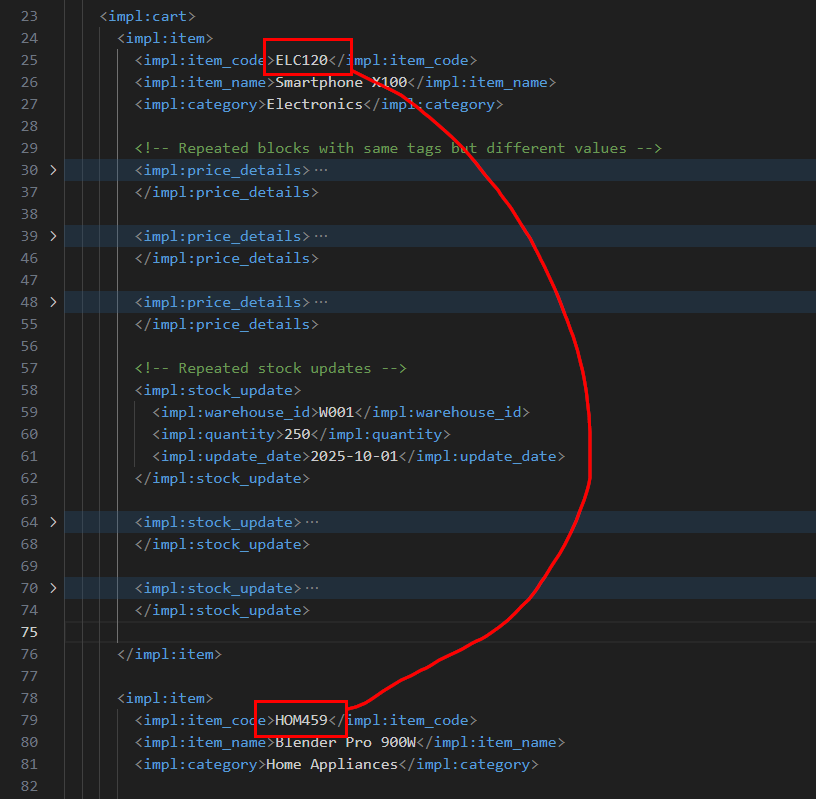
Hi @Yoichi @sudster
I am attaching the original file and O/P that needs to be extracted.
Actually, for every branch we need to extract every value and write it into data table as mentioned in the below Output.
Note:- Also, I have not extracted every value but in the final output we need to extract every value.
InputFile.xml (13.3 KB)
Output File: -
Account Number.pdf (55.5 KB)
Please help me with the solution.
Using Python Solution
Please check below step
import xml.etree.ElementTree as ET
import pandas as pd
Load and parse XML
tree = ET.parse(“input.xml”) # your xml filename
root = tree.getroot()
Define namespace (update if your XML uses a different prefix)
ns = {‘impa’: ‘http://abc.com/chc/abc/profile/xml/xyz’}
Extract data safely
data = {
“acct_num”: root.find(‘.//impa:acct_num’, ns).text if root.find(‘.//impa:acct_num’, ns) is not None else “”,
“trans_id”: root.find(‘.//impa:trans_id’, ns).text if root.find(‘.//impa:trans_id’, ns) is not None else “”,
“trans_eff_dt”: root.find(‘.//impa:trans_eff_dt’, ns).text if root.find(‘.//impa:trans_eff_dt’, ns) is not None else “”,
“ben_op_cd”: root.find(‘.//impa:ben_op_cd’, ns).text if root.find(‘.//impa:ben_op_cd’, ns) is not None else “”,
“brnc_cd”: root.find(‘.//impa:brnc_cd’, ns).text if root.find(‘.//impa:brnc_cd’, ns) is not None else “”,
}
Convert to DataFrame
df = pd.DataFrame([data])
Save to Excel
df.to_excel(“output.xlsx”, index=False)
print(“Data extracted and saved to output.xlsx  ”)
”)
Using UiPath
- Read XML File as a text format (variable = str_xml)
- Extract below parameter using Regex
i. imp:acct_num
System.Text.RegularExpressions.Regex.match(System.Text.RegularExpressions.Regex.match(str_xml,“(?=acct_num).*”),“\d+”)
ii. imp:trans_id
System.Text.RegularExpressions.Regex.match(System.Text.RegularExpressions.Regex.match(str_xml,“(?=impa:trans_id).*”),“\d+”)
iii. imp:trans_eff_dt
System.Text.RegularExpressions.Regex.match(System.Text.RegularExpressions.Regex.match(str_xml,“(?=imp:trans_eff_dt).*”),“(\d±\d±\d+)”)
iv. imp:ben_op_cd
System.Text.RegularExpressions.Regex.match(str_xml,“(?=imp:ben_op_cd).*(<)”).tostring.replace(“imp:ben_op_cd”,“”).replace(“<”,“”).trim
v. imp:brnc_cd
System.Text.RegularExpressions.Regex.match(str_xml,“(?=imp:brnc_cd).*(<)”).tostring.replace(“imp:brnc_cd”,“”).replace(“<”,“”).trim
Try this UiPath regex automation resolution
 Step-by-Step Solution (UiPath)
 Read the XML file
Use:
- Activity:
Read Text File - Output:
xmlContent(String variable) - Input: path of your
.xmlfile
 Load XML into an XML Document
Use:
- Activity:
Assign - Code:
xDoc = New System.Xml.XmlDocument()
xDoc.LoadXml(xmlContent)
- Variable:
xDoc→ Type:System.Xml.XmlDocument
 Define Namespace Manager (if XML has prefixes like impa:)
Add another Assign activity:
nsmgr = New System.Xml.XmlNamespaceManager(xDoc.NameTable)
nsmgr.AddNamespace("impa", "http://abc.com/chc/abc/profile/xml/xyz")
Replace the namespace URL with the one from your XML (it appears to be:
http://abc.com/chc/abc/profile/xml/xyz).
- Variable:
nsmgr→ Type:System.Xml.XmlNamespaceManager
 Extract values using XPath
Now use Assign activities for each value:
acct_num = xDoc.SelectSingleNode("//impa:acct_num", nsmgr).InnerText
trans_id = xDoc.SelectSingleNode("//impa:trans_id", nsmgr).InnerText
trans_eff_dt = xDoc.SelectSingleNode("//impa:trans_eff_dt", nsmgr).InnerText
ben_op_cd = xDoc.SelectSingleNode("//impa:ben_op_cd", nsmgr).InnerText
brnc_cd = xDoc.SelectSingleNode("//impa:brnc_cd", nsmgr).InnerText
Each variable should be of type String.
 Create a DataTable to store extracted data
Use Build Data Table activity:
Define 5 columns:
acct_num | trans_id | trans_eff_dt | ben_op_cd | brnc_cd
Output variable → dtOutput
 Add Data Row
Use Add Data Row activity:
- ArrayRow:
{acct_num, trans_id, trans_eff_dt, ben_op_cd, brnc_cd}
- DataTable:
dtOutput
 Write to Excel
Use:
- Activity:
Write Range (Workbook) - WorkbookPath:
"output.xlsx" - DataTable:
dtOutput - SheetName:
"Sheet1"
Output Example in Excel
| acct_num | trans_id | trans_eff_dt | ben_op_cd | brnc_cd |
|---|---|---|---|---|
| 3342734 | 9021375 | 2022-07-01 | DPPO1 | ACTIVE |
Hi @swapnil.naik
I think you are referring the wrong output solution.
I need to the output solution in the manner added here.
Account Number.pdf (55.5 KB)

Yeah
Actually what is the scenario is we are having the list of branches with the same solution you have provided
In that what we need to do is we need to extract rest of the data (whether it is same and save it in the next lines).
We need to extract the data between
impl:brnch_ben_opt
</impl:brnch_ben_opt>
I can’t share the xml file actually I have some limitations
Use this below logic (Windows)
getting some value from XML.zip (156.4 KB)
Hi @Kunal_Jain28598 ,
You already have different methods to parse the xml, posted by @Yoichi and @swapnil.naik . Using one of the methods, work on your problem. I don’t have time to spare on this at the moment as this is not a 15 minute solution. I’ll take a look when I get some free time though.
Hi @sudster
Sure thanks!!
@Kunal_Jain28598 , where exactly do you find difficulty with this process?- reading in the XML data to values or assigning values to a datatable?
You may read the file using XMLDocument class.
You may build the datatable initially using a read csv activity; this way you have the necessary columns.
Get key, value pairs using a recursive function - you do this with either a coded workflow or using the invoke workflow file. e.g:
 1_ePro :
 Level 2_caseprofile_trans :
 2_transaction_id : 9123443
 2_trans_effective_dt : 2022-07-01
 2_trans_ty : REWC
 2_casepro_trckng_num :  No Value
 Level 3_acct :
 3_account_num : 33456781
 Level 4_benefit_option :
 4_bench_optional_cd : DP123
 4_ben_opt_nm : Dental PPO
 4_prodt_ty : DPPO
 4_funding : 1
 4_rthing_t : P
 Level 5_brnch_ben_opt :
 5_branch_code : ACTIVE
 5_bench_optional_cd : DP123
 Level r_brnch_ben_opt_rt :
 r_age_step_cd :  No Value
 r_ancil_prodt_ty :  No Value
 r_gendr_cd :  No Value
 r_prem_eff_dt : 2019-07-01
 r_rate_tier_code : 122E
 r_stpals :  No Value
 r_bank_acct_blld_ind : N
 r_bank_acct_rt : 0.000
 r_bllg_stmnt_cd : 1
 r_comb_med_rt_ind : N
 r_prem : 56.310
 r_prem_can_dt : 2022-06-30
 r_residual_rt : 0.000
 r_resv_rt : 0.000
 r_rt_tier_opt_cd : 18
 Level r_brnch_ben_opt_rt :
 r_age_step_cd :  No Value
 r_ancil_prodt_ty :  No Value
 r_gendr_cd :  No Value
 r_prem_eff_dt : 2022-07-01
 r_rate_tier_code : 122E
 r_stpals :  No Value
 r_bank_acct_blld_ind : N
 r_bank_acct_rt : 0.000
 r_bllg_stmnt_cd : 1
 r_comb_med_rt_ind : N
 r_prem : 58.590
 r_prem_can_dt :  No Value
 r_residual_rt : 0.000
 r_resv_rt : 0.000
 r_rt_tier_opt_cd : 18
 Level r_brnch_ben_opt_rt :
 r_age_step_cd :  No Value
 r_ancil_prodt_ty :  No Value
 r_gendr_cd :  No Value
 r_prem_eff_dt : 2019-07-01
 r_rate_tier_code : 123E
 r_stpals :  No Value
 r_bank_acct_blld_ind : N
 r_bank_acct_rt : 0.000
 r_bllg_stmnt_cd : 1
 r_comb_med_rt_ind : N
 r_prem : 129.040
 r_prem_can_dt : 2022-06-30
 r_residual_rt : 0.000
 r_resv_rt : 0.000
 r_rt_tier_opt_cd : 18
 Level r_brnch_ben_opt_rt :
 r_age_step_cd :  No Value
 r_ancil_prodt_ty :  No Value
 r_gendr_cd :  No Value
 r_prem_eff_dt : 2022-07-01
 r_rate_tier_code : 123E
 r_stpals :  No Value
 r_bank_acct_blld_ind : N
 r_bank_acct_rt : 0.000
 r_bllg_stmnt_cd : 1
 r_comb_med_rt_ind : N
 r_prem : 134.230
 r_prem_can_dt :  No Value
 r_residual_rt : 0.000
 r_resv_rt : 0.000
 r_rt_tier_opt_cd : 18
 Level r_brnch_ben_opt_rt :
 r_age_step_cd :  No Value
 r_ancil_prodt_ty :  No Value
 r_gendr_cd :  No Value
 r_prem_eff_dt : 2019-07-01
 r_rate_tier_code : 182E
 r_stpals :  No Value
 r_bank_acct_blld_ind : N
 r_bank_acct_rt : 0.000
 r_bllg_stmnt_cd : 1
 r_comb_med_rt_ind : N
 r_prem : 116.260
 r_prem_can_dt : 2022-06-30
 r_residual_rt : 0.000
 r_resv_rt : 0.000
 r_rt_tier_opt_cd : 18
 Level r_brnch_ben_opt_rt :
 r_age_step_cd :  No Value
 r_ancil_prodt_ty :  No Value
 r_gendr_cd :  No Value
 r_prem_eff_dt : 2022-07-01
 r_rate_tier_code : 182E
 r_stpals :  No Value
 r_bank_acct_blld_ind : N
 r_bank_acct_rt : 0.000
 r_bllg_stmnt_cd : 1
 r_comb_med_rt_ind : N
 r_prem : 120.940
 r_prem_can_dt :  No Value
 r_residual_rt : 0.000
 r_resv_rt : 0.000
 r_rt_tier_opt_cd : 18
 Level r_brnch_ben_opt_rt :
 r_age_step_cd :  No Value
 r_ancil_prodt_ty :  No Value
 r_gendr_cd :  No Value
 r_prem_eff_dt : 2019-07-01
 r_rate_tier_code : 183E
 r_stpals :  No Value
 r_bank_acct_blld_ind : N
 r_bank_acct_rt : 0.000
 r_bllg_stmnt_cd : 1
 r_comb_med_rt_ind : N
 r_prem : 191.230
 r_prem_can_dt : 2022-06-30
 r_residual_rt : 0.000
 r_resv_rt : 0.000
 r_rt_tier_opt_cd : 18
 Level r_brnch_ben_opt_rt :
 r_age_step_cd :  No Value
 r_ancil_prodt_ty :  No Value
 r_gendr_cd :  No Value
 r_prem_eff_dt : 2022-07-01
 r_rate_tier_code : 183E
 r_stpals :  No Value
 r_bank_acct_blld_ind : N
 r_bank_acct_rt : 0.000
 r_bllg_stmnt_cd : 1
 r_comb_med_rt_ind : N
 r_prem : 198.910
 r_prem_can_dt :  No Value
 r_residual_rt : 0.000
 r_resv_rt : 0.000
 r_rt_tier_opt_cd : 18
 Level f_brnch_bnopt_fees :
 f_fees_eff_dt : 2019-07-01
 f_rate_basis_cd : 1
 f_type_of_rate_codd : Q
 f_bank_acct_blld_ind : N
 f_bllg_stmnt_cd : 1
 f_comb_rt_ind : Y
 f_fee_grp_seq_num : 0
 f_fee_pct : 0.00
 f_fees : 0.700
 f_fees_can_dt : 2022-06-30
 f_var_rt_ind : N
 Level f_brnch_bnopt_fees :
 f_fees_eff_dt : 2022-07-01
 f_rate_basis_cd : 1
 f_type_of_rate_codd : P
 f_bank_acct_blld_ind : N
 f_bllg_stmnt_cd : 1
 f_comb_rt_ind : Y
 f_fee_grp_seq_num : 0
 f_fee_pct : 0.00
 f_fees : 0.700
 f_fees_can_dt :  No Value
 f_var_rt_ind : N
 Level 5_brnch_ben_opt :
 5_branch_code : SNAKE
 5_bench_optional_cd : DP123
 Level r_brnch_ben_opt_rt :
 r_age_step_cd :  No Value
 r_ancil_prodt_ty :  No Value
 r_gendr_cd :  No Value
 r_prem_eff_dt : 2019-07-01
 r_rate_tier_code : 180E
 r_stpals :  No Value
 r_bank_acct_blld_ind : N
 r_bank_acct_rt : 0.000
 r_bllg_stmnt_cd : 1
 r_comb_med_rt_ind : N
 r_prem : 56.310
 r_prem_can_dt : 2022-06-30
 r_residual_rt : 0.000
 r_resv_rt : 0.000
 r_rt_tier_opt_cd : 18
 Level r_brnch_ben_opt_rt :
 r_age_step_cd :  No Value
 r_ancil_prodt_ty :  No Value
 r_gendr_cd :  No Value
 r_prem_eff_dt : 2022-07-01
 r_rate_tier_code : 180E
 r_stpals :  No Value
 r_bank_acct_blld_ind : N
 r_bank_acct_rt : 0.000
 r_bllg_stmnt_cd : 1
 r_comb_med_rt_ind : N
 r_prem : 58.590
 r_prem_can_dt :  No Value
 r_residual_rt : 0.000
 r_resv_rt : 0.000
 r_rt_tier_opt_cd : 18
 Level r_brnch_ben_opt_rt :
 r_age_step_cd :  No Value
 r_ancil_prodt_ty :  No Value
 r_gendr_cd :  No Value
 r_prem_eff_dt : 2019-07-01
 r_rate_tier_code : 181E
 r_stpals :  No Value
 r_bank_acct_blld_ind : N
 r_bank_acct_rt : 0.000
 r_bllg_stmnt_cd : 1
 r_comb_med_rt_ind : N
 r_prem : 129.040
 r_prem_can_dt : 2022-06-30
 r_residual_rt : 0.000
 r_resv_rt : 0.000
 r_rt_tier_opt_cd : 18
 Level r_brnch_ben_opt_rt :
 r_age_step_cd :  No Value
 r_ancil_prodt_ty :  No Value
 r_gendr_cd :  No Value
 r_prem_eff_dt : 2022-07-01
 r_rate_tier_code : 181E
 r_stpals :  No Value
 r_bank_acct_blld_ind : N
 r_bank_acct_rt : 0.000
 r_bllg_stmnt_cd : 1
 r_comb_med_rt_ind : N
 r_prem : 134.230
 r_prem_can_dt :  No Value
 r_residual_rt : 0.000
 r_resv_rt : 0.000
 r_rt_tier_opt_cd : 18
 Level r_brnch_ben_opt_rt :
 r_age_step_cd :  No Value
 r_ancil_prodt_ty :  No Value
 r_gendr_cd :  No Value
 r_prem_eff_dt : 2019-07-01
 r_rate_tier_code : 182E
 r_stpals :  No Value
 r_bank_acct_blld_ind : N
 r_bank_acct_rt : 0.000
 r_bllg_stmnt_cd : 1
 r_comb_med_rt_ind : N
 r_prem : 116.260
 r_prem_can_dt : 2022-06-30
 r_residual_rt : 0.000
 r_resv_rt : 0.000
 r_rt_tier_opt_cd : 18
 Level r_brnch_ben_opt_rt :
 r_age_step_cd :  No Value
 r_ancil_prodt_ty :  No Value
 r_gendr_cd :  No Value
 r_prem_eff_dt : 2022-07-01
 r_rate_tier_code : 182E
 r_stpals :  No Value
 r_bank_acct_blld_ind : N
 r_bank_acct_rt : 0.000
 r_bllg_stmnt_cd : 1
 r_comb_med_rt_ind : N
 r_prem : 120.940
 r_prem_can_dt :  No Value
 r_residual_rt : 0.000
 r_resv_rt : 0.000
 r_rt_tier_opt_cd : 18
 Level r_brnch_ben_opt_rt :
 r_age_step_cd :  No Value
 r_ancil_prodt_ty :  No Value
 r_gendr_cd :  No Value
 r_prem_eff_dt : 2019-07-01
 r_rate_tier_code : 183E
 r_stpals :  No Value
 r_bank_acct_blld_ind : N
 r_bank_acct_rt : 0.000
 r_bllg_stmnt_cd : 1
 r_comb_med_rt_ind : N
 r_prem : 191.230
 r_prem_can_dt : 2022-06-30
 r_residual_rt : 0.000
 r_resv_rt : 0.000
 r_rt_tier_opt_cd : 18
 Level r_brnch_ben_opt_rt :
 r_age_step_cd :  No Value
 r_ancil_prodt_ty :  No Value
 r_gendr_cd :  No Value
 r_prem_eff_dt : 2022-07-01
 r_rate_tier_code : 183E
 r_stpals :  No Value
 r_bank_acct_blld_ind : N
 r_bank_acct_rt : 0.000
 r_bllg_stmnt_cd : 1
 r_comb_med_rt_ind : N
 r_prem : 198.910
 r_prem_can_dt :  No Value
 r_residual_rt : 0.000
 r_resv_rt : 0.000
 r_rt_tier_opt_cd : 18
 Level f_brnch_bnopt_fees :
 f_fees_eff_dt : 2019-07-01
 f_rate_basis_cd : 1
 f_type_of_rate_codd : Q
 f_bank_acct_blld_ind : N
 f_bllg_stmnt_cd : 1
 f_comb_rt_ind : Y
 f_fee_grp_seq_num : 0
 f_fee_pct : 0.00
 f_fees : 0.700
 f_fees_can_dt : 2022-06-30
 f_var_rt_ind : N
 Level f_brnch_bnopt_fees :
 f_fees_eff_dt : 2022-07-01
 f_rate_basis_cd : 1
 f_type_of_rate_codd : Q
 f_bank_acct_blld_ind : N
 f_bllg_stmnt_cd : 1
 f_comb_rt_ind : Y
 f_fee_grp_seq_num : 0
 f_fee_pct : 0.00
 f_fees : 0.700
 f_fees_can_dt :  No Value
 f_var_rt_ind : N
 Level 4_branch :
 4_branch_code : ACTIVE
 4_brnch_nm : All Active Employees
 Level 4_branch :
 4_branch_code : SNAKE
 4_brnch_nm : All SNAKE Participants
 Level 4_branch :
 4_branch_code : 0000
 4_brnch_nm : All Employees